Personal Account Profile Settings
The personal account profile settings feature allows you to customize and improve your account's personal information and display content, shaping a personalized social image. Reasonable profile settings not only better showcase yourself but also help friends identify and contact you.
Settings Process
Open the BatChat APP, click on the personal profile area on the "My" page, and enter the "Profile Settings" page to modify personal information.
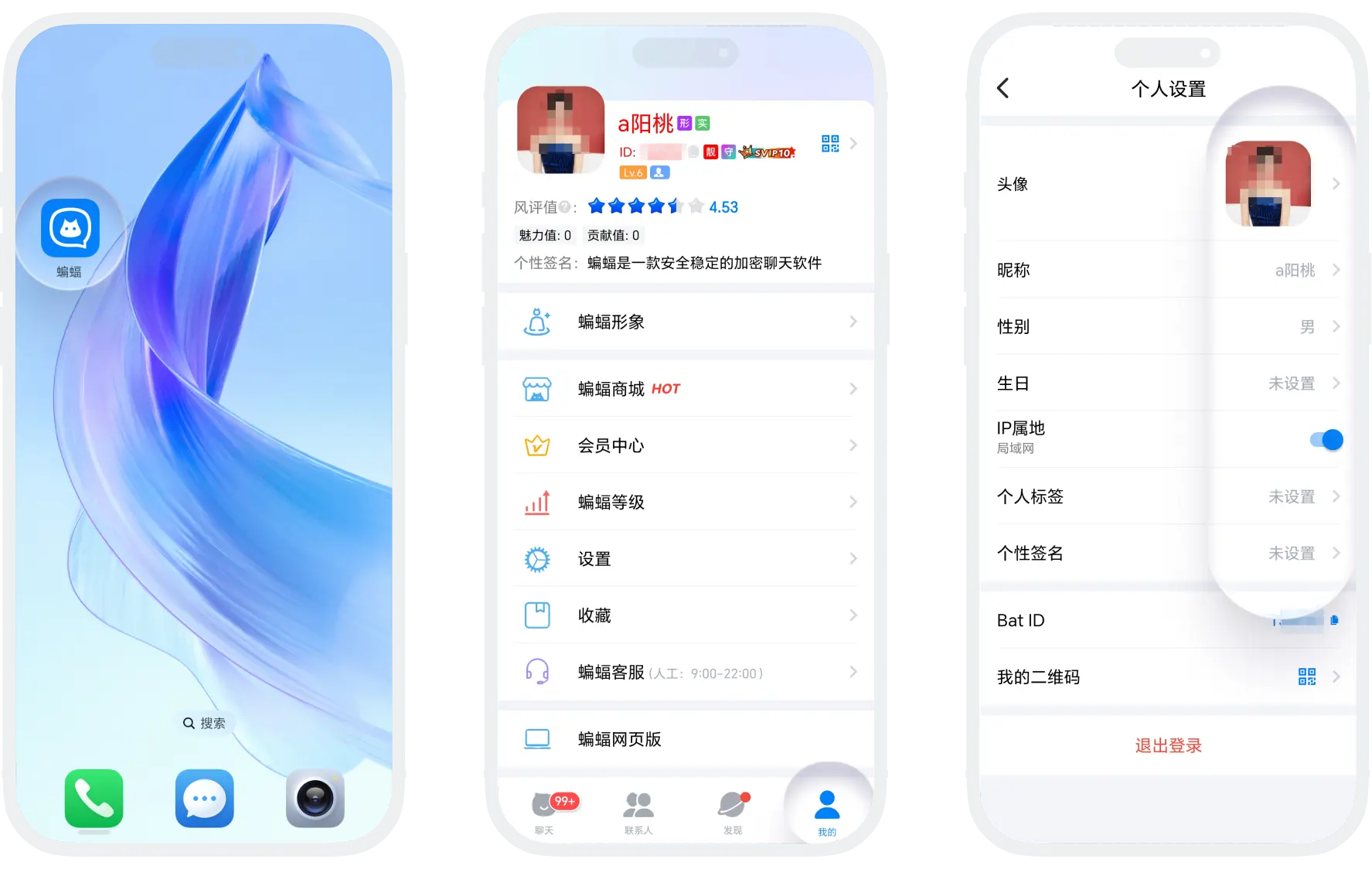
Avatar Settings
- Avatar Type: Regular users support setting static avatars, SVIP10+/Black Diamond members support setting dynamic avatars (GIF format); you can also set your 3D BatChat image as an avatar for added fun;
- Avatar Frame: Unlock and wear avatar frames automatically by activating Honor Membership, showcasing your distinguished status;
- Modification Rules:
| User Level | Modification Rules |
|---|---|
| Regular User/VIP | 1 time/7 days |
| SVIP1-3 | 2 times/7 days |
| SVIP4-5/Gold Member | 3 times/7 days |
| SVIP6-7/Platinum Member/Diamond Member | 4 times/7 days |
| SVIP8/Gold Diamond Member | 5 times/7 days |
| SVIP9-10/Black Diamond Member | 6 times/7 days |
| SVIP11 | 7 times/7 days |
Avatar Setting Tips: It is recommended to use clear, high-recognition images; dynamic avatars should choose smooth, non-dazzling animations
Nickname Settings
- Modification Rules: All users can only modify their nickname once every 7 days; you can obtain additional modification chances by using modification cards (using 1 modification card allows 7 additional nickname modifications within 7 days);
- How to Obtain Modification Cards: In "BatChat Mall" - "Points Draw", click the "Draw Benefits" in the upper right corner, and exchange for modification cards by consuming a certain number of draw chances;
- Using Modification Cards:
- Find "Modification Card" in "BatChat Mall" and click "Use";
- When the nickname modification limit is reached, click "Use Modification Card";
Other Profile Information
- Gender: Optional, gender can only be set once;
- Birthday: Optional, birthday information can be modified once every 7 days;
- IP Location: Automatically displayed and cannot be changed (SVIP members can disable IP location display);
- Personal Tags: You can add up to 3 interest tags to help friends understand your hobbies;
- Personal Signature: You can set a one-sentence introduction to show personal style or status;
- Bat ID: Your unique account identifier; you can purchase your favorite special ID in "BatChat Mall" - "Special ID Plaza", which will directly replace your original ID;
- My QR Code: Generate your personal exclusive QR code for friends to scan and add;
- Reputation Score: The reputation score is automatically calculated by the BatChat system based on the user's device, network, level, experience, reports, violations, membership, special ID, image, consumption, and other factors. The full score is 6 points, and higher scores are better. If the other party's reputation score is too low, please be aware of risks when chatting with them and beware of fraud.

- Strictly prohibited from using avatars, nicknames, signatures, etc. with illegal, non-compliant, or infringing content;
- Do not impersonate others or use official-related identifiers;
- Prohibited from containing pornographic, violent, politically sensitive, or other harmful information;
- Comply with public order and good customs, and maintain a good online environment.
Was this page helpful?
