Set Status
By setting status, your 3D avatar will enter specific scenes and perform corresponding dynamic actions, vividly showing your current mood, activity or status. Status supports custom effective duration and auto-reply, making your digital avatar more intelligent and personalized, conveying richer information in social interactions.
Status Setting Conditions
Setting status requires meeting the following conditions:
- Current avatar is wearing at least one paid dressing:
- Paid dressing includes: clothing, makeup, hairstyles, accessories, featured sets, etc. purchased from the mall (free gifts or system default dressing are not counted).
Status Setting Process
- Open BatChat App, enter 'My' - 'BatChat Avatar';
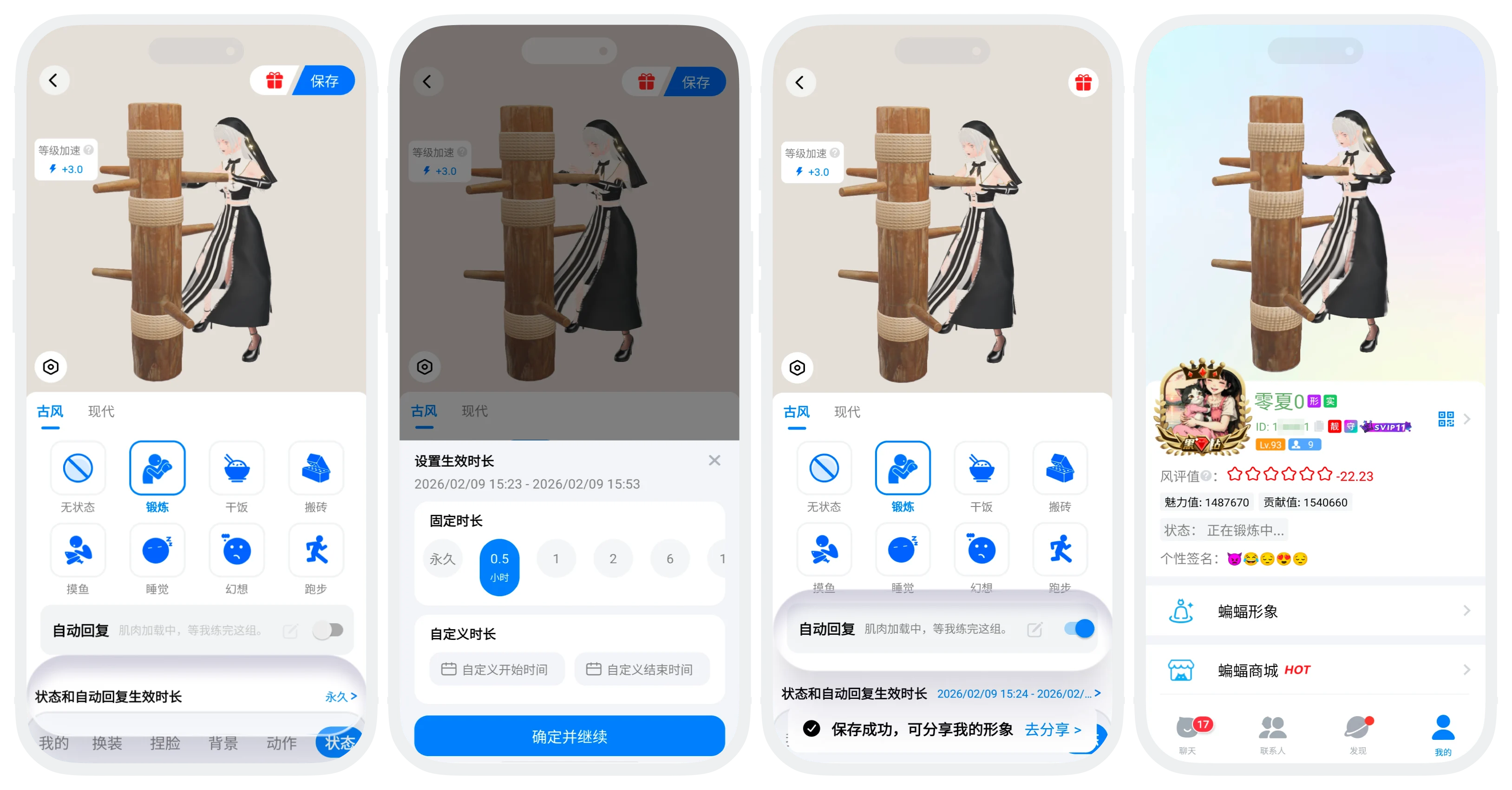
- Click to switch to the 'Status' category below the avatar dressing page;
- Click any status card, your 3D avatar will immediately enter this status scene, showing the complete scene and dynamic actions;
- Set Auto-Reply (optional): After enabling auto-reply, during the status effective period, when you receive friend messages in single chat, the system will automatically reply with your preset content
- Click to turn on the 'Auto-Reply' switch;
- Click the 'Edit' icon to modify the reply content (1-24 characters);
- Set Effective Duration:
- Click the effective duration row at the bottom to enter the duration setting page:
- Can set 'Permanent', 'Fixed Duration' or custom start time and end time;
- After the above content is set, click 'Save', status setting is successful.

- Auto-reply only takes effect in single chat, group chat messages do not trigger auto-reply;
- Can modify or turn off auto-reply at any time during the status effective period.
Status Display Rules
- During the status effective period, all scenes where your 3D avatar is visible will display the status scene and actions, including but not limited to: personal profile page avatar area, full-screen avatar homepage, avatars in the recommended plaza;
- Status has highest priority, during the effective period it will completely replace the original background and action settings, after status ends, the system automatically restores your previous background and action settings.
FAQ
Can be set, but will not be displayed during status effective period. Your set background and action will be temporarily stored and automatically restored for display after the status ends.
Was this page helpful?
