Send Bulk Message
The bulk messaging function allows you to send notification, greeting, or other identical content messages to multiple friends simultaneously. This function is particularly suitable for holiday greetings, event notifications, important reminders, and other scenarios, helping you efficiently complete batch communication while maintaining the independence of each message (non-group chat form).
Bulk Messaging Process
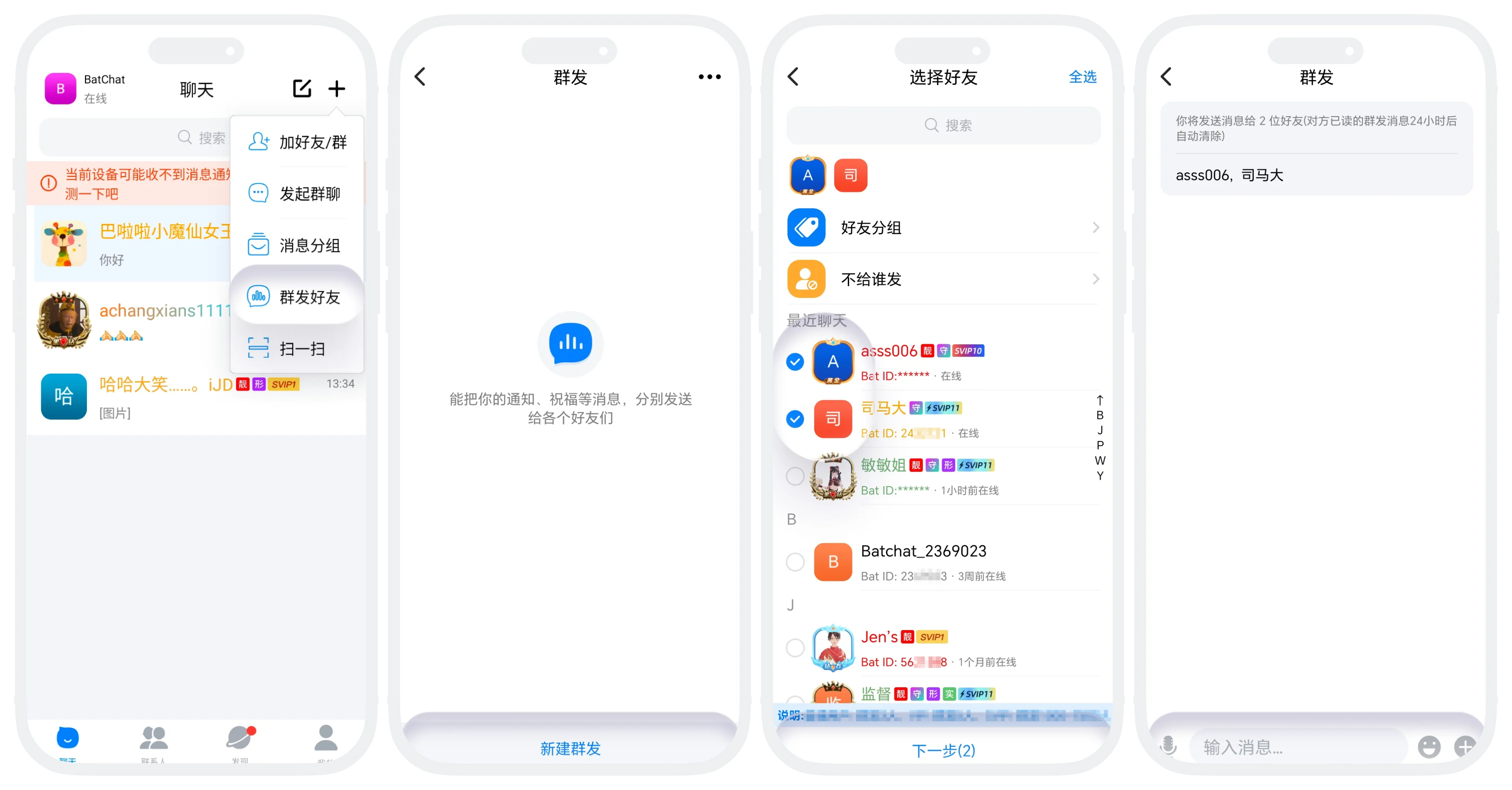
- Click '+' in the upper right corner of the 'Message List', click 'Bulk Message', enter the bulk message list;
- Click 'New Bulk Message', select receiving friends (can click 'Friend Groups' to quickly select all friends in your preset friend groups);
- Click 'Next' at the bottom of the page, enter the bulk content editing page. Bulk message content currently supports: text, voice, image/video, points red packet, Bat bag;
- After content editing is complete, click 'Send' to send the message to selected friends.
Note: You can click 'Send Another' in the bulk message history list to quickly apply the previously selected friends for this bulk message without manually checking again.
Bulk Messaging Rules
The number of friends per bulk message and the number of bulk messages per day vary according to different membership levels, see the table below for details:
| Membership Level | Daily Bulk Messages | Friends per Bulk Message |
|---|---|---|
| Regular User | 1 time | 20 people/time |
| VIP | 2 times | 100 people/time |
| SVIP1 | 3 times | 200 people/time |
| SVIP2 | 3 times | 300 people/time |
| SVIP3 | 4 times | 500 people/time |
| SVIP4 | 4 times | 800 people/time |
| SVIP5 | 5 times | 1000 people/time |
| SVIP6 | 5 times | 1200 people/time |
| SVIP7 | 6 times | 1500 people/time |
| SVIP8 | 6 times | 1800 people/time |
| SVIP9 | 7 times | 2000 people/time |
| SVIP10 | 10 times | 2500 people/time |
| SVIP11 | 15 times | 3000 people/time |
| Gold Member | 8 times | 2000 people/time |
| Platinum Member | 9 times | 2000 people/time |
| Diamond Member | 10 times | 2000 people/time |
| Gold Diamond Member | 11 times | 2000 people/time |
| Black Diamond Member | 12 times | 3000 people/time |
Bulk Message Quick Exclude Specific Friends
- Function: The system automatically excludes friends in specified groups from the bulk list, suitable for scenarios where you select all friends for this bulk message but need to exclude specific friends;
- Manage 'Do Not Send To' Groups:
- In the 'Bulk Message Friend List', click 'More' in the upper right corner - 'Do Not Send To';
- Click 'Create Group', check the friends to exclude, and save;
- Apply Do Not Send To Groups: On the new bulk message - select friends page, click 'Do Not Send To', select the groups where you want to exclude friends (supports multiple selection). This bulk message will exclude all friends in the selected 'Do Not Send To' groups.

Was this page helpful?
