Send Message
Single chat is the most basic communication method in the BatChat app, supporting one-on-one encrypted chat with friends. Combined with rich message types, privacy protection settings, and personalized features, it provides you with a secure, convenient, and efficient private communication experience.
Message Type Instructions
| Message Type | Sending Method | Function Description |
|---|---|---|
| Text Message | Bottom input box | Send text messages, supports emoticons and other formats |
| Voice Message | Voice button on the left side of bottom input box | Send voice messages |
| Image/Video | Bottom page '+' - 'Image' | Select images/videos from phone album to send |
| Camera | Bottom page '+' - 'Camera' | Directly take photos or videos to send |
| Watermark | Bottom page '+' - 'Watermark' | Take watermark photos/videos with time, location, etc. information and send |
| Tip | Bottom page '+' - 'Tip' | Send points to friends as a gift |
| Coupon | Bottom page '+' - 'Coupon' | Send virtual coupons such as membership coupons, special ID coupons |
| Call | Bottom page '+' - 'Call' | Initiate voice call |
| Video | Bottom page '+' - 'Video' | Initiate video call |
| Location | Bottom page '+' - 'Location' | Send real-time location or specific place |
| Card | Bottom page '+' - 'Card' | Send friend/group chat cards |
| Bubble | Bottom page '+' - 'Bubble' | Use VIP/SVIP and other member-exclusive chat bubbles |
| File | Bottom page '+' - 'File' | Send local files (documents, compressed packages, etc.) |
| Sticker | Bottom page 'Sticker' | Send system stickers, supports uploading your own sticker packs |
Note: You can adjust the order of each function through the '+' - 'Edit' function at the bottom of the chat interface. Click to enter the edit list, long press and drag to the target position, then click save to modify the function order.
Send Voice Message
- Voice message duration limit: Regular users - 60s, VIP - 3 minutes, SVIP and Honor Members - 5 minutes;
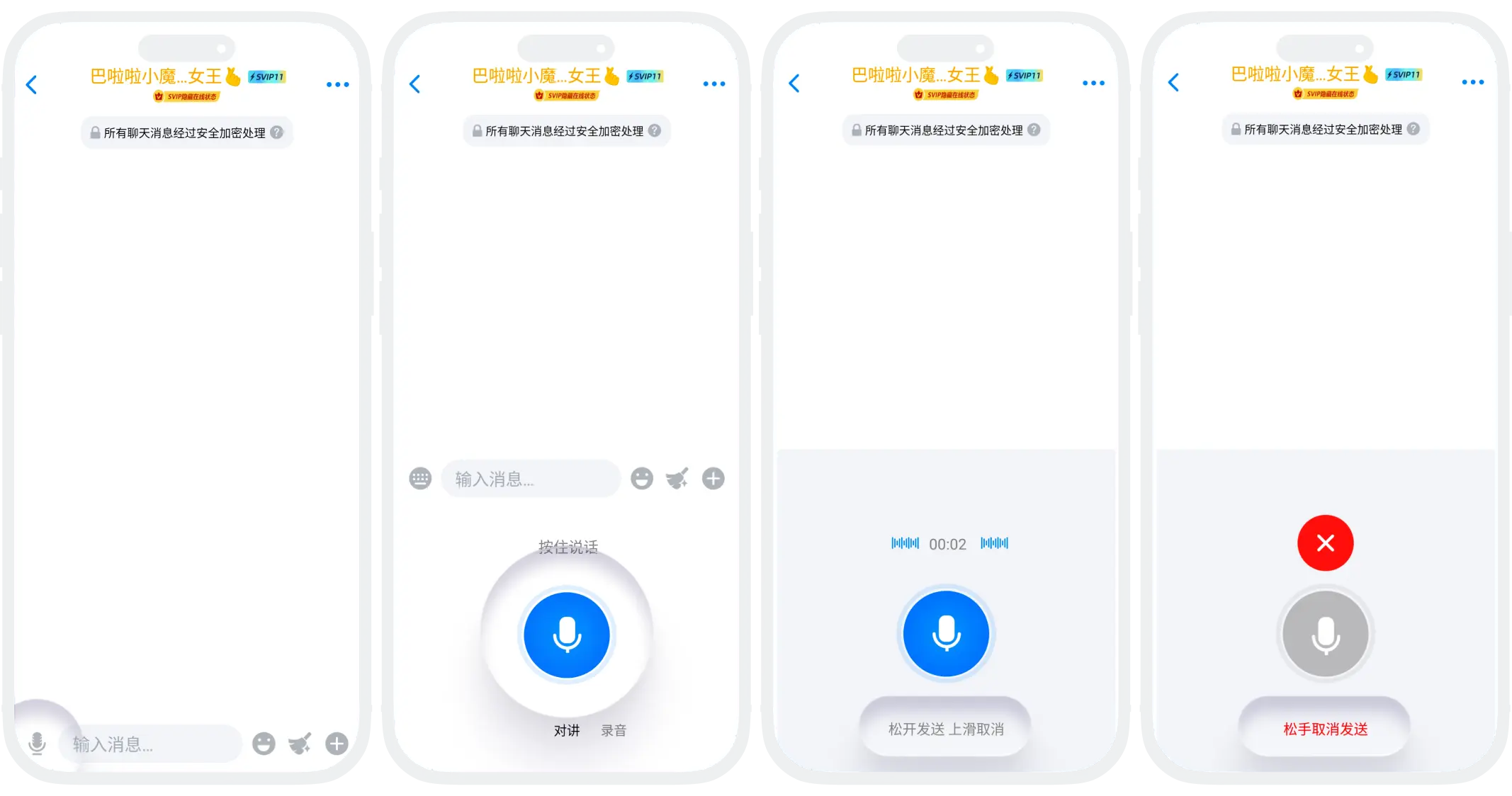
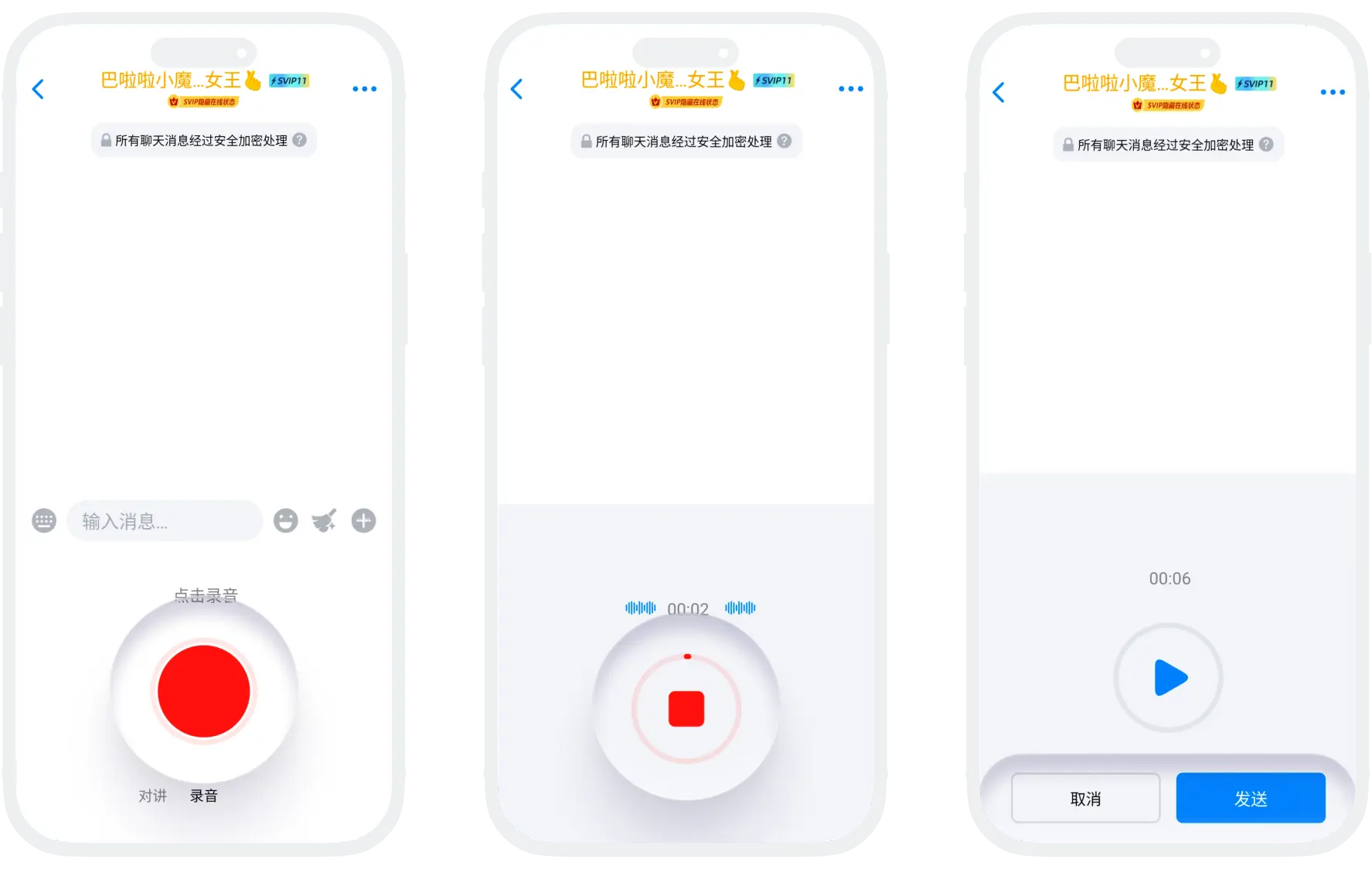
- Sending process: Click the 'Voice' button at the bottom of the page, supports two sending modes;
- Walkie-talkie Mode (suitable for sending short voice messages):
- Long press the recording button to start recording, release the button to send;
- Slide up during recording to cancel recording;
- Recording Mode (suitable for sending long voice messages):
- Click the recording button to start recording, click the button again to end recording, click 'Send';
- Completed voice recordings support preview.
- Walkie-talkie Mode (suitable for sending short voice messages):
Send Image-Text Combined Message
- The image-text combined sending function allows you to select up to 9 images at once and add unified text description, achieving efficient combination sending of images and text. This function is particularly suitable for sharing multiple related photos, creating step-by-step instructions, product displays, and other scenarios;
- Sending process:
- Click the 'Album' button in the bottom toolbar of the chat interface to enter the album selection page;
- Select Images and Add Description: Check the images/videos you want to send (up to 9), and add text description in the input box at the bottom of the page;
- Preview and Sort Adjustment: Click 'Preview' in the lower left corner to preview the display effect of images, can drag to adjust image sorting;
- Switch Sending Mode: The upper right corner can switch sending modes (Combined Send: send images and text description as one message, Send Separately: split selected images and text into multiple messages to send;
- Click 'Send'.
