Message Read Status Management
Message read status is used to display the reading status of messages. To meet different users' privacy needs, the platform provides flexible read status management options for VIP and above members. You can choose whether to show your message reading status to the other party, achieving personalized control of reading privacy.

Tip: Disabling message read receipts is a VIP and above member function. You can go to 'My' - 'Member Center', activate membership and then set it.
Setting Process
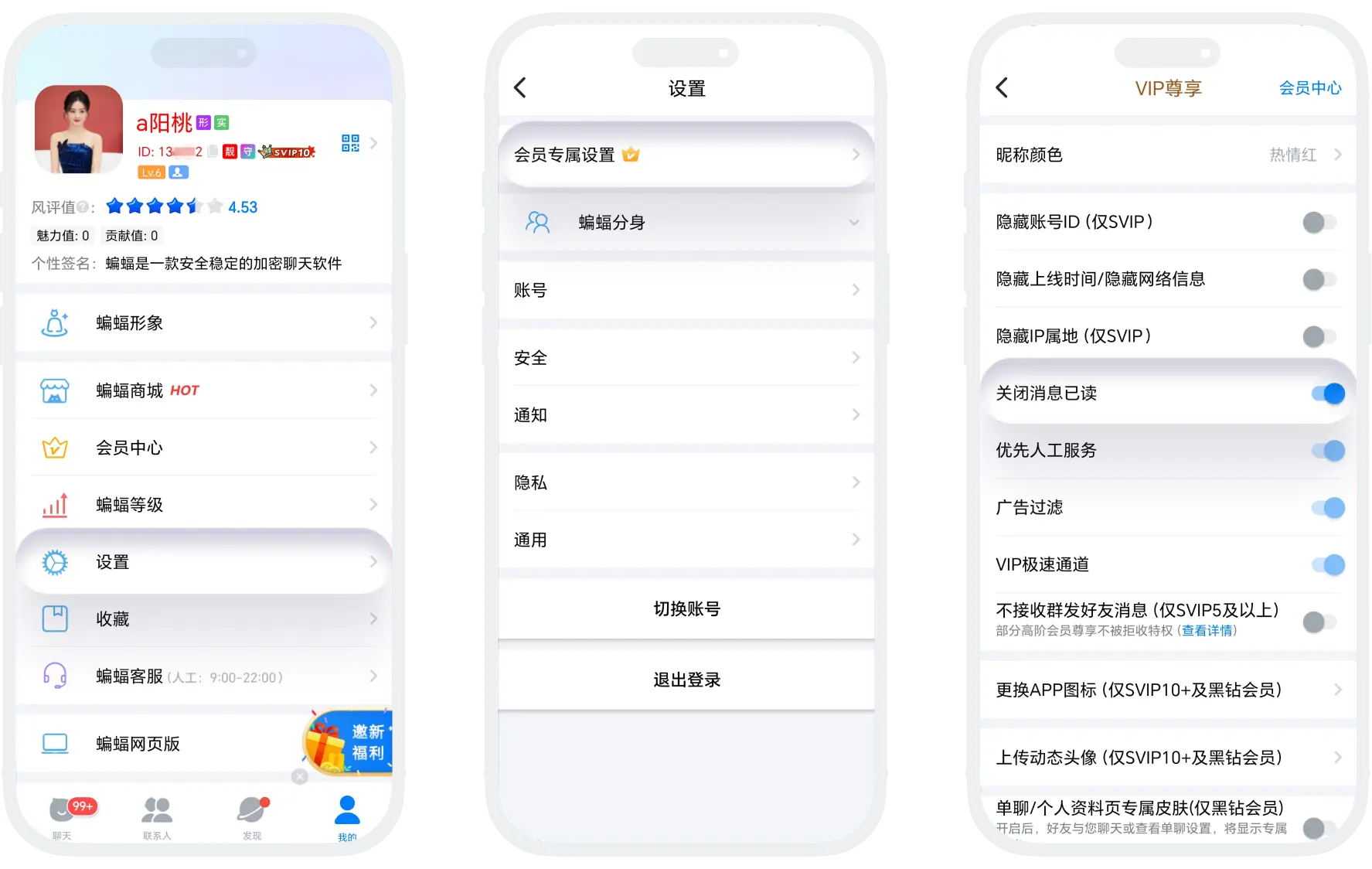
- Enter 'My' - 'Settings' - 'Member Exclusive Settings' (or directly enter 'Member Center', click 'Member Function Settings' at the bottom of the page);
- Find 'Disable Message Read', switch the switch status:
- Off: Normal display of my read status;
- On: Hide read status (messages always show as unread until I reply to the other party, then messages will automatically change to read).
FAQ
Yes. Disabling read status only affects the other party seeing your reading status, and does not affect you seeing the other party's read status. You can still normally see whether the other party has read your messages, unless the other party has also disabled read status.
Currently not supported. This is a global setting that applies to all messages.
