Simple Mode
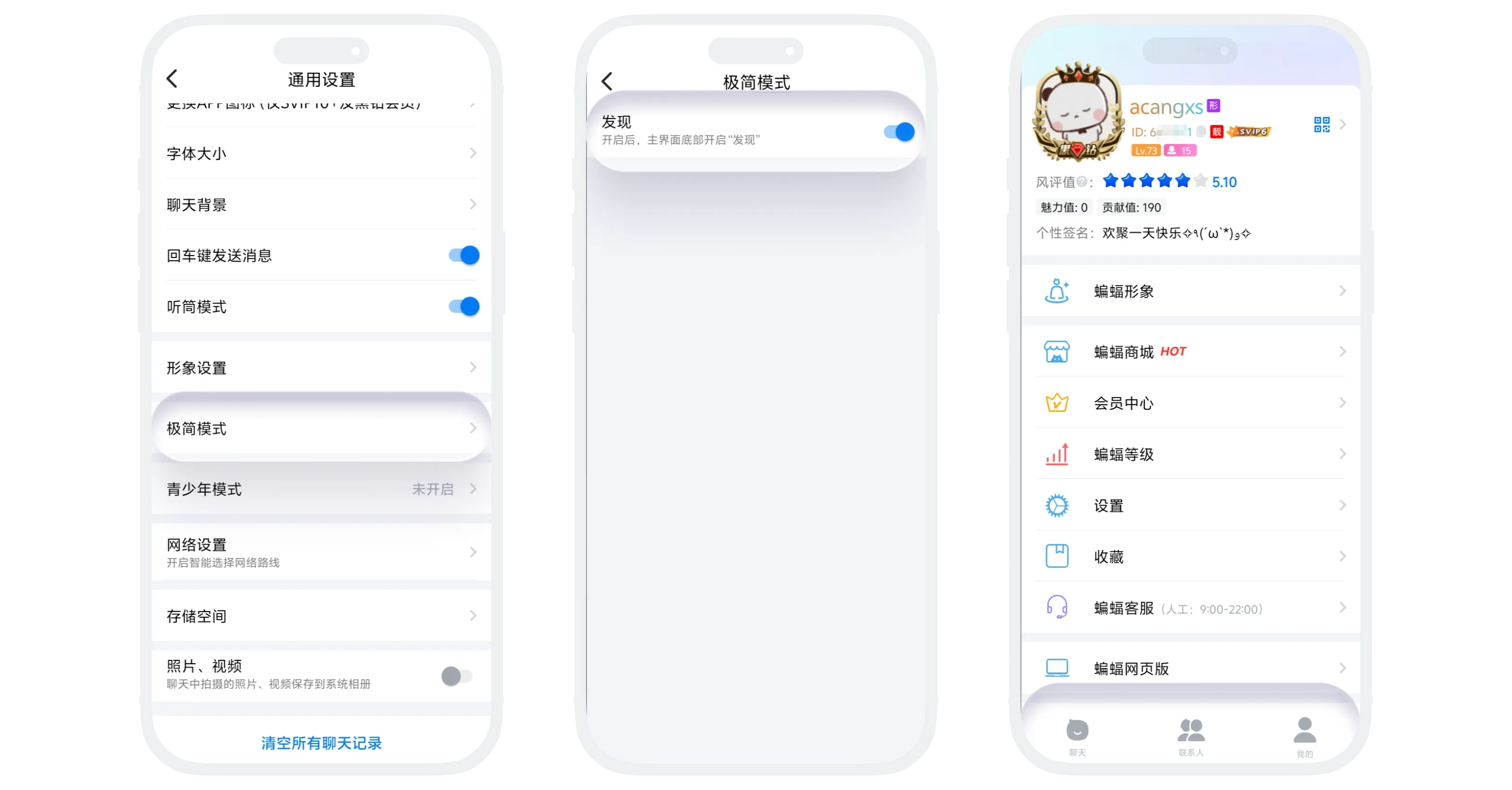
'Simple Mode' provides you with personalized interface streamlining. If you don't need the related functions of the 'Discover' module (such as Avatar Plaza, Level Leaderboard, Benefits Center, etc.) in daily use, you can enable simple mode to hide the 'Discover' page entry, making the bottom navigation bar more concise and focusing on core chat functions.
Enable/Disable Simple Mode
- Click 'Simple Mode' in 'My' - 'Settings' - 'General';
- Click the display switch for the 'Discover' module:
- On: The 'Discover' entry in the bottom navigation bar is displayed;
- Off: The 'Discover' entry in the bottom navigation bar is not displayed.
FAQ
Yes. Click '+' in the upper right corner of the 'Message List' - 'Add Friend/Group', and you can also use the search function.
Yes. Points, balance, coupons and other assets are not affected. You can use them normally through 'My' - 'BatChat Mall'.
You enabling simple mode only affects your own interface, not others. Your avatar may still appear in others' avatar plaza (unless you separately set not to participate in display).
