Network Settings
'Network Settings' provides you with network connection optimization and fault repair functions. When you encounter network connection errors, image/video loading abnormalities, message sending failures, and other issues, you can improve connection quality by adjusting network settings. This module includes professional functions such as intelligent network route selection, proxy configuration, and intelligent reconnection. It is recommended to operate under customer service guidance.
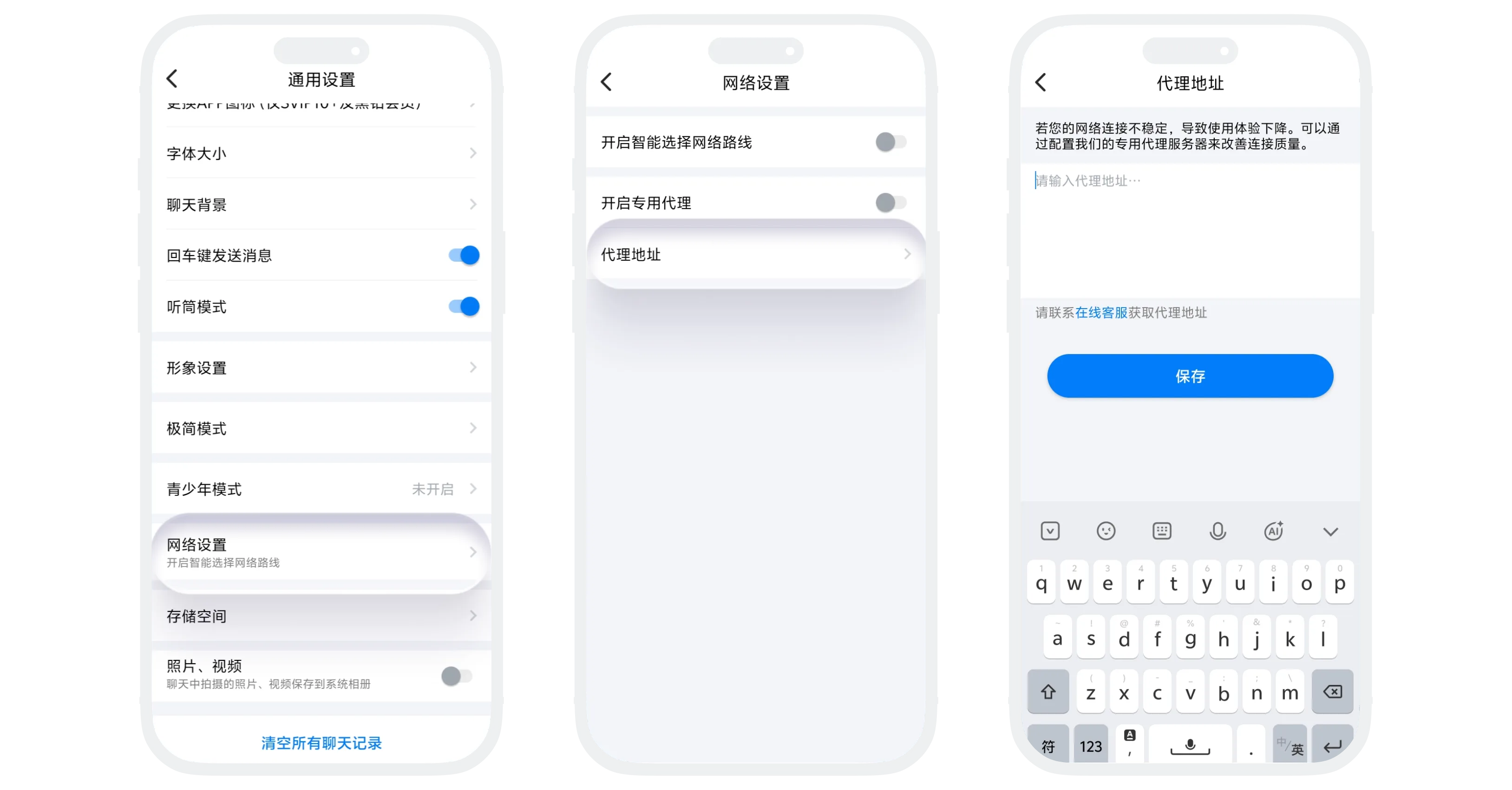
Intelligent Network Route Selection
- The 'Intelligent Network Route Selection' function can automatically select the optimal network connection path based on your current network environment (operator, region, network type, etc.) to improve access speed and stability;
- Enabled by default, can be disabled in 'Settings' - 'General' - 'Network Settings' page.
Dedicated Proxy
- 'Dedicated Proxy' allows you to configure an exclusive proxy server for the BatChat App for connection optimization in specific network environments. This function is usually used in special regions or for fault troubleshooting under customer service guidance;
- Enable process:
- Enter the 'Network Settings' page, click the right switch:
- On: Enable proxy function, need to configure proxy address;
- Off: Disable proxy, use direct connection;
- Proxy address configuration: Click to enter the proxy address setting page, enter the proxy server address provided by customer service, click 'Save';
- Return to the network settings page, turn on the 'Enable Dedicated Proxy' switch.
- Enter the 'Network Settings' page, click the right switch:

Proxy address must be provided by customer service. Please do not fill in unknown addresses yourself. Incorrect proxy configuration may result in inability to connect to the network.
FAQ
Usually it will improve network speed, especially during cross-network access. This function will automatically select the optimal path, generally without negative impact.
Please operate under customer service guidance to avoid changing settings yourself. If self-changes cause network abnormalities, you can contact customer service to assist you in restoring default settings.
