Group Horn
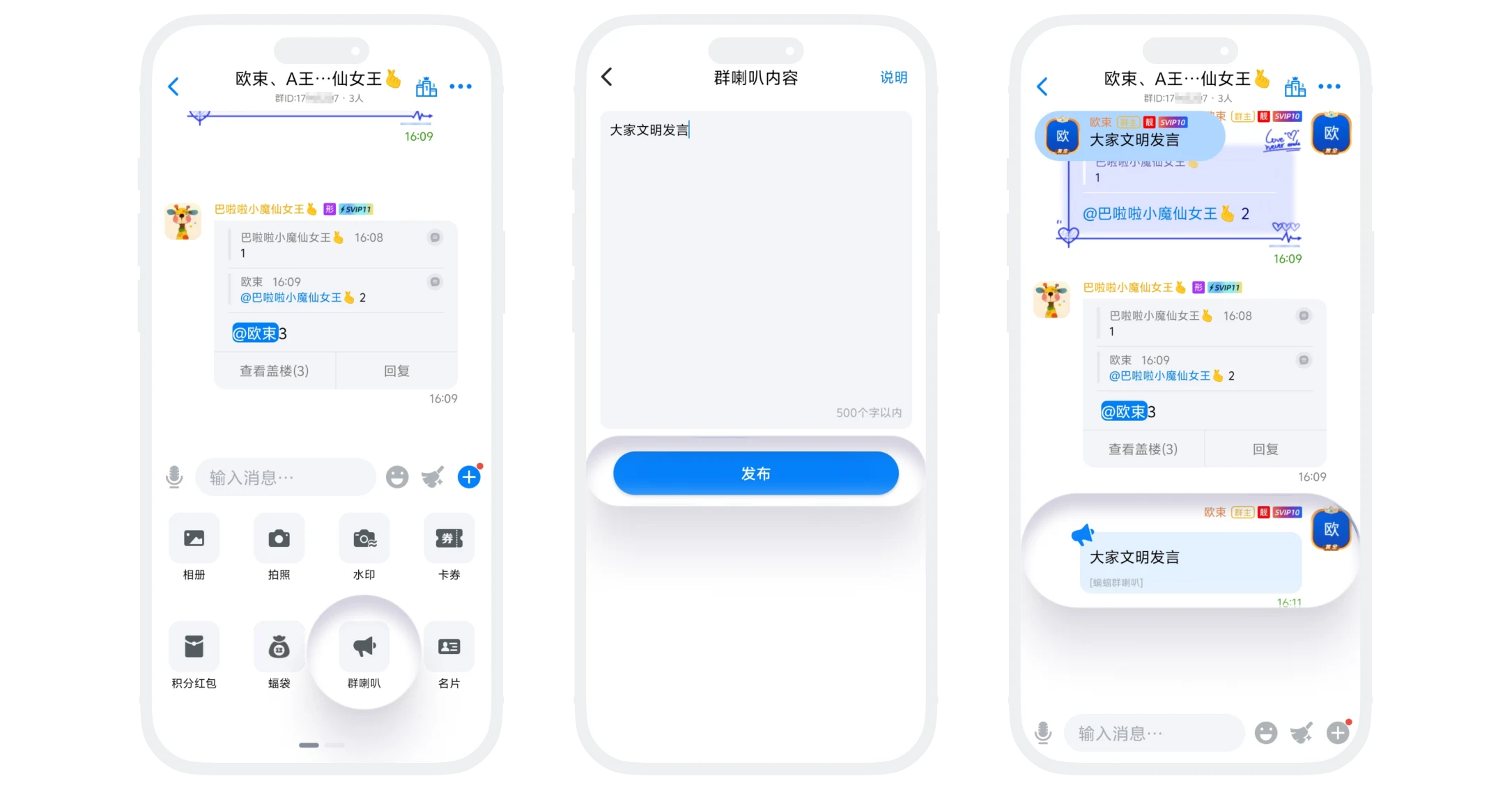
Group horn message is a high-priority, strongly indicative message publishing function within group chats. Sent horn messages will be displayed prominently in the upper left corner of the group chat interface, helping important information stand out in fast-scrolling chats and ensure group members pay attention in time. This function is limited by membership level for daily sending times, suitable for group announcements, important notifications, event promotions, and other scenarios.
Sending Process
- All group members click '+' in the lower right corner of the group chat interface - 'Group Horn', enter the group horn message publishing page;
- Fill in the group horn message content, can include basic formatting (such as line breaks, spaces), no more than 500 characters;
- Click 'Publish', and the group horn message will be sent.
Sending Frequency Rules
According to user membership level, the number of group horn messages that can be sent daily varies:
| User Level | Sending Times |
|---|---|
| Regular User | 0 times per day |
| VIP | 6 times per day |
| SVIP1-2 | 7 times per day |
| SVIP3-4 | 8 times per day |
| SVIP5-6 | 9 times per day |
| SVIP7-8 | 10 times per day |
| SVIP9 | 11 times per day |
| SVIP10 | 12 times per day |
| SVIP11 | 13 times per day |
| Gold Member | 13 times per day |
| Platinum Member | 14 times per day |
| Diamond Member | 15 times per day |
| Gold Diamond Member | 16 times per day |
| Black Diamond Member | 17 times per day |

Tips:
- Sending times automatically reset at 00:00 daily;
- Unused times do not accumulate to the next day;
- Times are account global limits, sending in any group counts toward usage.
FAQ
Group horn messages are displayed in a highlighted independent area, more eye-catching; @ all members is mentioned in messages, easily drowned out in刷屏. Both can be used complementarily.
Yes. Like regular messages, they support recall. After recall, the display in the upper left corner disappears synchronously.
The upper left corner only displays group horn messages of the current group. When switching groups, the displayed content switches accordingly.
Not supported temporarily. All members can publish group horn messages, but group owners and administrators can long press group horn messages to recall them.
