Send Red Packet/Bat Bag
- Group chat points red packets and coupon bat bags are two core features for incentivizing interaction within the group and distributing member benefits:
- Points Red Packet: Users can use personal points to distribute points rewards in the group, and other members can directly receive points into their accounts after claiming;
- Coupon Bat Bag: Users can distribute benefit packages containing virtual coupons (such as membership coupons, discount coupons, experience coupons, count coupons);
- Both features support diverse distribution modes and claiming condition settings, helping group owners and administrators achieve precise operations and activity improvement.
Points Red Packet
Red Packet Types
- Random Points Red Packet: Total points are randomly distributed among red packets with varying amounts. Need to set the number of red packets and total points;
- Fixed Points Red Packet: Red packet amount is fixed. Can set the number of red packets and points amount for each red packet;
- Exclusive Points Red Packet: Designated to be sent to a specific 1 group member. Need to specify the group member and set the points amount for the red packet.
Red Packet Levels
The system automatically classifies levels based on the total points of the red packet and displays different cover styles:
| Red Packet Level | Total Points Range |
|---|---|
| BatChat Points Red Packet | 5-1000 points |
| BatChat Advanced Points Red Packet | 1001–10000 points |
| BatChat Super Points Red Packet | Greater than 10000 points |
Claiming Condition Settings
Can set red packet claiming conditions, such as designated membership level, designated user level, etc.:
| Condition Type | Description |
|---|---|
| All members can claim | No restrictions, all group members can claim |
| Only VIP and above members can claim | Must activate VIP membership to claim |
| Only SVIP(x) and above members can claim | Must reach designated SVIP level, x self-set, range 1-11 |
| Only level(x) and above members can claim | BatChat account must reach designated level, x self-set, range 2-100 |
| Only reputation value(x) and above members can claim | Account reputation value not lower than set value, x self-set, range 0-6 |
| Only group activity value(x) and above members can claim | Member's activity value in this group not lower than set value, x self-set, range 1-999 |
Note: Can view member activity values of top 100 members and your own activity value in this group's activity rank. See Group Activity Rank for details.
Distribution Process
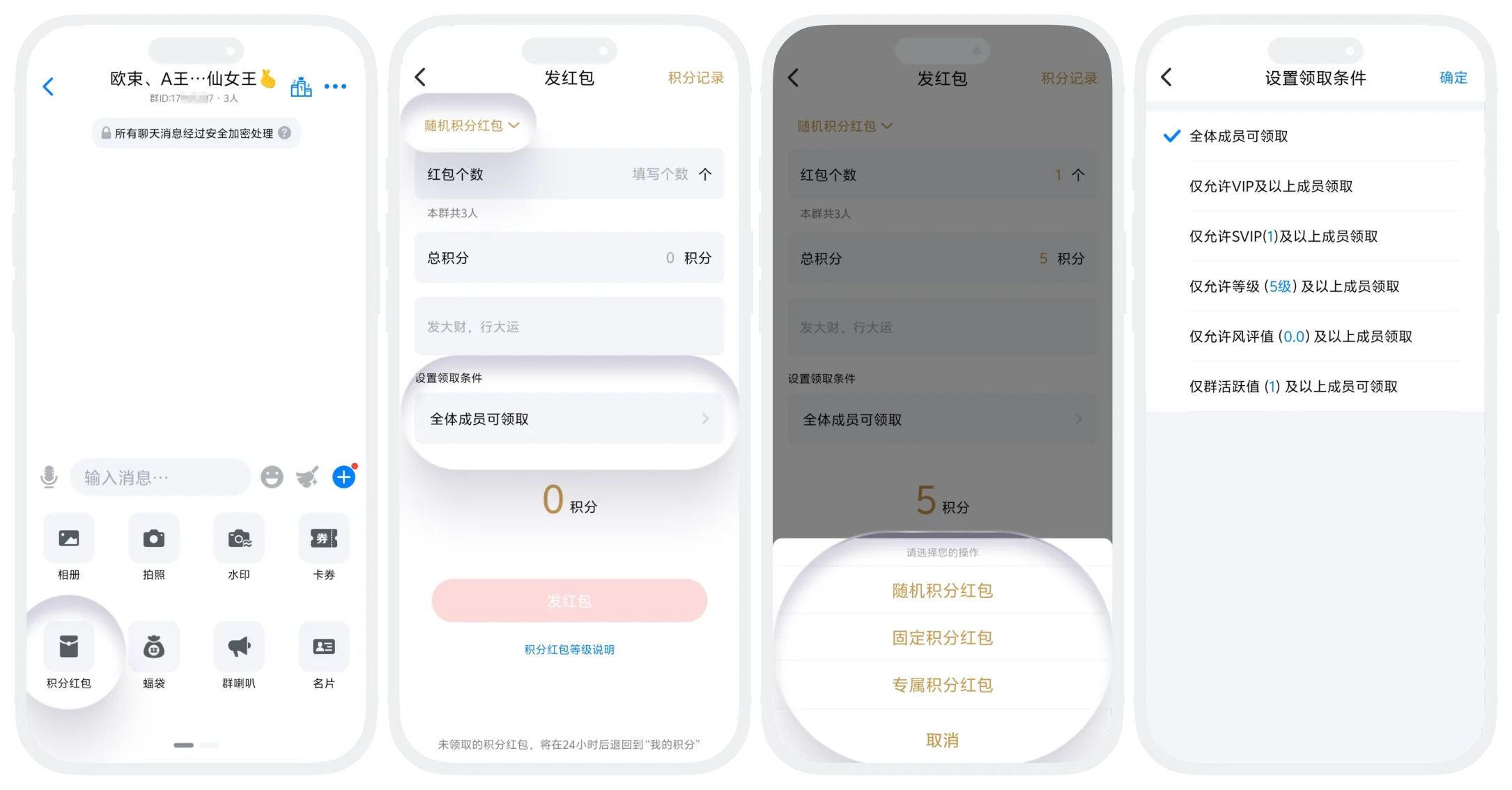
- Click the "+" button in the lower right corner of the group chat page - "Points Red Packet" to enter the red packet release page;
- Select red packet type and set red packet parameters according to different types;
- Number of Red Packets: Fill in the number of red packets to distribute (cannot exceed group member count);
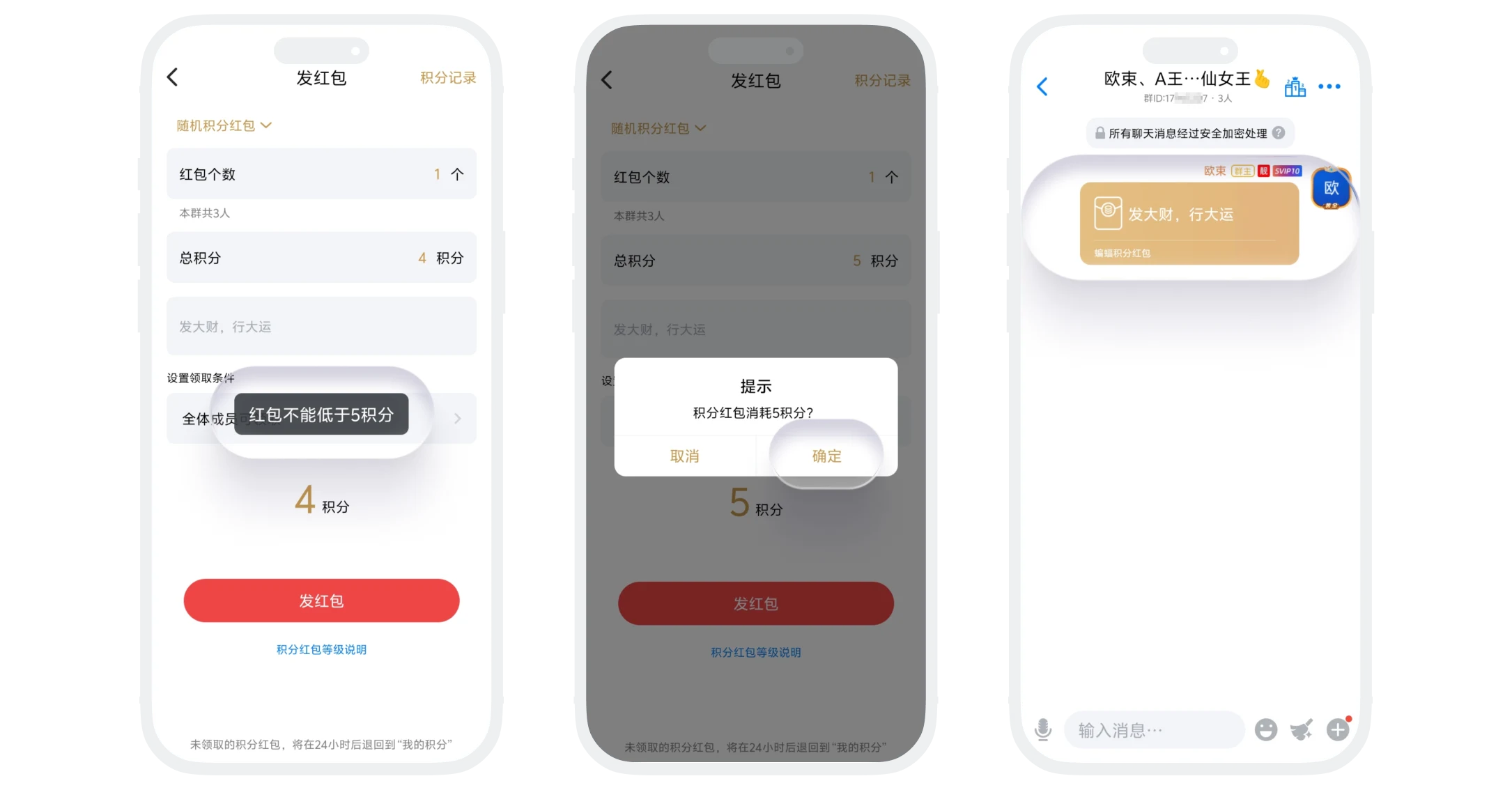
- Red Packet Amount: Fill in the red packet amount, total amount cannot be less than 5 points;
- Recipient: If sending an exclusive points red packet, need to select one member from the group member list as the recipient;
- Blessing Message: Customize the blessing message for the red packet cover;
- Set claiming conditions, default is all members can claim (if it's an exclusive points red packet, setting claiming conditions is not supported);
- After confirming sufficient points balance, click "Send Red Packet". The red packet is sent successfully and displayed in the group chat.
Claiming and Return Rules
- Claiming Process: Eligible members click the red packet message in the group, click "Open", and the claimed points amount and claiming details will be displayed. Claimed points are automatically deposited into the member's account;
- Unclaimed Processing: Points remaining unclaimed within 24 hours after the red packet is sent will be automatically refunded to the sender's points account (refund amount will be notified to the sender via BatChat Assistant).
Bat Bag
Bat Bag Type Description
- Random Coupon Bat Bag: The type and quantity of coupons distributed are randomly allocated within a certain range. Need to set the number of bat bags and select from available coupons in your account, system randomly distributes;
- Regular Coupon Bat Bag: The coupon type and quantity in each bat bag are consistent. Need to set the number of bat bags and select the coupon type and quantity for each bat bag.
Supported Coupon Types
| Coupon Type | Description |
|---|---|
| Membership Coupon | Used to exchange VIP/SVIP membership duration |
| Discount Coupon | Can be used for discounts when consuming in designated platform scenarios |
| Experience Coupon | Increase user experience points, upgrade account level |
| Count Coupon | Used to exchange lottery benefits in the points lottery module |
Claiming Condition Settings
Consistent with points red packets, supports six condition settings.
Distribution and Claiming Process
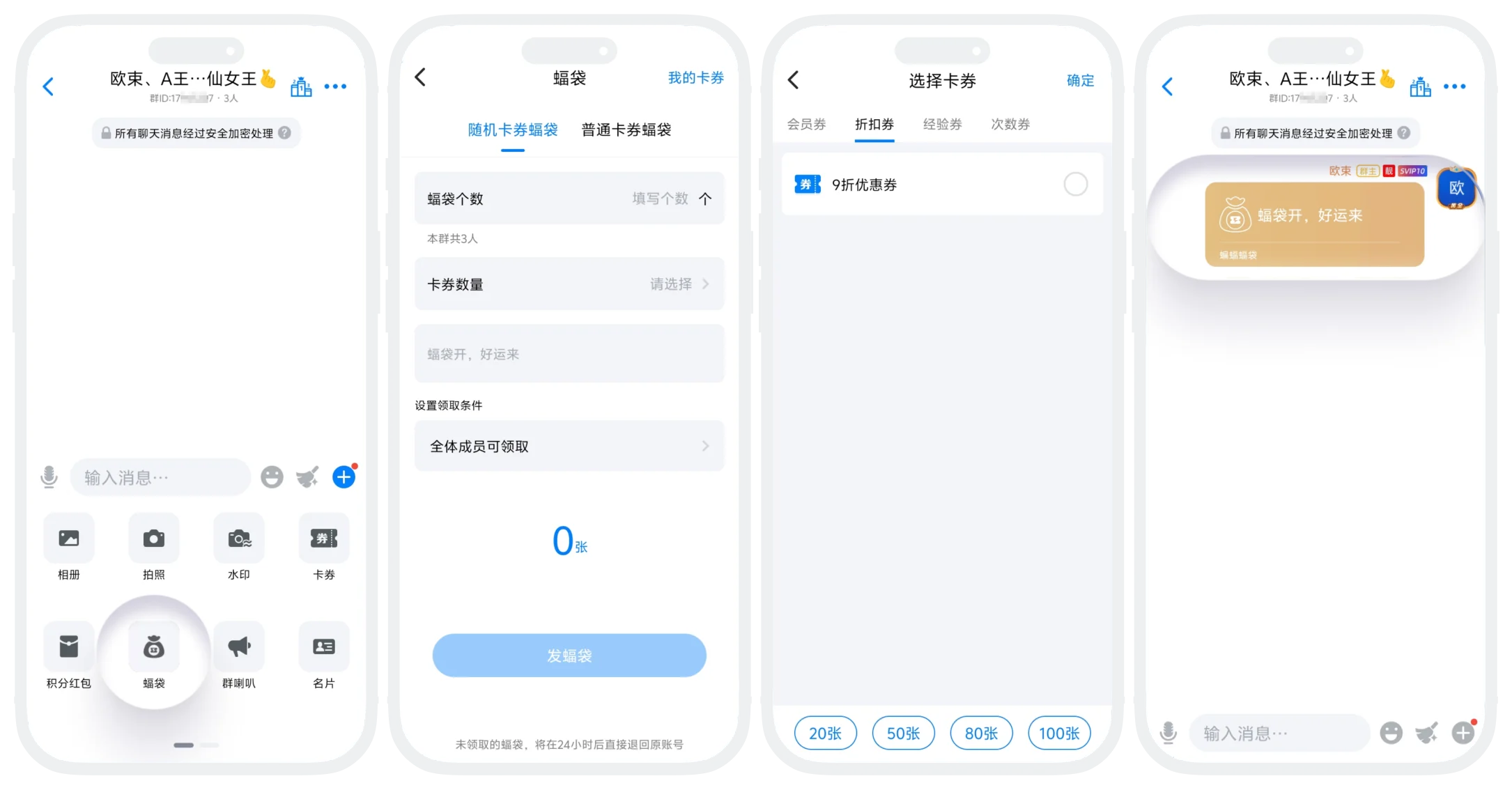
- Distribution process is similar to points red packets. Click the "+" button in the lower right corner of the group chat page - "Bat Bag" to enter the bat bag release page;
- Select bat bag type, set coupon content and claiming conditions to distribute;
- After members claim, coupons are automatically deposited into the recipient's coupon package and can be used in corresponding scenarios.
Distribution and Claiming Process
- Some coupons have usage validity periods (discount coupons, experience coupons), please use promptly after claiming;
- Unclaimed bat bags also automatically expire after 24 hours, unclaimed coupons are automatically returned to the sender's coupon package.

Notes:
- Claiming conditions cannot be changed after setting, please choose carefully;
- Red packets/bat bags cannot be recalled, please confirm before sending;
- Do not use red packets for违规transactions, cashing out, gambling, or other activities.
FAQ
Yes, coupons can be used by yourself or transferred to other users after claiming.
Can see, but will prompt "Only VIP can claim" when clicking. Other claiming conditions are the same.
Yes. For red packets that have been claimed, clicking will display claiming details including claimant, claiming time, and claiming amount.
