Threaded Message
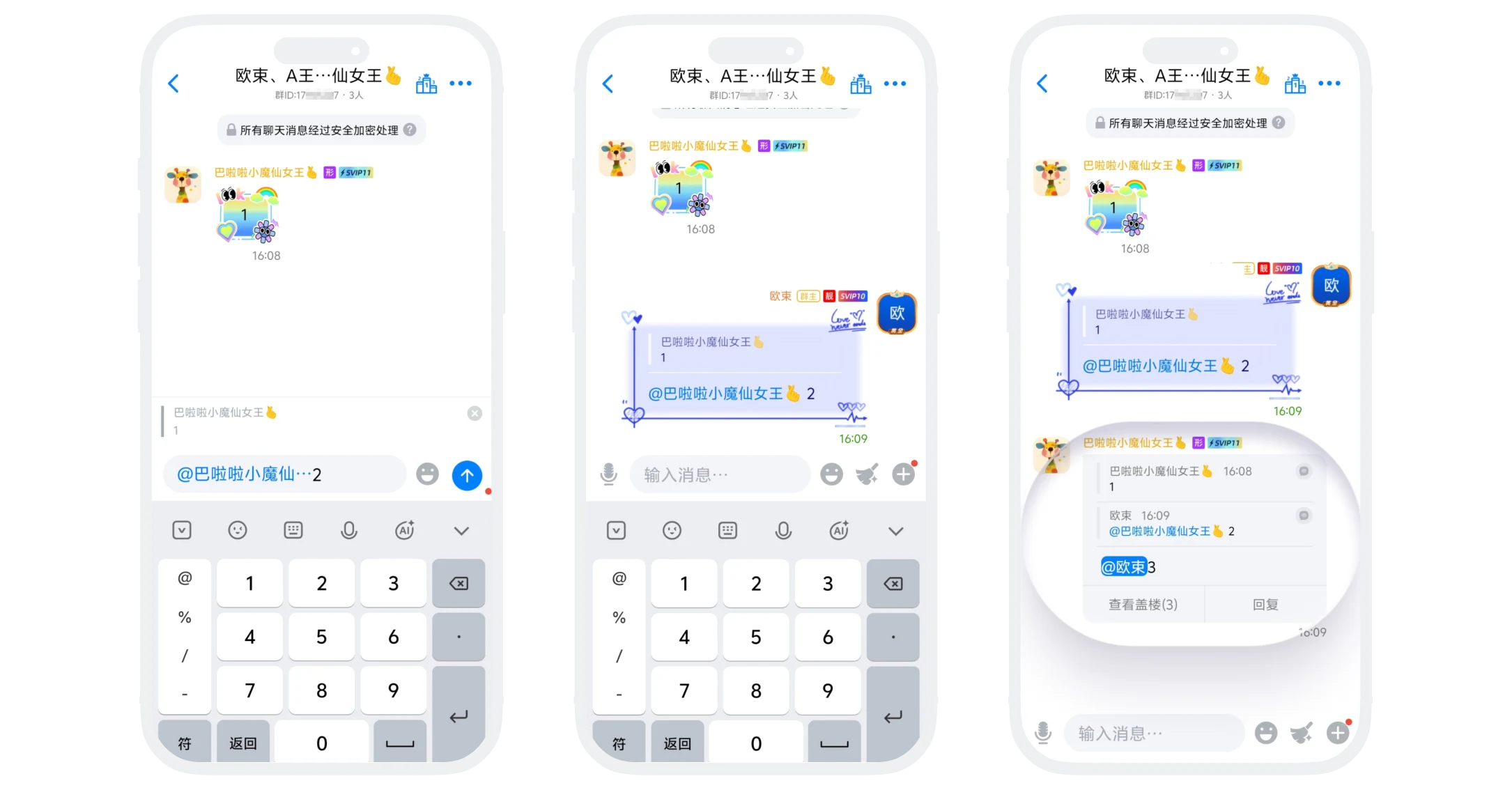
Threaded message is an intelligent message aggregation feature in group chats for continuous discussions. When a message is continuously quoted and replied to multiple times forming a conversation thread, the system automatically synthesizes related messages into a "threaded message" to keep the chat interface clean, improve reading efficiency, while preserving complete discussion context for members to follow up and interact.
Threading Conditions and Process
- Starting Message: Any group chat message can serve as the "thread base";
- Continuous Replies: Need to satisfy at least 3 messages logically forming a "quote reply chain", i.e.:
- Message A → replied as Message B (quoting A)
- Message B → replied as Message C (quoting B)
- Automatic Synthesis: When the third message meeting conditions is sent, the system automatically merges messages A, B, and C into one threaded message;
- Append Thread: Click "Reply" on the threaded message, the system automatically quotes the latest message in the thread as the reply object and automatically @ the sender of that message, input content and send (only supports text and emoji), this message automatically joins the thread, floor count +1.

Tip: If you don't want to continue threading, directly input and send content (without clicking the thread's "Reply"), this message will be displayed as an independent message, not merged into the thread.
Threaded Message Display and Viewing
- Aggregated Display: Threaded messages are displayed as one aggregated message in the chat interface, showing up to the most recent 8 messages;
- Message Count: "View Thread(X)" displayed at the aggregated message, where X is the total number of messages in the current thread, click to enter thread details to view all messages in the thread.
Threaded Message Related Operations
Recall
Recall Latest Threaded Message (i.e., most recent reply):
- Operation Permission: Only the message sender or group owner and administrators can recall;
- Operation Process: Long-press the most recent threaded message, click "Recall";
- Effective Result: This message is removed from the thread, thread total floor count decreases by 1 accordingly, historical threaded messages are unaffected, content and order remain unchanged.
Recall Other Non-Latest Messages in Thread (any historical message except the latest one):
- Operation Permission: Only the message sender or group owner and administrators can recall;
- Operation Process: Long-press the message to be recalled, click "Recall";
- Effective Result: Only recall this sender's message record, thread structure is unaffected, floor count unchanged, context order preserved.
Forward
- Method 1: Long-press the threaded message area, select "Forward", only forwards the latest message in the thread (i.e., most recent reply content);
- Method 2: Click to enter threaded message details page, click "Forward" in the upper right corner, can forward the complete threaded message.
FAQ
No, group owners or administrators can only pin regular text messages.
Currently this feature cannot be turned off. All continuous quote replies meeting conditions will automatically trigger threading.
