Group Join Settings
Group chat join settings allow group owners and administrators to flexibly control the verification method for new members joining the group chat, from completely open to strict review, meeting the security and management needs of different types of group chats.
Join Method Description
- Basic Mode
- Allow anyone to join: All members who can find this group (except blacklist members) can directly join the group chat;
- Require identity verification, reviewed by administrator: Requires administrator to manually review each join application, can be processed in official account 'Group Notification' or 'Manage Group' - 'Application List';
- Do not allow anyone to join: Prohibits anyone from joining, only allows joining through invitation;
- Identity/Level Verification Mode
- Only allow VIP and SVIP to join: Only VIP/SVIP or higher level membership users can join the group chat;
- Only allow SVIP(x) to join: x is SVIP level (range: 1-11), only users of that SVIP level can join the group chat;
- Only allow level(x) and above to join: x is BatChat level, only users who reach that level can join the group chat;
- Only allow reputation value(x) and above to join: x is user's BatChat reputation value, only users who reach that level can join the group chat
- Q&A Mode
- Need to answer questions and be reviewed by administrator: Questions are set by group owner or super administrator. Users need to answer questions when applying to join, and submit answers for administrator review;
- Need to correctly answer questions: Questions and answers are set by group owner or super administrator. Users need to fill in answers when applying to join, and can directly join if answered correctly;
- Invitation Mode
- Only allow group members to invite: Does not allow users to apply to join on their own, but all group members can invite friends to join;
- Do not allow group members to invite: Other users can apply to join on their own, but group members cannot invite friends to join;
- Only allow group owner and administrators to invite: Does not allow users to apply to join on their own, only group owner and administrators can invite friends to join;
Setting Process
This item only allows group owner to operate.
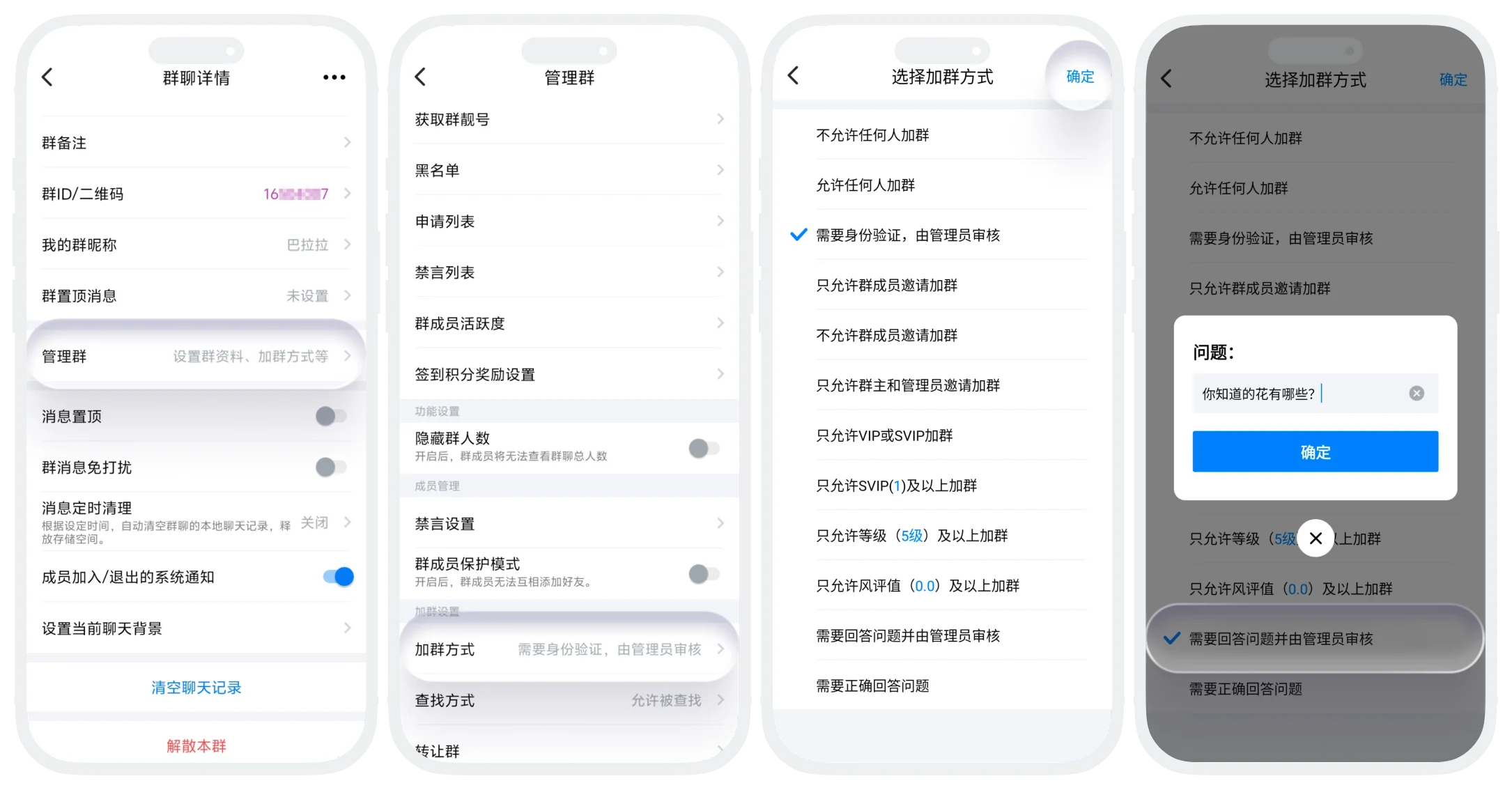
- On the group chat page, click 'More' in the upper right corner to enter the group chat details page;
- Click 'Manage Group' - 'Join Method';
- Select join method and set corresponding parameters;
- Set verification questions and answers;
- Configure identity/level requirements
- Click 'Confirm' to save settings;
FAQ
No, only one main join method can be selected each time.
It is recommended to use the 'Need to correctly answer questions' or 'Require identity verification and be reviewed by administrator' mode, which can effectively filter robots and advertising accounts.
Was this page helpful?
