Group Member Protection Mode
Group member protection mode is a special security function designed to protect group members' privacy. After enabling, it will restrict unnecessary social interactions between group members, effectively preventing member information leakage and harassment behavior, while ensuring normal communication in the group is not affected.
Enable Group Member Protection Mode
- Effects after enabling:
- Nickname and ID desensitized display between group members, only showing the first character or number, for example Zhang* (BatID: 3******);
- Viewing group member profile page will hide the 'Add Friend' button;
- Permission requirements: Only group owner can operate;
- Enable process: On the group chat page, click 'More' in the upper right corner, find 'Manage Group', turn on the 'Group Member Protection' switch.
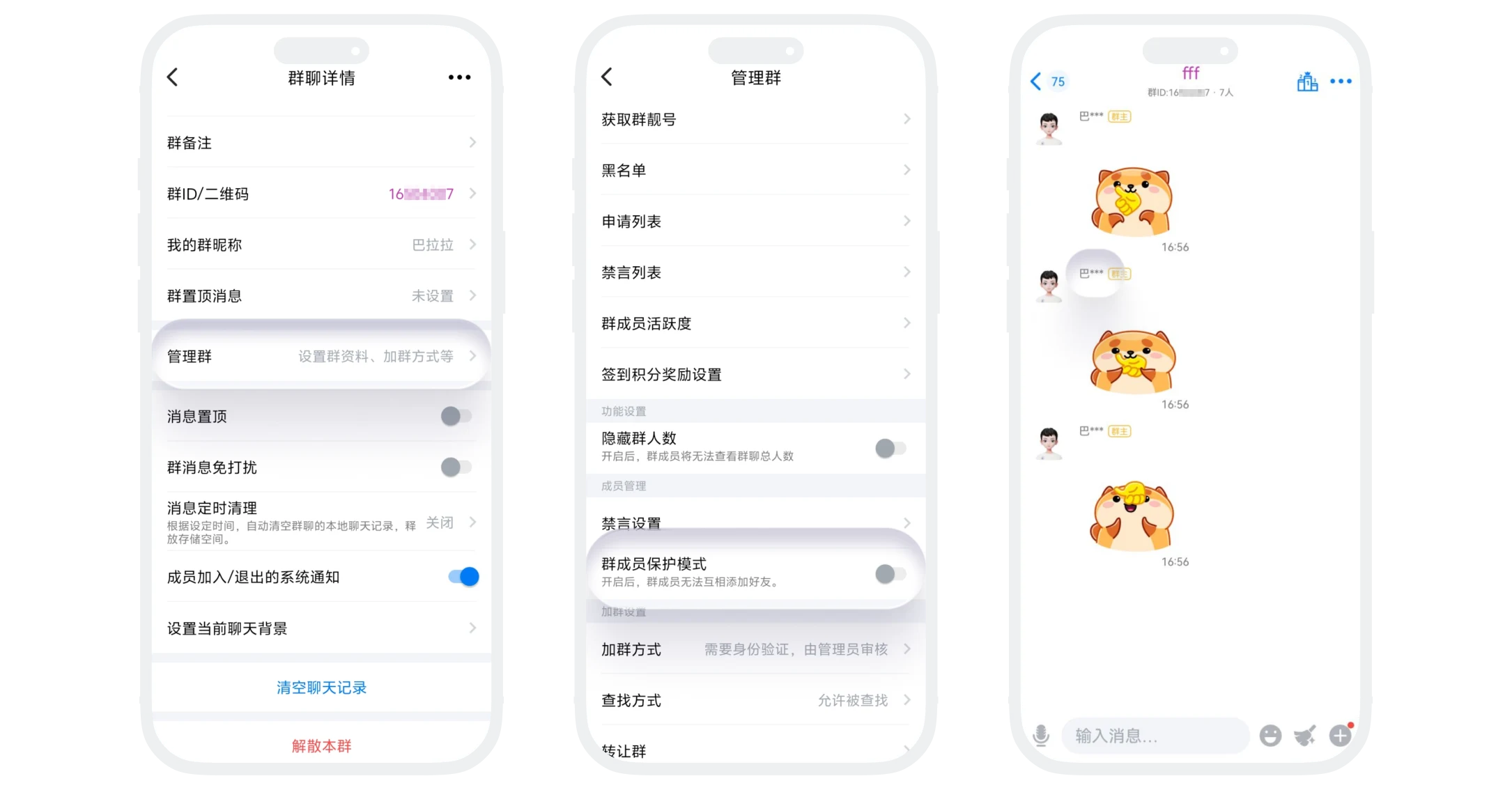

Please note: Group member protection mode only takes effect between regular members. Group owner and administrators can still normally view group member information to manage the group chat.
FAQ
Group member protection mode is only used to protect member information and will not affect normal group chat communication.
No, this is a global setting for the group chat.
Yes. All new members automatically enter protection status.
