Check-in Points Settings
Check-in points rewards are a management function used to motivate group members to participate in daily check-in and improve group activity. Group owners can set the points rewards that group members can obtain for daily check-in. The system will automatically freeze corresponding points from the group owner account and distribute them to members who complete check-in.
Reward Method and Rules Description
- Provide two points distribution methods:
- Fixed Points: Each member can obtain the same amount of points for daily check-in;
- Random Points: Each member can obtain random points within the set range for daily check-in (need to set upper and lower limits);
- Daily Total Reward Points: Set the total points pool for check-in rewards in this group (for example: 1000 points). After the points obtained by group members for check-in reach the set limit for the day, other group members will no longer receive points for check-in;
- Points automatic freeze mechanism:
- After enabling this function, the system automatically freezes points equivalent to 'Daily Total Reward Points' from the group owner account daily;
- Frozen points are only used for daily check-in distribution. Unclaimed points will be automatically returned.
Setting Process
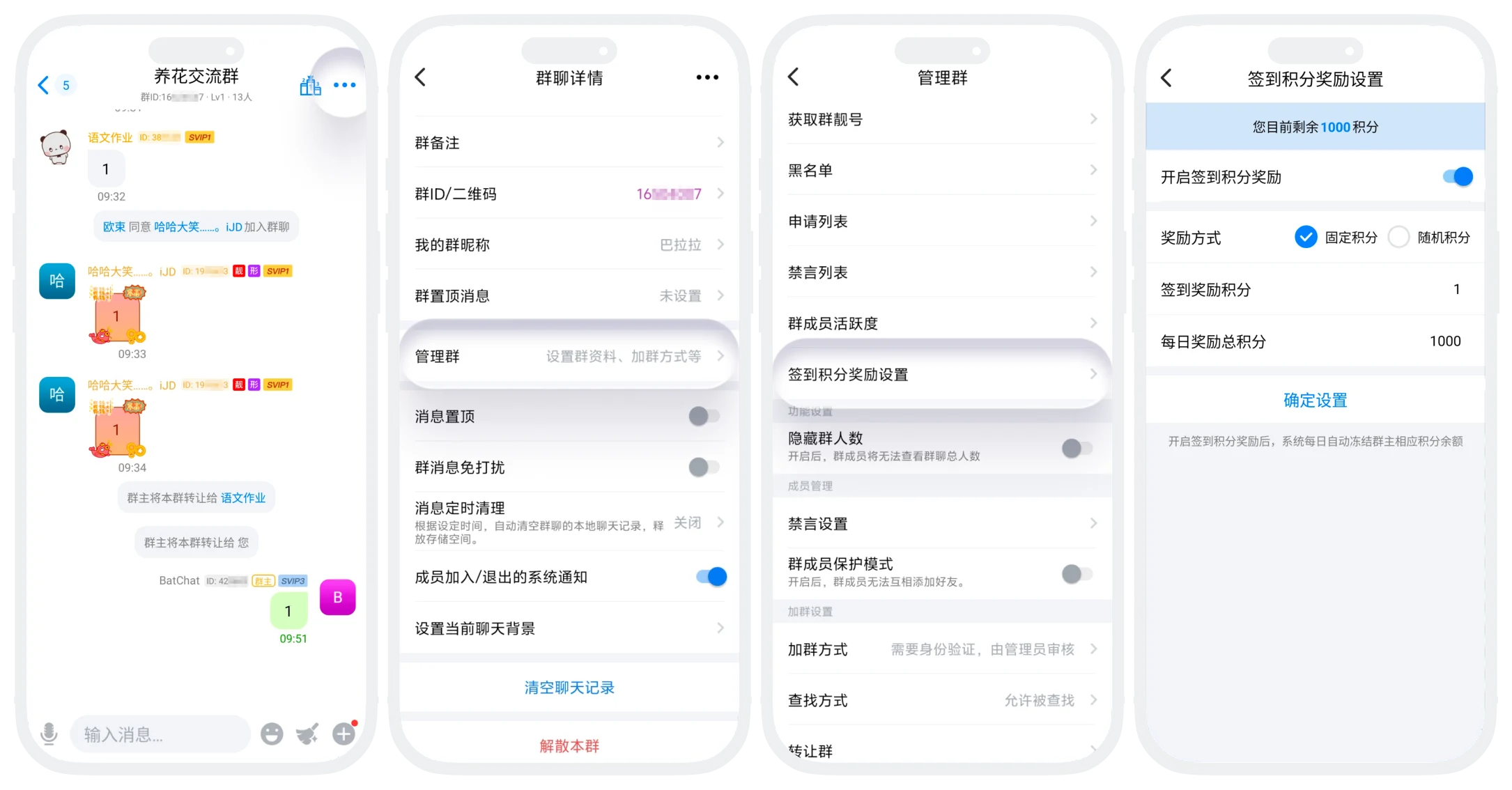
- On the group chat page, click 'More' in the upper right corner to enter the group chat details page, click 'Manage Group' - 'Check-in Points Reward Settings';
- Turn on the 'Check-in Points Reward Settings' switch and set parameters;
- Reward Method: Choose 'Fixed Points' or 'Random Points';
- Check-in Reward Points: Fill in the points that can be obtained for daily check-in (if 'Random Points' is selected, need to set the maximum and minimum values of the random range). This item must be a positive integer;
- Daily Total Reward Points: Set the total points pool for check-in rewards in this group, and must not exceed the remaining points in the account;
- After setting is complete, click 'Confirm Settings'. The system will verify whether the group owner points balance is sufficient and complete the setting.

Notes:
- Points Balance: Please ensure the group owner account has sufficient points before enabling, otherwise the setting cannot be successful;
- Points Freeze: Daily total reward points will be automatically frozen in the daily system scheduled task. Please reserve balance in advance.
How to Check-in and Claim?
After the group owner sets it up, group members enter the group chat, click the 'Group Activity Rank' icon at the top right of the group chat, enter the group activity rank, click 'Check-in Now' at the top, and complete check-in to claim points (watching ads can give 3x points).


Please note: Each user can only claim check-in points for 3 group chats daily. After exceeding 3 group chats, you can still check-in normally but cannot obtain check-in points.
FAQ
If points are insufficient during setup, the system will prompt 'Insufficient balance' and cannot enable; if balance is insufficient on a certain day after enabling, check-in rewards for that day will be suspended.
Unclaimed points will be automatically returned to the group owner account.
