Group Search Settings
Group chat search settings function allows group owner to customize the searchability and search conditions of this group chat in the platform. Through flexible configuration, you can balance the openness and privacy of the group, attracting new members while protecting group privacy and security.
Setting Process
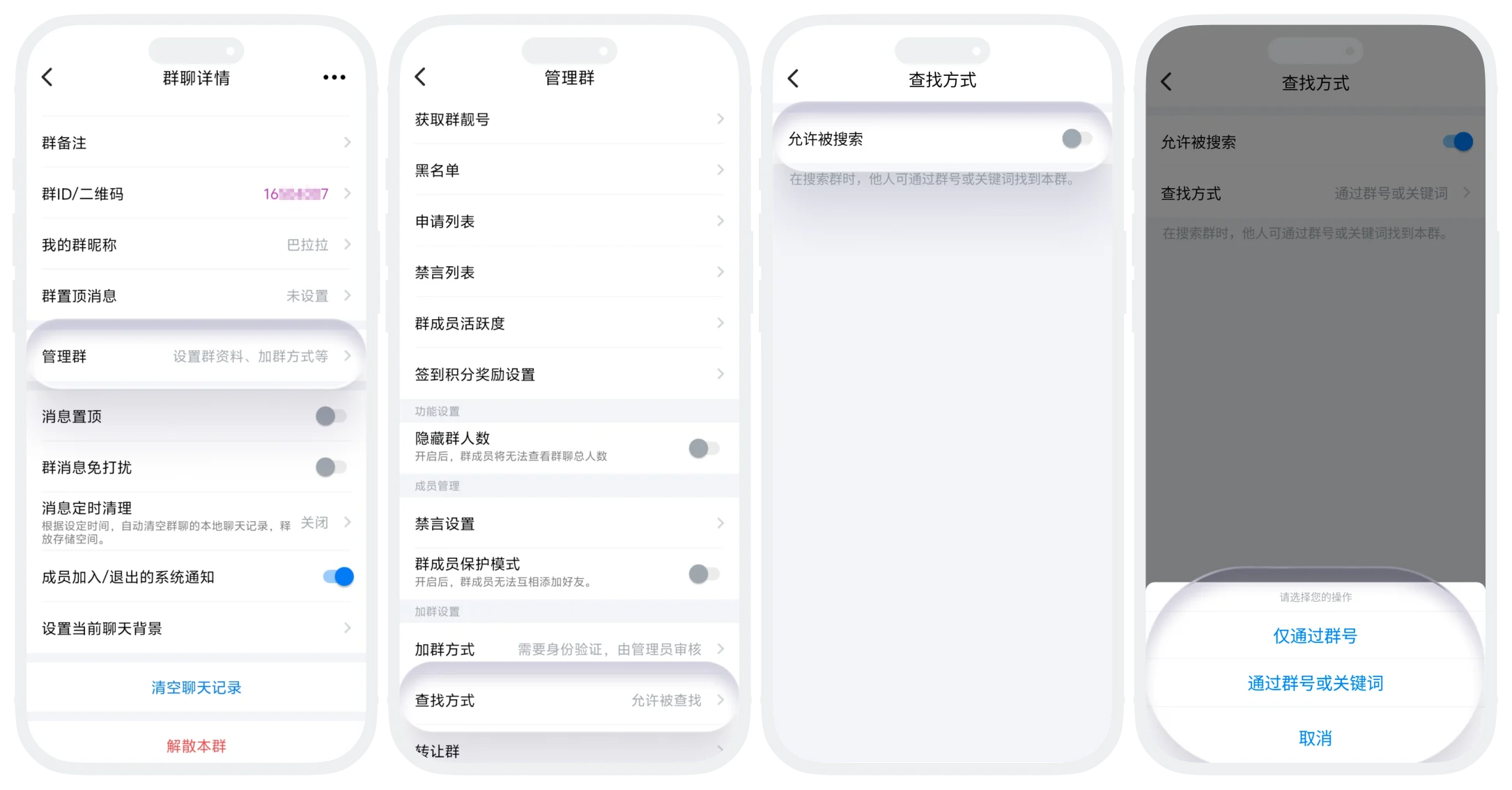
- On the group chat page, click 'More' in the upper right corner to enter the group chat details page, click 'Manage Group' - 'Search Method';
- Set the 'Allow to be Searched' switch:
- Enable: Users can find this group through specified methods and apply to join;
- Disable: Users cannot search for this group, can only join through group member invitation;
- If 'Allow to be Searched' switch is enabled, you can set 'Search Method':
- Search only by group number: Users can only perform exact search by entering the complete group number, cannot search by keywords;
- By group number and keywords: Users can directly enter the group number for exact search, or enter group name, group tags, etc. for fuzzy matching.
FAQ
No. After the group chat prohibits search, users who scan the group QR code also cannot apply to join the group chat.
Was this page helpful?
