Coupon Acquisition and Usage
The coupon module is a virtual equity management center provided by BatChat App for users, integrating coupon acquisition, usage, management, gifting and other functions. Currently supports membership coupons, discount coupons and other practical coupons, helping users obtain membership services, special IDs and other value-added products in a more favorable way. All coupons are managed uniformly, with convenient operation and flexible usage.
General Function Description
- Entry path: 'My' - 'BatChat Mall' - 'My Coupons';
- General operations: Most coupons support use, gift, view description and other operations;
- Status identification: Clearly distinguish between unused, used, gifting and other statuses.
Membership Coupon Usage Instructions
- Coupon basic information:
- Membership coupon types: 1 month VIP coupon, 3 months VIP coupon, 6 months VIP coupon, 1 year SVIP coupon;
- Main purpose: Exchange for corresponding duration membership services;
- Acquisition methods:
- 'BatChat Mall' - 'Purchase Membership Exchange Coupon', select the membership coupon type you want to purchase, complete payment;
- 'BatChat Mall' - 'Points Lottery', use account points to draw, have a chance to get 1 month VIP coupon;
- Membership coupon usage process:
- Enter the 'Membership Coupon' list, select any unused membership coupon, click 'Use';
- After confirming use, your membership validity period will be automatically extended by the corresponding duration, viewable in 'My' - 'Member Center';
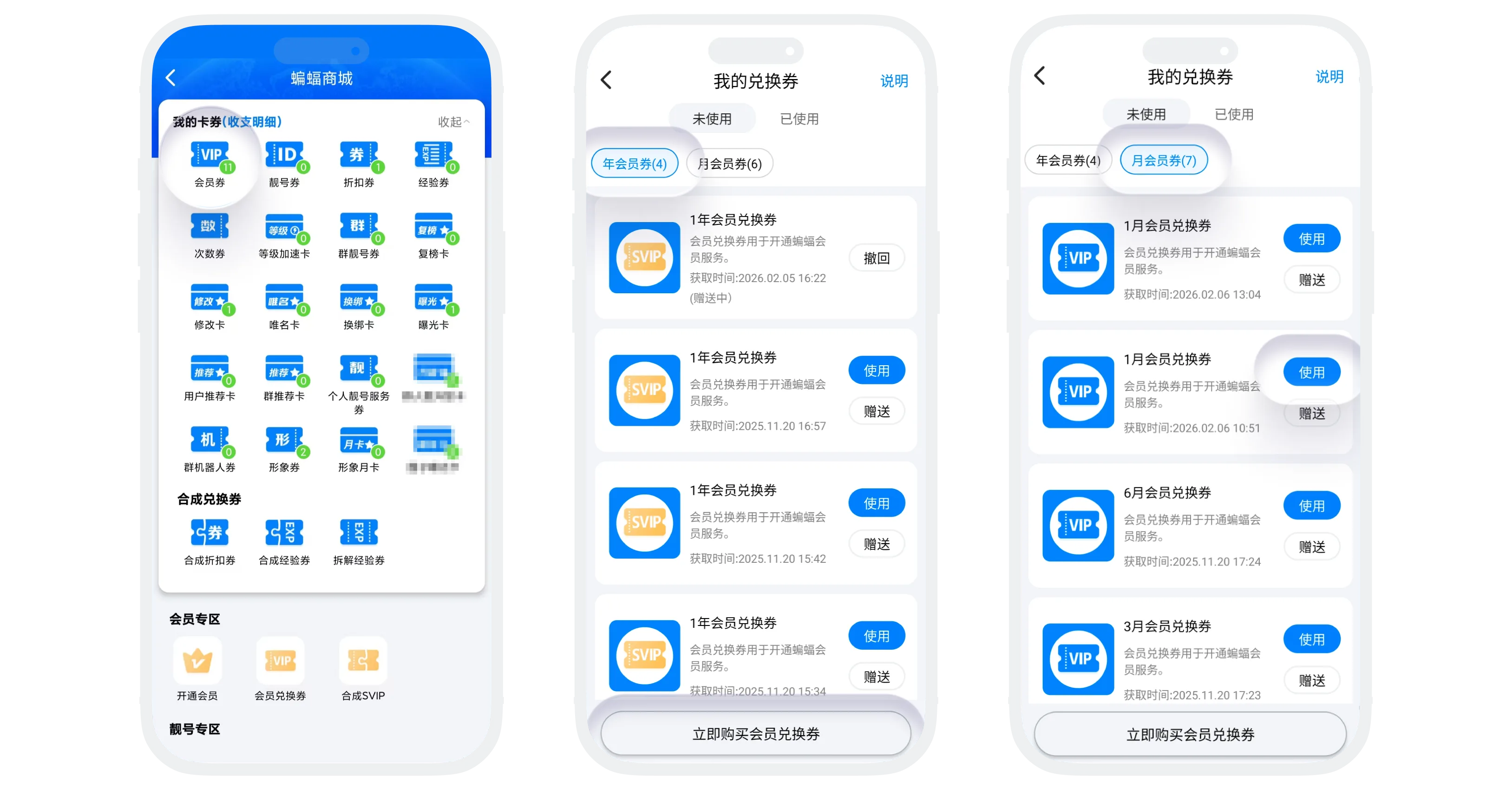

Please note: If using both VIP and SVIP coupons, SVIP services will be enjoyed first, and VIP services will continue after SVIP expires.
- Other operations:
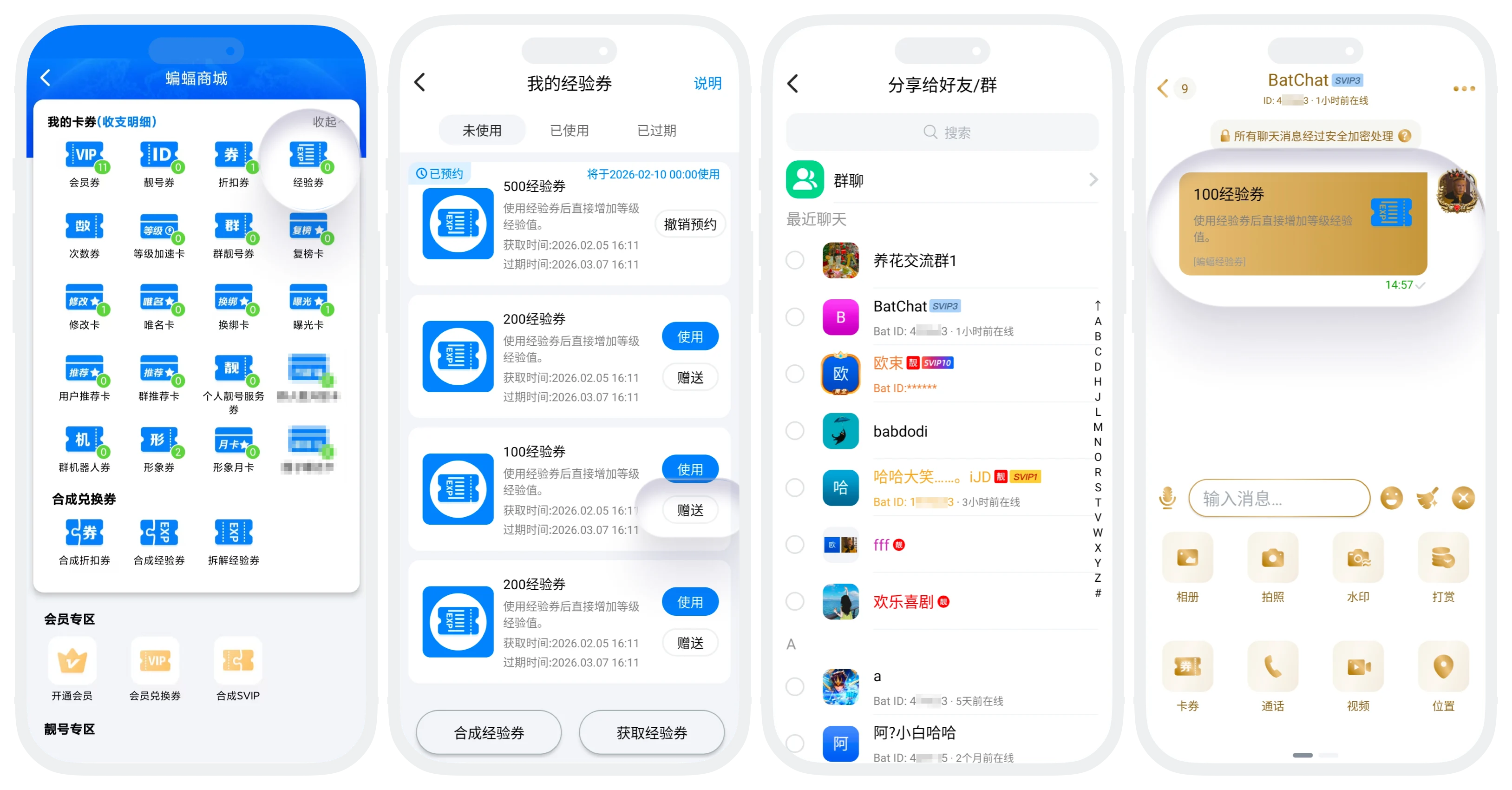
- Gift to friends: Click 'Gift' to share unused membership coupons with friends or groups, see Gift Coupon;
- View description: Click 'Description' in the upper right corner to understand detailed usage rules;
- Used list: Can view past exchange records, support single delete or one-click clear.
Discount Coupon Usage Instructions
- Coupon basic information:
- Discount coupon types: 50% off coupon, 60% off coupon, 70% off coupon, 80% off coupon, 90% off coupon;
- Main purpose: Enjoy discounts when purchasing membership, special IDs and other services in BatChat App;
- Acquisition methods:
- 'BatChat Mall' - 'Points Lottery', participate in lottery, have a probability to get discount coupons;
- 'BatChat Mall' - 'Points Lottery' - 'Lottery Benefits', use already drawn times to exchange for discount coupons;
- Discount coupon usage process:
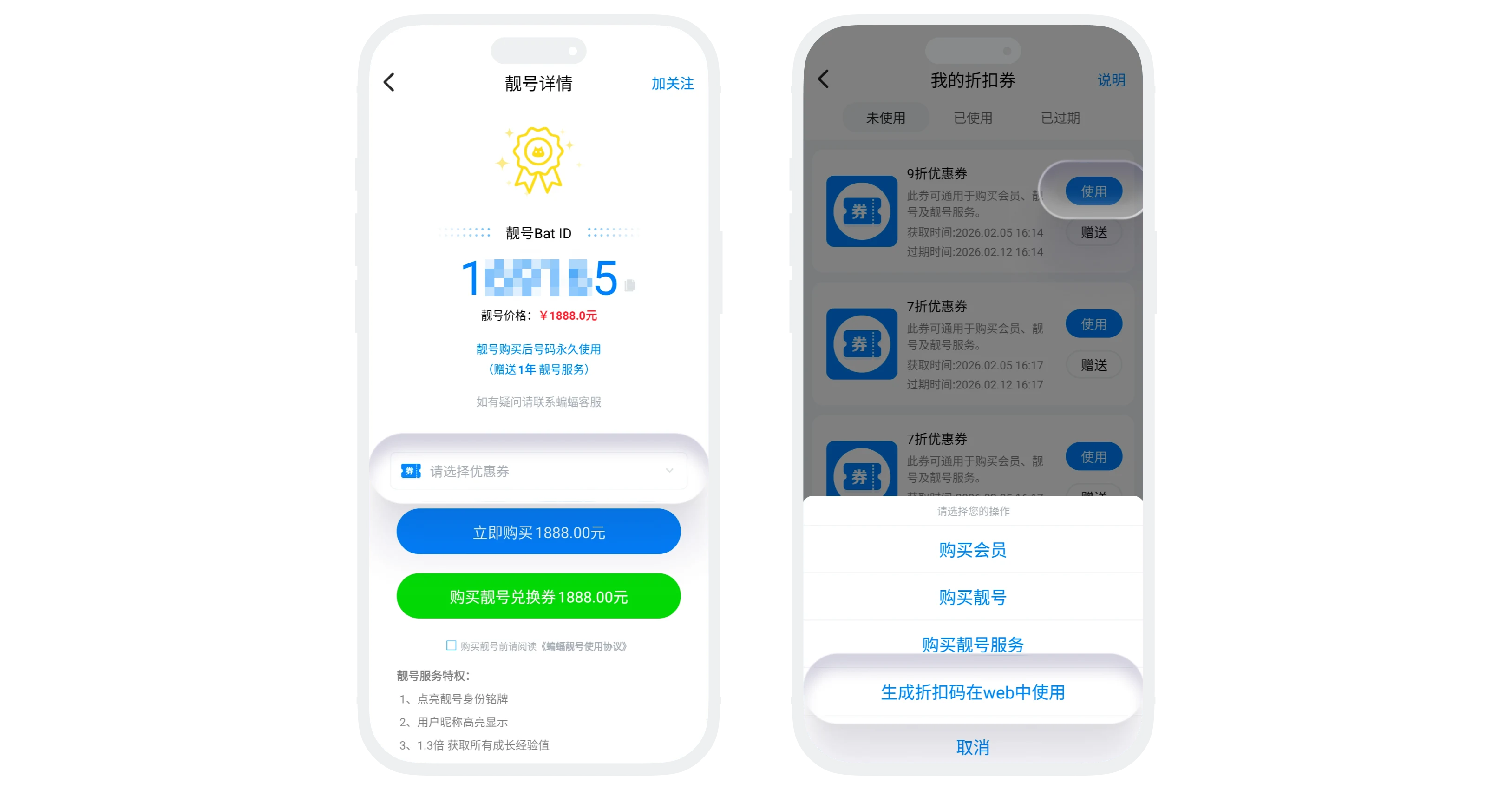
- Method 1: When purchasing membership, special IDs and other services in the App, select the corresponding discount coupon on the payment page;
- Method 2: In 'My' - 'Discount Coupon' list, select any unused discount coupon, click 'Use', can generate a discount code, directly use the discount code to enjoy the discounted price when purchasing value-added services on the BatChat web end;
- Discount coupon validity period: Discount coupons are valid for 30 days after acquisition, cannot be used after expiration;
- Other operations:
- Craft discount coupons: Can craft multiple low discount coupons into higher discount coupons, see details Craft Coupon;
- Gift discount coupons, view description, view used coupons process is the same as other coupons;
XP Coupon Usage Instructions
- Coupon basic information:
- XP coupon types: 50 XP coupon, 100 XP coupon, 200 XP coupon, 1000 XP coupon;
- Main purpose: Use XP coupons to obtain XP to quickly improve account level;
- Acquisition methods:
- 'BatChat Mall' - 'Points Lottery', participate in lottery, have a probability to get XP coupons;
- 'BatChat Mall' - 'Points Lottery' - 'Lottery Benefits', use already drawn times to exchange for XP coupons;
- XP coupon validity period: XP coupons are valid for 30 days after acquisition, cannot be used after expiration;
- XP coupon usage process:
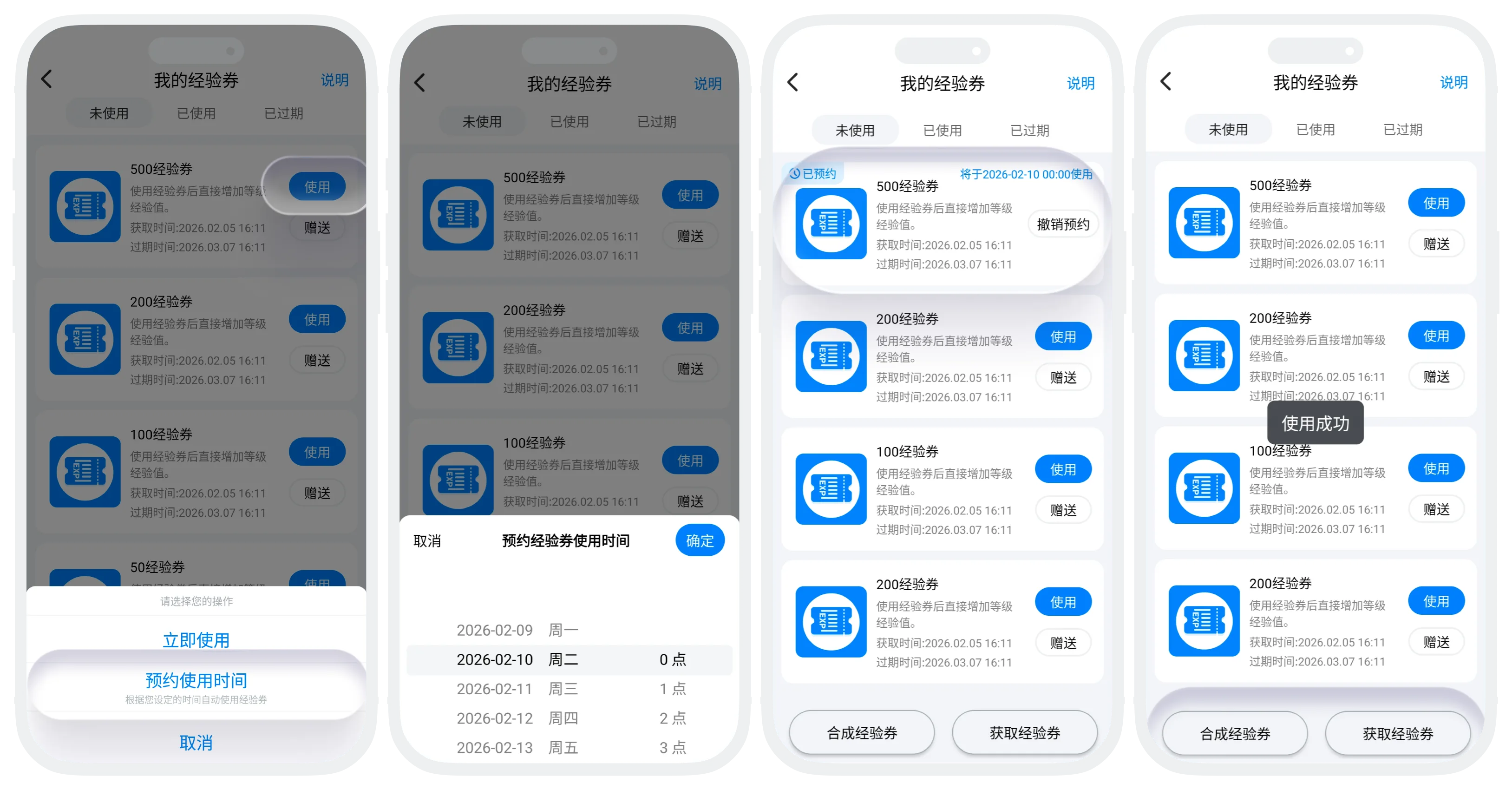
- Enter the "XP Coupon" list, select any unused XP coupon, and tap "Use";
- Tap "Use Now" and confirm;
- Tap "Schedule Usage Time" and set a usage time (available within the next 7 days, accurate to the minute). Scheduled XP coupons will appear in the "Unused" list and support "Cancel Schedule". When the scheduled time arrives, the system will automatically use the coupon;
- After the XP coupon is used successfully, XP is credited immediately. You can view all XP gained today in "My" - "BatChat Level";
- Other operations:
- Craft XP coupons: Multiple low-value XP coupons can be crafted into a higher-value XP coupon. See Craft Coupon;
- Dismantle XP coupons: One high-value XP coupon can be dismantled into multiple low-value XP coupons. See Dismantle Coupon;
- Gift, view description, and view used coupons follow the same process as other coupons;
- Daily XP coupon usage limits:
| Membership Level | XP Coupon Usage Limit |
|---|---|
| Regular User | 2000 |
| VIP | 2000 |
| SVIP1 | 5000 |
| SVIP2 | 5500 |
| SVIP3 | 6000 |
| SVIP4 | 6500 |
| SVIP5 | 7000 |
| SVIP6 | 7500 |
| SVIP7 | 8000 |
| SVIP8 | 8500 |
| SVIP9 | 9000 |
| SVIP10 | 12000 |
| SVIP11 | 13000 |
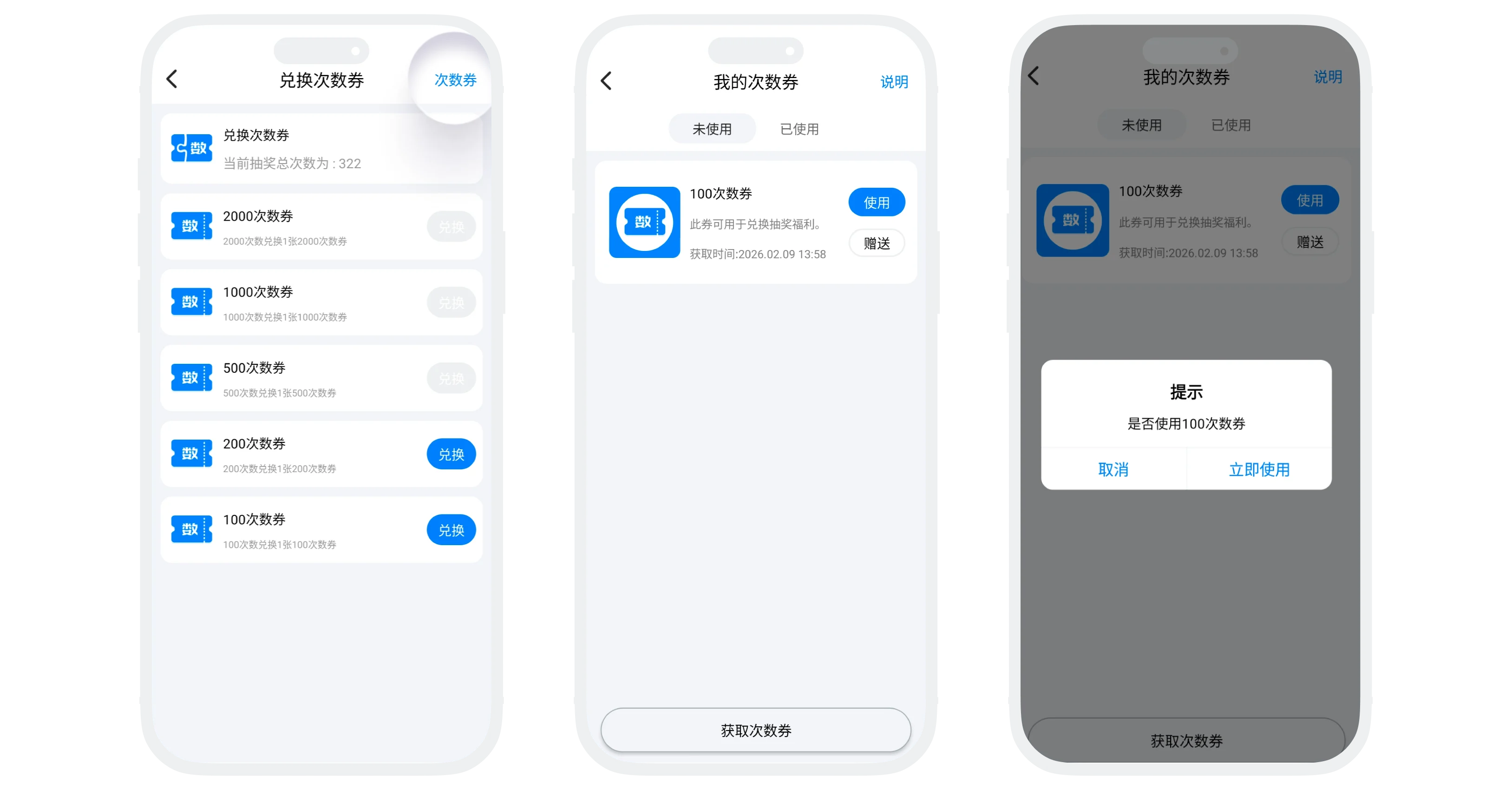
Draw Coupon Usage Instructions
- Coupon basic information:
- Draw coupon types: 10-draw coupon, 20-draw coupon, 30-draw coupon, 100-draw coupon, 200-draw coupon;
- Main purpose: A dedicated coupon for redeeming lottery draws. After use, it directly increases your draw count. Draws can be exchanged for rewards such as Honor Membership and Exposure Cards;
- Acquisition methods:
- In the "Draw Coupon" list, use your existing draw count to exchange for a draw coupon of the corresponding amount;
- After successful exchange, your total draw count is immediately reduced. Tap "Draw Coupon" in the upper-right corner to view redeemed draw coupons;
- Draw coupon usage process:
- In the "Draw Coupon" list, tap "Draw Coupon" in the upper-right corner to view all draw coupons you own;
- Tap "Use" on any draw coupon. After confirmation, the corresponding number of draws is added immediately;
- Other operations: Gift, view description, and view used coupons follow the same process as other coupons;
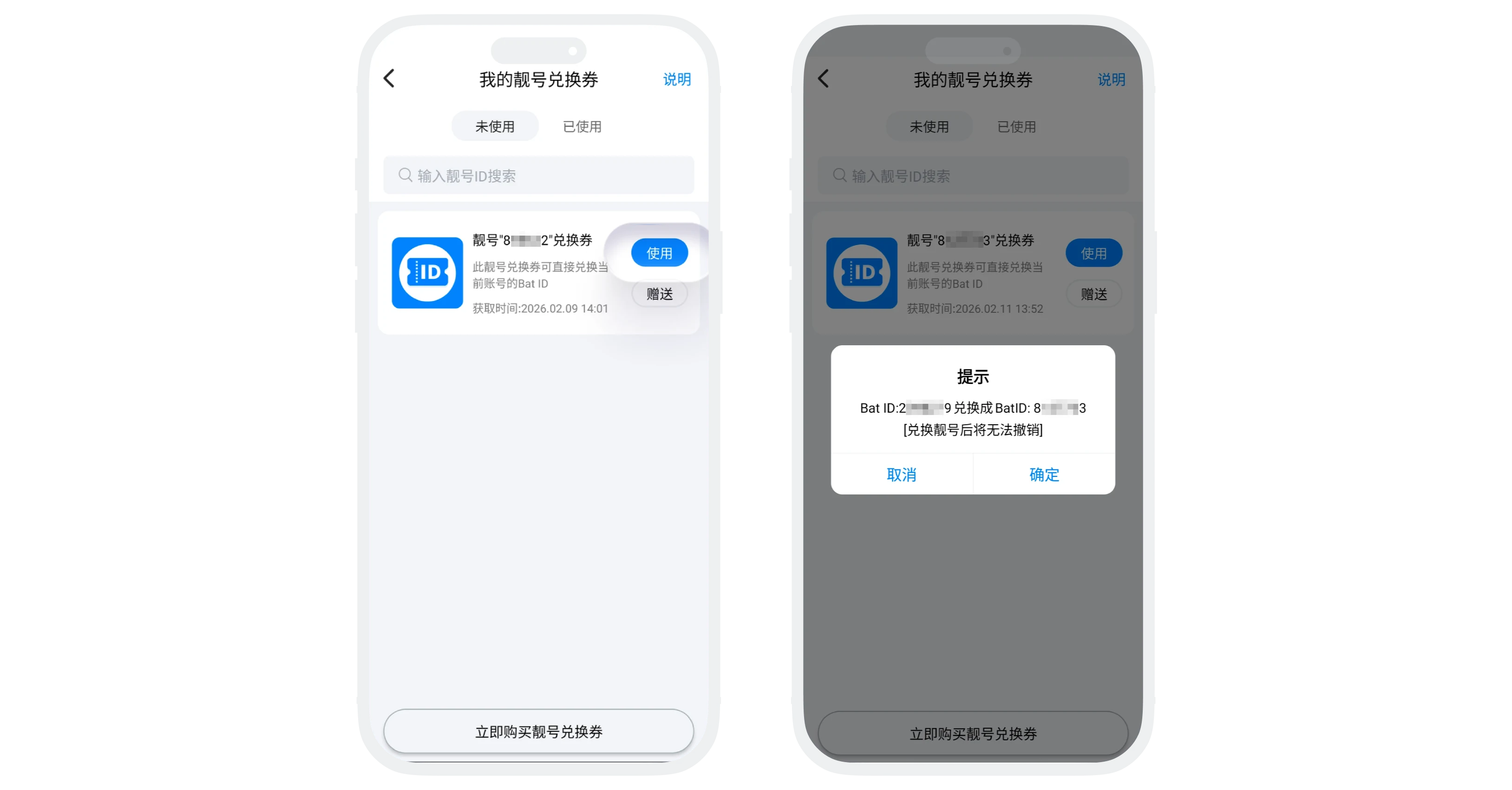
Special ID Coupon Usage Instructions
Personal Special ID Coupon
- Coupon basic information:
- Main purpose: Replace your personal BatID with an exclusive special ID (one coupon, one ID; each coupon corresponds to one fixed special ID);
- Acquisition method: Go to "BatChat Mall" - "Buy Special ID", tap the special ID you want to purchase, and select "Buy Special ID Coupon";
- Usage process:
- In "Special ID Coupon", select the special ID coupon you want to use and tap "Use";
- After confirming the information, tap "Confirm". Your personal BatID will be replaced with the ID corresponding to the coupon;
- Other operations: Gift, view description, and view used coupons follow the same process as other coupons;
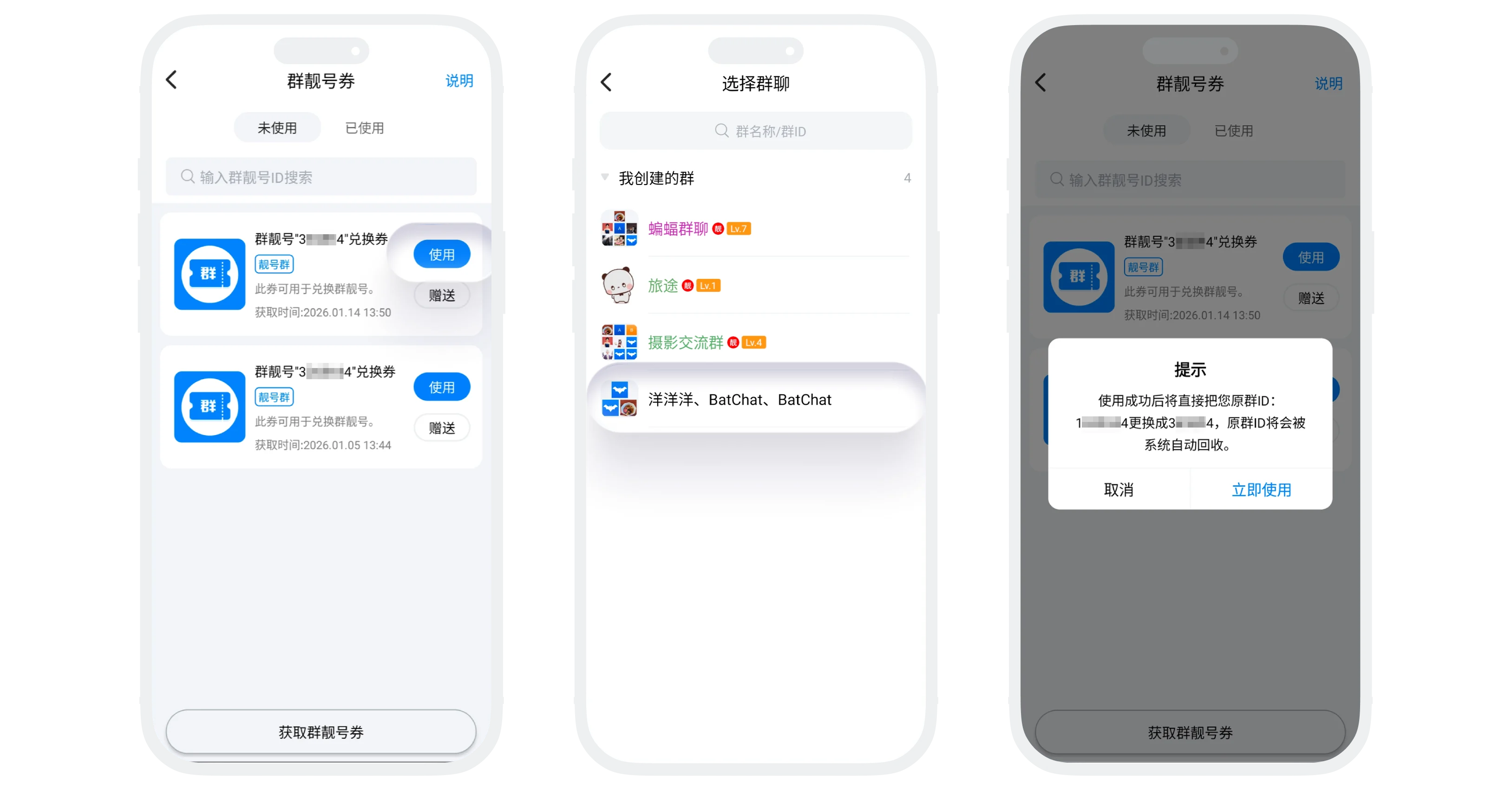
Group Special ID Coupon
- Coupon basic information:
- Main purpose: Replace the ID of a group you created with an exclusive group special ID (one coupon, one ID; each coupon corresponds to one fixed group special ID);
- Acquisition method: Go to "BatChat Mall" - "Group Special ID", tap the group special ID you want to purchase, and select "Buy Group Special ID Coupon";
- Usage process:
- In "Group Special ID Coupon", select the coupon you want to use and tap "Use";
- Select the group whose ID you want to change (only groups you created can be changed);
- After confirming the information, tap "Confirm". The group ID will be replaced with the ID corresponding to the coupon;
- Other operations: Gift, view description, and view used coupons follow the same process as other coupons;
Please note:
- Whether it is a personal or group special ID, the change cannot be undone and the original ID cannot be restored. Other users must use the new ID to find you or the group;
- The original ID will be recycled by the system and may be registered by another user;
- Changing the ID does not affect your account data, friend relationships, group identity, or other information;
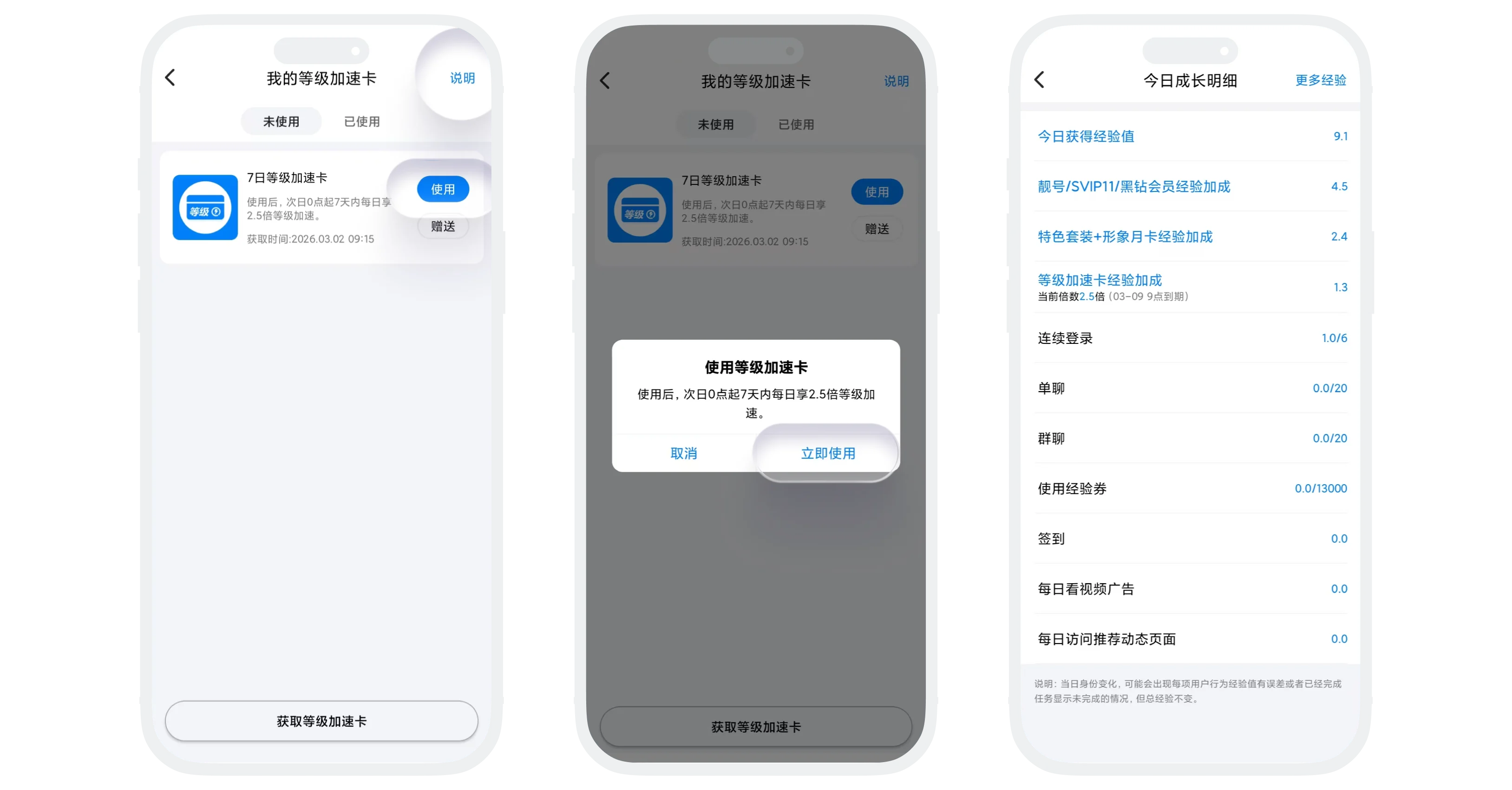
Level Boost Card Usage Instructions
- Coupon basic information:
- Card type: 7-day Level Boost Card (daily XP earned during the 7 days receives a 2.5x multiplier);
- Main purpose: An advanced item for accelerating XP gain. After use, it provides an additional XP multiplier for the specified number of days, helping you level up faster;
- Acquisition method: Purchase from the "Level Boost Card" list;
- Usage process:
- In the "Level Boost Card" list, select the boost card you want to use;
- Tap "Use" and confirm;
- Usage rules:
- After use, the boost starts at 00:00 the next day. For example: if you use it today at 15:00, day one starts tomorrow at 00:00;
- Using multiple boost cards extends the valid days cumulatively, while the multiplier remains unchanged;
- Remaining boost time and multiplier details can be viewed in "My" - "BatChat Level" - "Boost Details";
- Other operations: Gift, view description, and view used coupons follow the same process as other coupons;
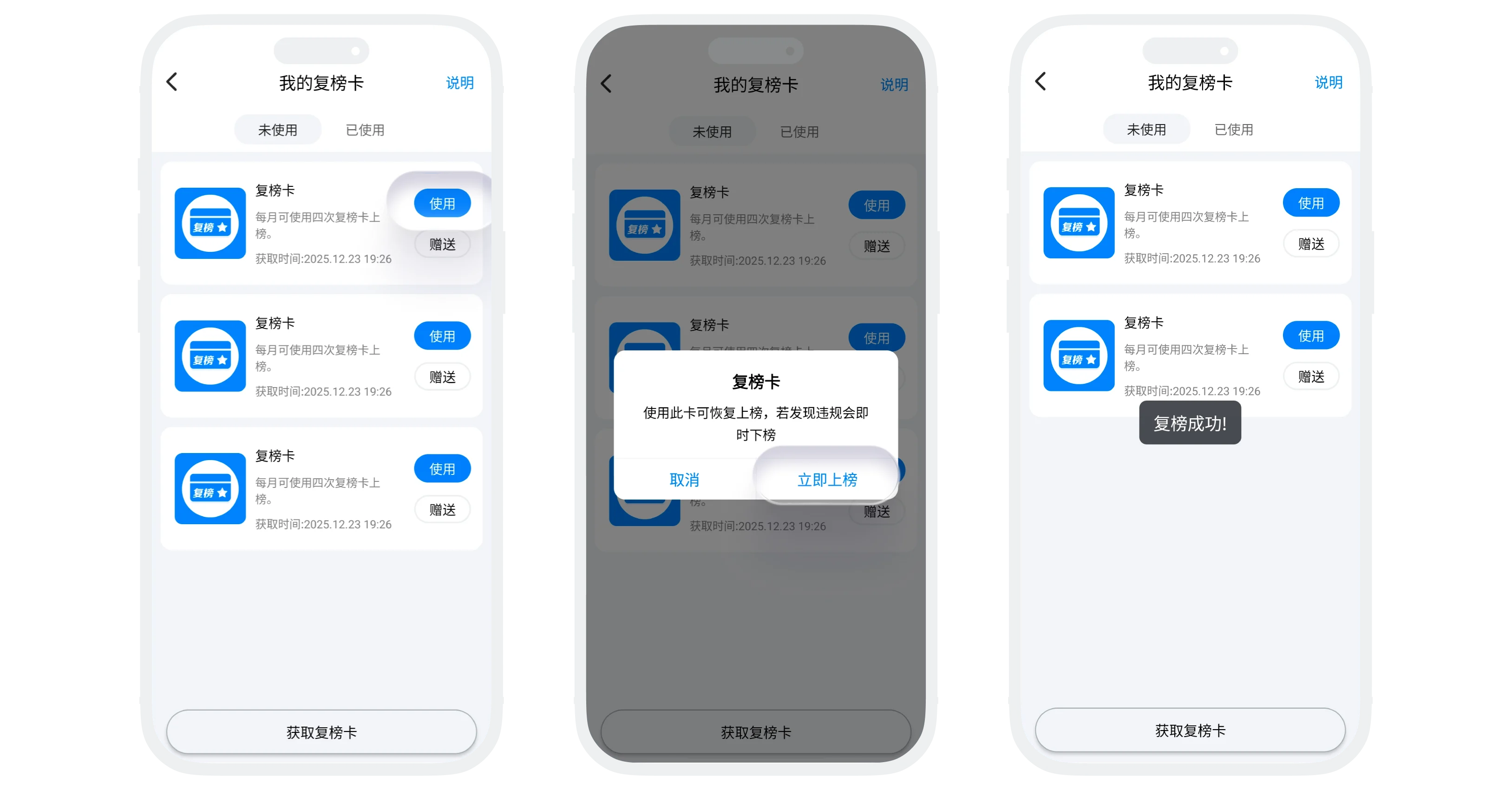
Restore Ranking Card Usage Instructions
- Coupon basic information:
- Main purpose: If your account is removed from the level ranking due to violations or other reasons, using a Restore Ranking Card immediately restores your ranking eligibility;
- Acquisition method: Exchange with draw count ("BatChat Mall" - "Points Lottery" - draw count exchange);
- Usage process:
- Prerequisite: Your account has been removed from the level ranking due to violations or other reasons;
- In the "Restore Ranking Card" list, select a card, tap "Use", and confirm to restore ranking eligibility;
- Usage limit: Up to 4 times per month. After the limit is reached, it cannot be used again;
- Other operations: Gift, view description, and view used coupons follow the same process as other coupons;
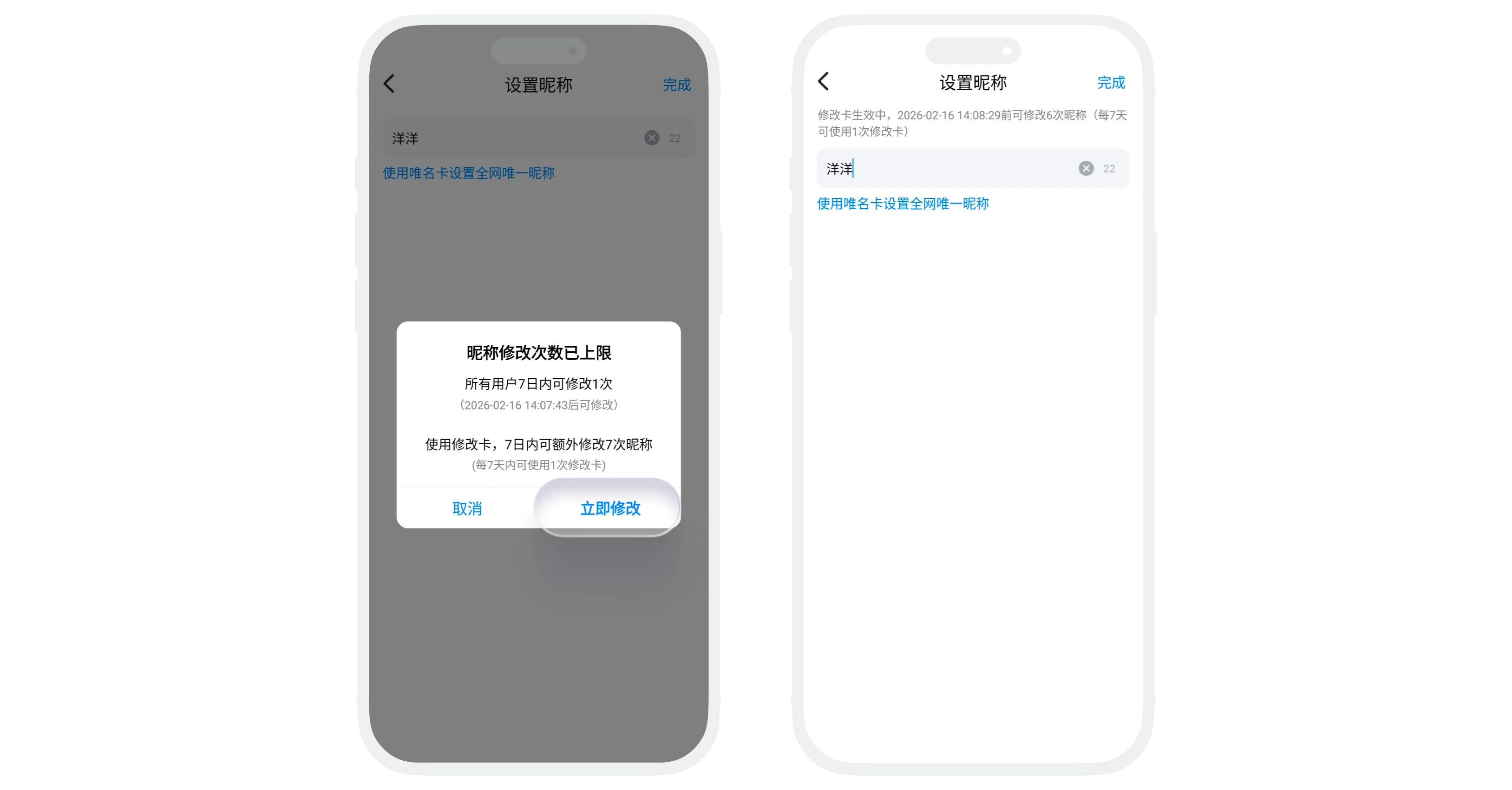
Update Card Usage Instructions
- Coupon basic information:
- Main purpose: Increase nickname change attempts (7 additional nickname changes within 7 days after use) and modify existing real-name verification information;
- Acquisition method: Exchange with draw count ("BatChat Mall" - "Points Lottery" - draw count exchange);
- Usage process:
- Increase nickname change attempts: When the nickname change limit prompt appears, tap "Use Update Card" to change successfully and receive the remaining 6 nickname change attempts within 7 days (remaining attempts can be viewed on the nickname editing page);
- Modify real-name verification information: Go to "My" - "Settings" - "Account" - "Real-Name Verification", then tap "Modify Real-Name Verification" to update verified information;
- Usage rules:
- Can be used once every 7 days;
- It is valid for 7 days after use. Unused change attempts expire automatically after 7 days;
- Other operations: Gift, view description, and view used coupons follow the same process as other coupons;
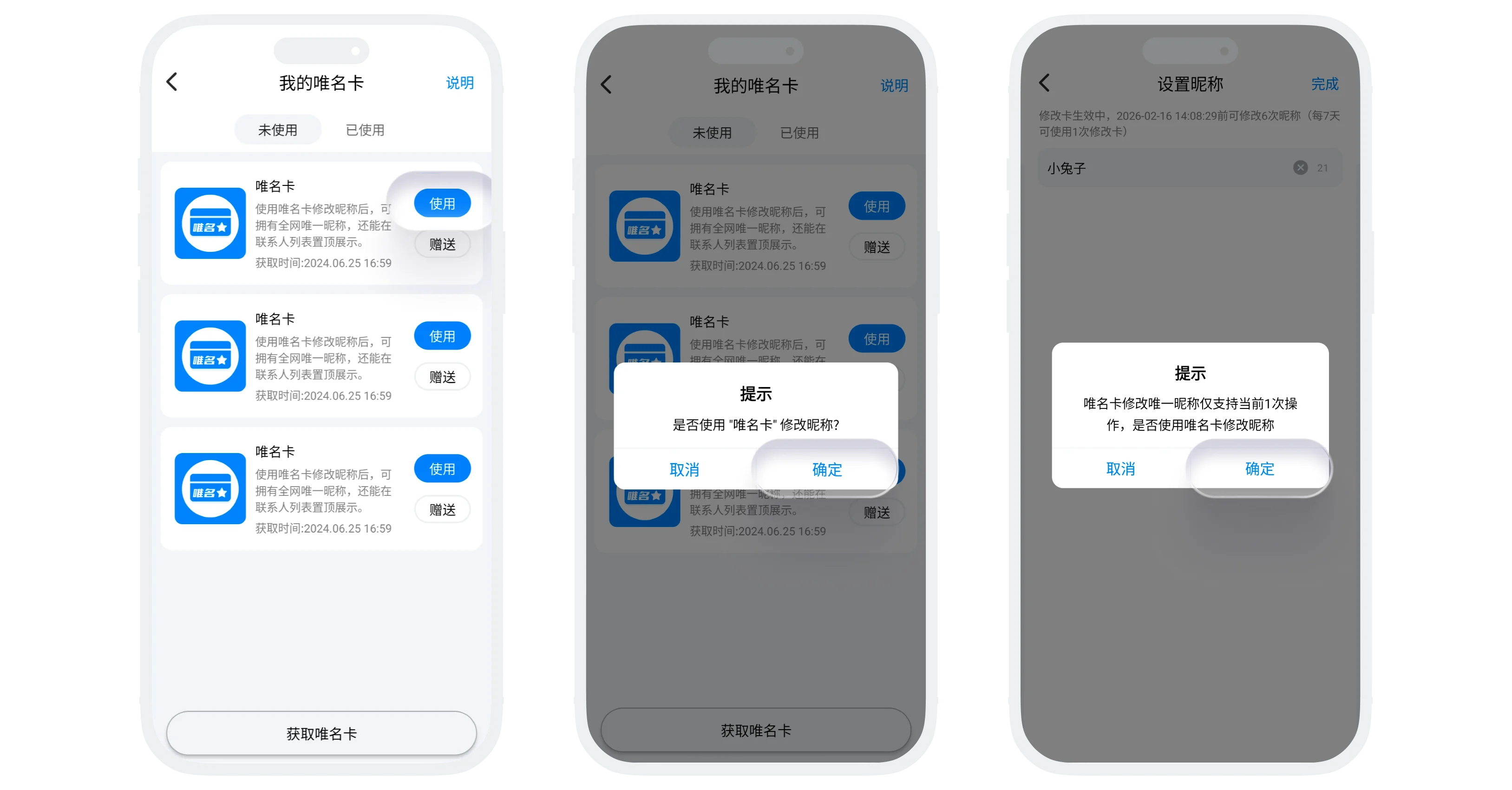
Unique Name Card Usage Instructions
- Coupon basic information:
- Main purpose:
- Set your nickname as a unique platform-wide nickname, preventing other users from using the same nickname. One Unique Name Card allows 3 unique nickname changes;
- Your account will be pinned in all friends' contact lists;
- Users who use a Unique Name Card will display a special badge;
- Acquisition method: Exchange with draw count ("BatChat Mall" - "Points Lottery" - draw count exchange);
- Main purpose:
- Usage process:
- In the "Unique Name Card" list, tap "Use" to automatically jump to the nickname settings page;
- Enter the unique nickname you want to set (it cannot duplicate another user's nickname on the platform), then tap "Save";
- Usage rules:
- Each Unique Name Card allows 3 unique nickname changes. Using multiple cards consecutively accumulates change attempts;
- After all 3 attempts are used, changing the nickname again permanently removes the unique-name privilege. The nickname will no longer be unique, contact pinning will be canceled, and the special badge will disappear;
- Other operations: Gift, view description, and view used coupons follow the same process as other coupons;
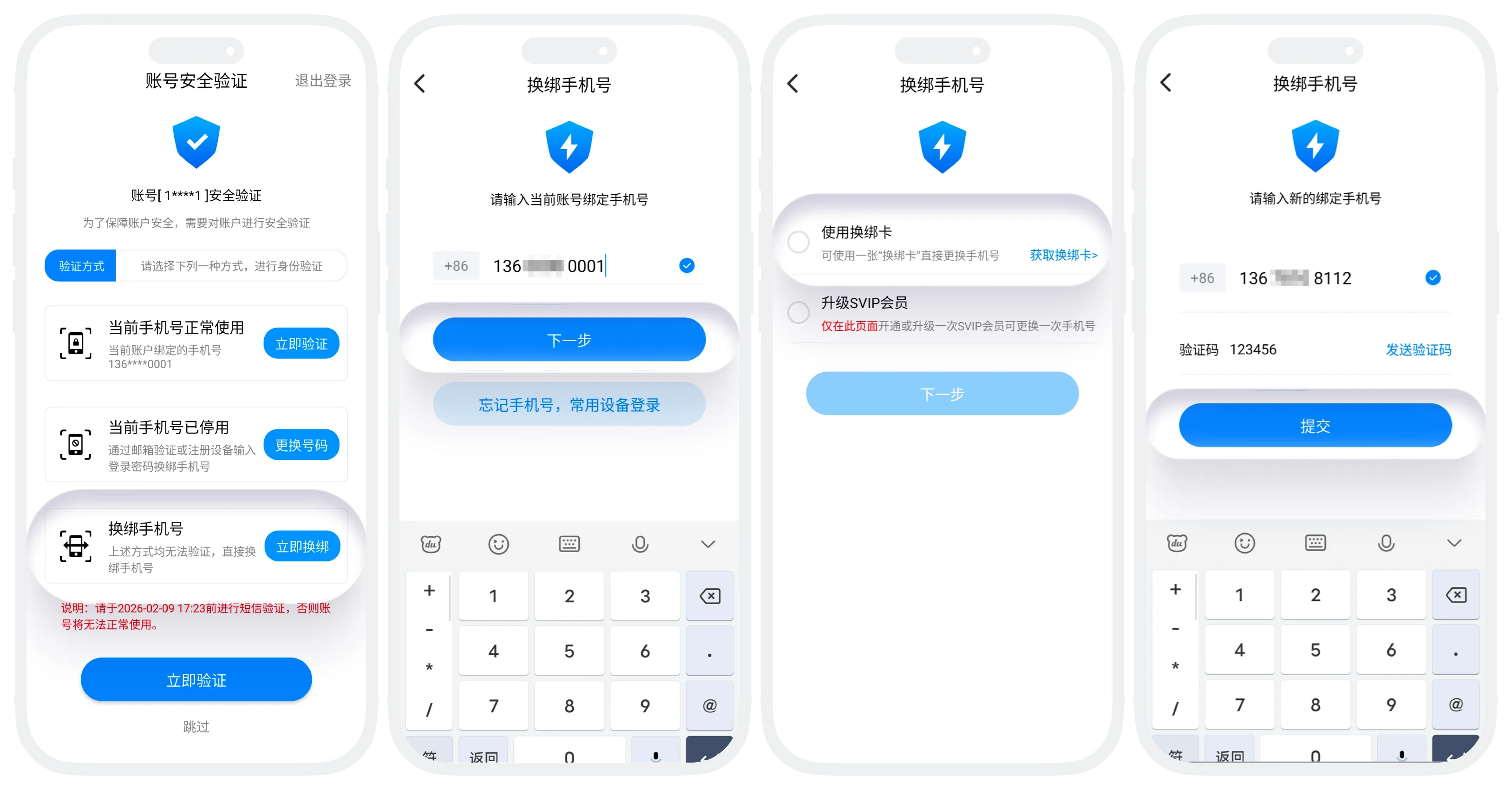
Phone Rebinding Card Usage Instructions
- Coupon basic information:
- Main purpose: On the account security verification page, if the currently bound phone number cannot be used normally, use a Phone Rebinding Card to quickly rebind a phone number;
- Acquisition method: Exchange with draw count ("BatChat Mall" - "Points Lottery" - draw count exchange);
- Usage process:
- On the security verification page, tap "Rebind Now" for "Rebind Phone Number";
- Enter the currently bound phone number for identity verification (if the current device is a trusted device, verification may be skipped);
- After verification, enter the rebinding page, select "Use Phone Rebinding Card", then tap "Next";
- Enter the new phone number, receive and enter the verification code, and complete rebinding;
- Other operations: Gift, view description, and view used coupons follow the same process as other coupons;
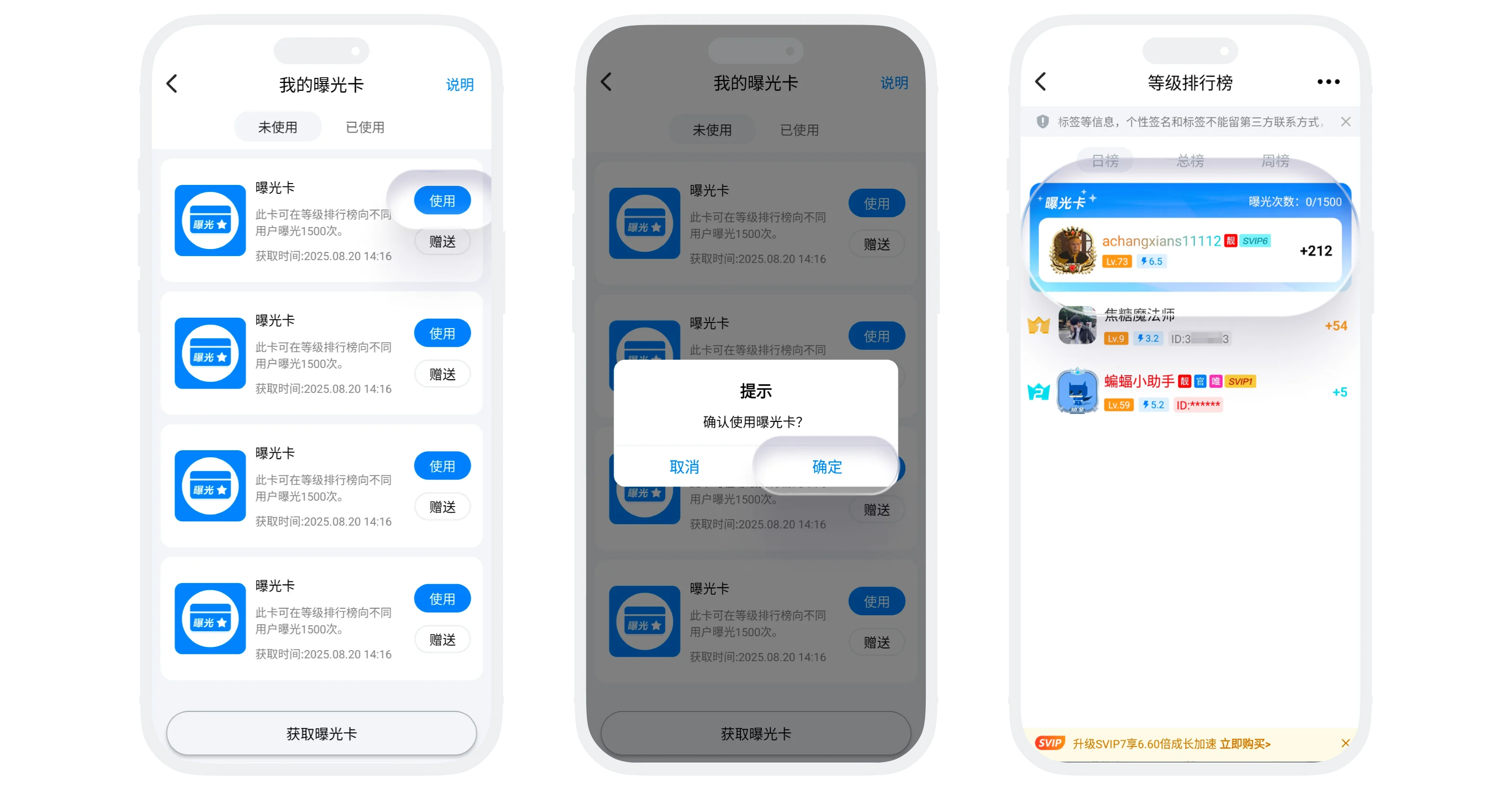
Exposure Card Usage Instructions
- Coupon basic information:
- Main purpose: After using an Exposure Card, your account receives 1500 exposure opportunities at the top of the daily level ranking, greatly increasing visibility on BatChat;
- Acquisition method: Exchange with draw count ("BatChat Mall" - "Points Lottery" - draw count exchange);
- Usage process:
- In the "Exposure Card" list, tap "Use" and confirm;
- After successful use, go to "Discover" - "Ranking" - "Daily Ranking" to view the current exposure count (visible only to you);
- Exposure rules:
- Counting: Each time a different user sees you, it counts as 1 exposure;
- Usage: Multiple Exposure Cards can be used continuously. Exposure counts are accumulated, and you will also be prioritized for exposure in the daily ranking;
- Removal: Once exposure reaches 1500 times, you immediately disappear from the exposure area;
- Other operations: Gift, view description, and view used coupons follow the same process as other coupons;
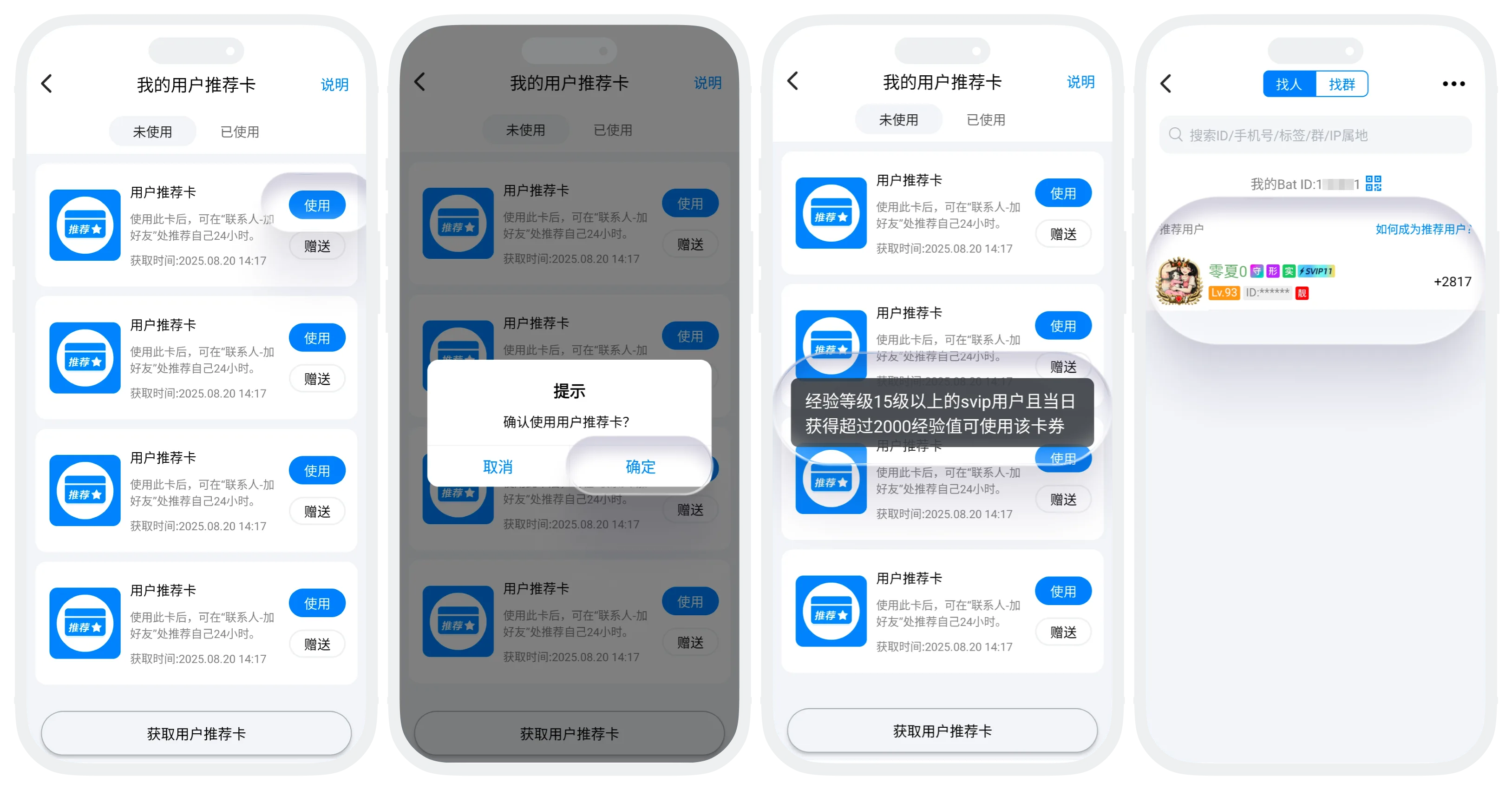
User Recommendation Card Usage Instructions
- Coupon basic information:
- Main purpose: After using a User Recommendation Card, your account receives 24 hours of recommended display on the "Add Friends/Groups" - "Find People" page, helping more potential friends discover and add you;
- Acquisition method: Exchange with draw count ("BatChat Mall" - "Points Lottery" - draw count exchange);
- Usage:
- Usage restriction: Only SVIP users above account level 15 who have gained more than 2000 XP that day can use this card;
- Usage process: Eligible users can tap "Use" in the "User Recommendation Card" list and confirm;
- After successful use, go to "Messages" - "+" - "Add Friends/Groups" - "Find People" to view your recommended status;
- Recommendation rules:
- Recommendation duration: Each User Recommendation Card provides 24 hours of recommendation time. Multiple cards accumulate duration;
- Recommendation order: If multiple users use recommendation cards, they are displayed in descending order by XP gained that day;
- Removal: After the valid time ends, you immediately disappear from the "Recommended Users" position;
- Other operations: Gift, view description, and view used coupons follow the same process as other coupons;
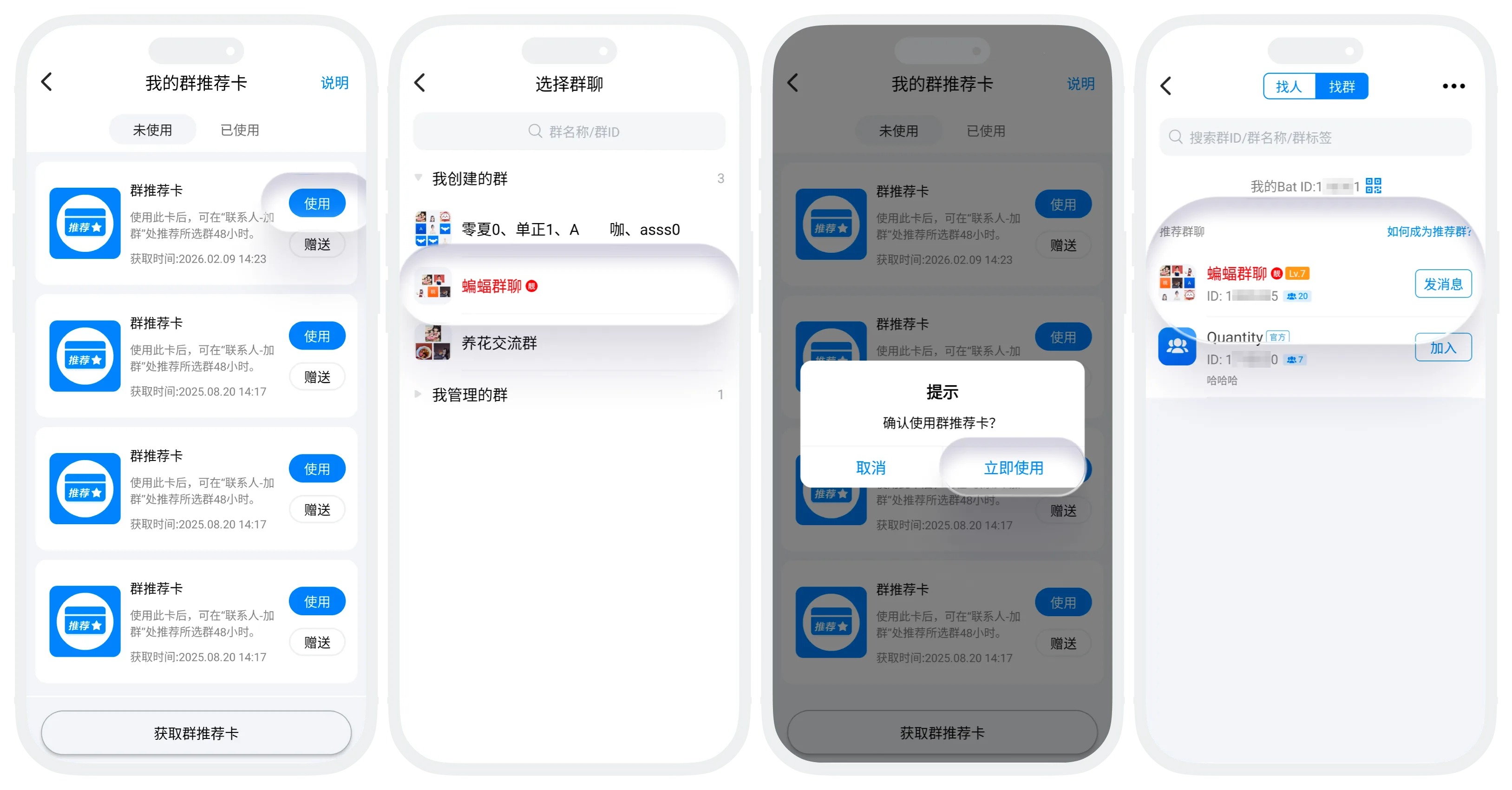
Group Recommendation Card Usage Instructions
- Coupon basic information:
- Main purpose: After using a Group Recommendation Card, your group receives 48 hours of recommended display on the "Add Friends/Groups" - "Find Groups" page, attracting more members to join;
- Acquisition method: Exchange with draw count ("BatChat Mall" - "Points Lottery" - draw count exchange);
- Usage:
- Usage restriction: The group level must be above level 1, and the group must not be banned;
- Usage process:
- Eligible users tap "Use" in the "Group Recommendation Card" list;
- Tap the group to recommend and confirm;
- After successful use, go to "Messages" - "+" - "Add Friends/Groups" - "Find Groups" to view the recommended group;
- Recommendation rules:
- Recommendation duration: Each Group Recommendation Card provides 48 hours of recommendation time. Multiple cards accumulate duration;
- Recommendation order: If multiple groups are recommended, they are displayed in descending order by group level;
- Removal: After the valid time ends, the group immediately disappears from the "Recommended Groups" position;
- Other operations: Gift, view description, and view used coupons follow the same process as other coupons;
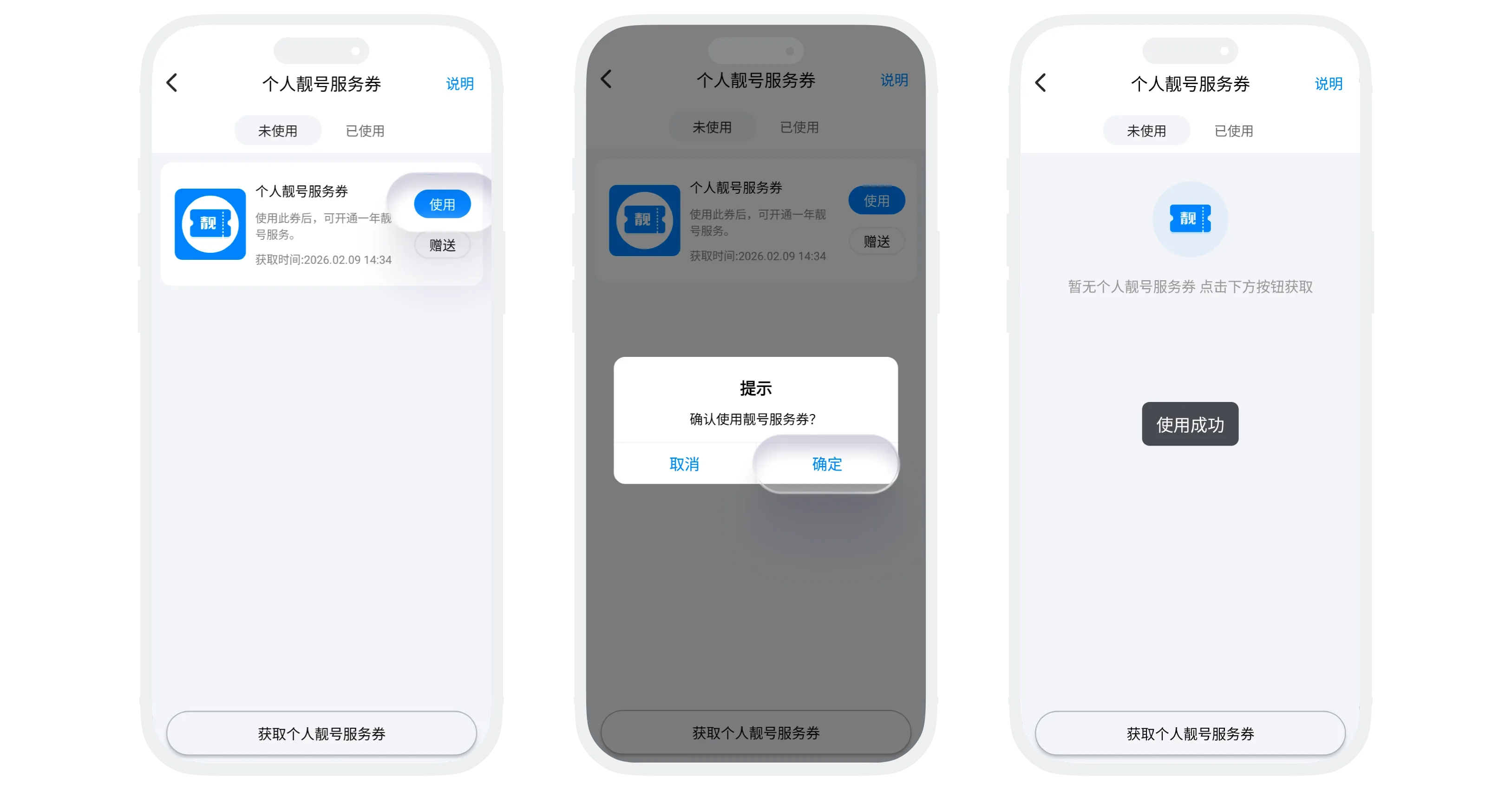
Personal Special ID Service Coupon Usage Instructions
- Coupon basic information:
- Main purpose: Enjoy one year of special ID privilege service after use;
- Privileges: Light up the special ID nameplate, highlight the user nickname, and receive 1.3x level XP acceleration;
- Acquisition method: Go to "BatChat Mall" - "Special ID Service" and tap "Buy Special ID Service Coupon";
- Usage process:
- In the "Personal Special ID Coupon" list, tap "Use" to redeem 1 year of special ID service (using multiple coupons accumulates valid time);
- After successful use, go to "BatChat Mall" - "Special ID Service" to view the valid time of the service;
- Difference from a Special ID Coupon: It only provides privileges and does not include a corresponding exclusive ID;
- Other operations: Gift, view description, and view used coupons follow the same process as other coupons;
Group Bot Coupon Usage Instructions
- Coupon basic information:
- Group bot coupon types: 1-month Group Bot Coupon, 3-month Group Bot Coupon, 6-month Group Bot Coupon, 1-year Group Bot Coupon;
- Main purpose: Activate or renew group bot service for a group;
- Acquisition method: In "BatChat Mall" - "Group Bot", tap "Get Group Bot Coupon", select the coupon duration you want, and complete payment;
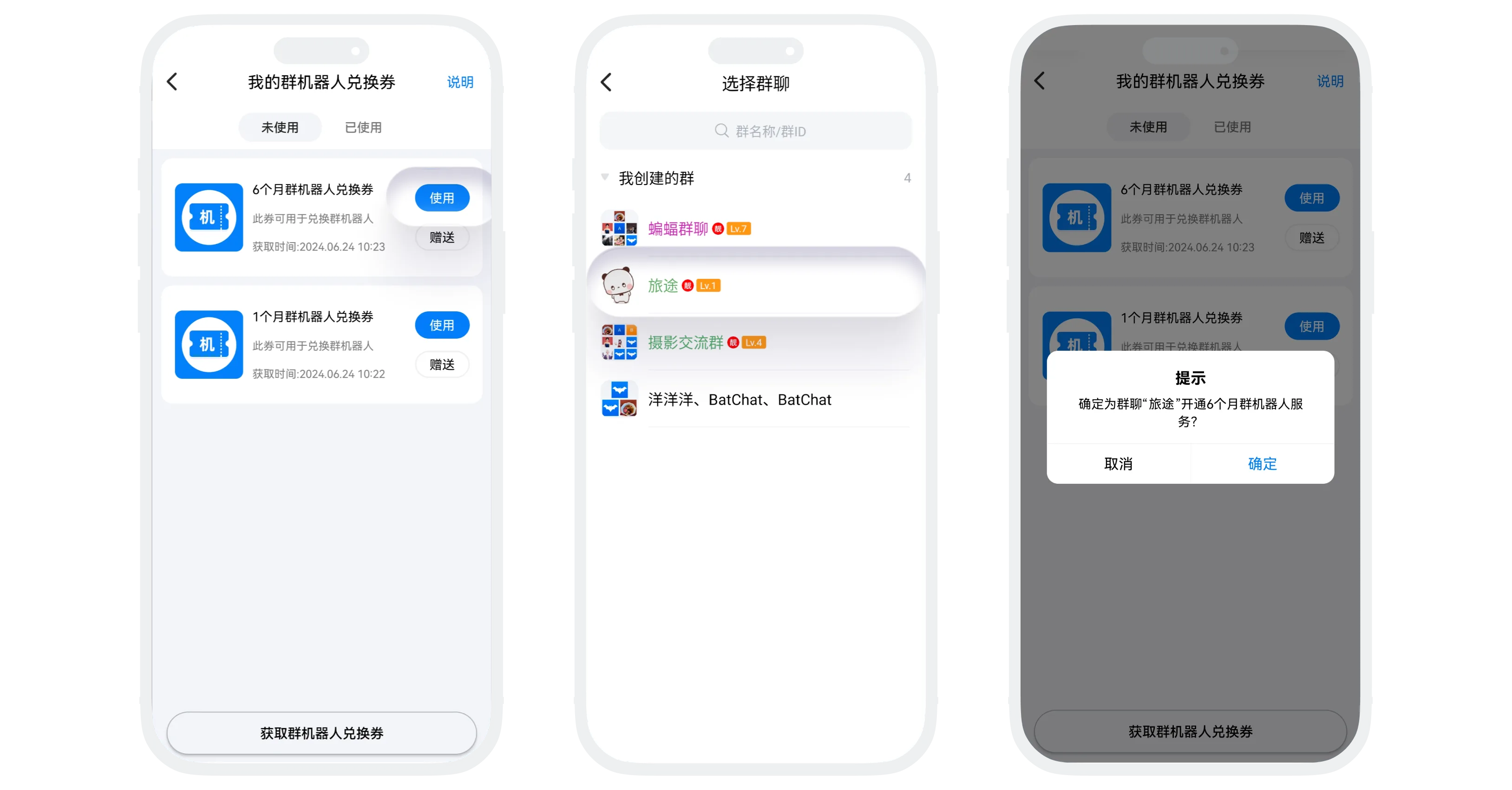
- Usage process:
- Enter the "Group Bot Coupon" list, select any unused Group Bot Coupon, and tap "Use";
- Select the group to activate (you can only activate a group bot for groups where you are the group owner), then confirm use;
- Usage rules:
- Each group is activated independently: Every group must be activated separately, and bot service time is calculated independently for each group;
- Renewal: For groups where a group bot is already active, using a Group Bot Coupon extends the bot service period. Using multiple coupons extends the service period cumulatively;
- Other operations:
- Group bot configuration management: See Group Bot Activation;
- Gift, view description, and view used coupons follow the same process as other coupons;
Avatar Outfit Coupon Usage Instructions
-
Purpose: Used to obtain or renew avatar outfit items (currently only special outfits support outfit coupons; other regular outfits can only be purchased directly);
-
Acquisition methods:
Method 1:
- Go to "BatChat Mall" - "Avatar Zone", tap "Buy Outfit Coupon" to enter the purchase page;
- Tap the outfit you want to purchase to preview it;
- Tap the cart icon, select the duration, and enter the number of coupons to buy (default 1; up to 100 per purchase);
- Tap "Buy Outfit Coupon" and complete payment;
Method 2:
- Go to "My" - "BatChat Avatar", then tap the outfit you want to purchase to preview it;
- Tap a special outfit you do not own to preview it;
- Tap the cart icon, select the duration, and choose "Buy Exchange Coupon" as the purchase method (note: only 1 coupon can be purchased at a time in this mode);
- Tap "Buy" and complete payment;
-
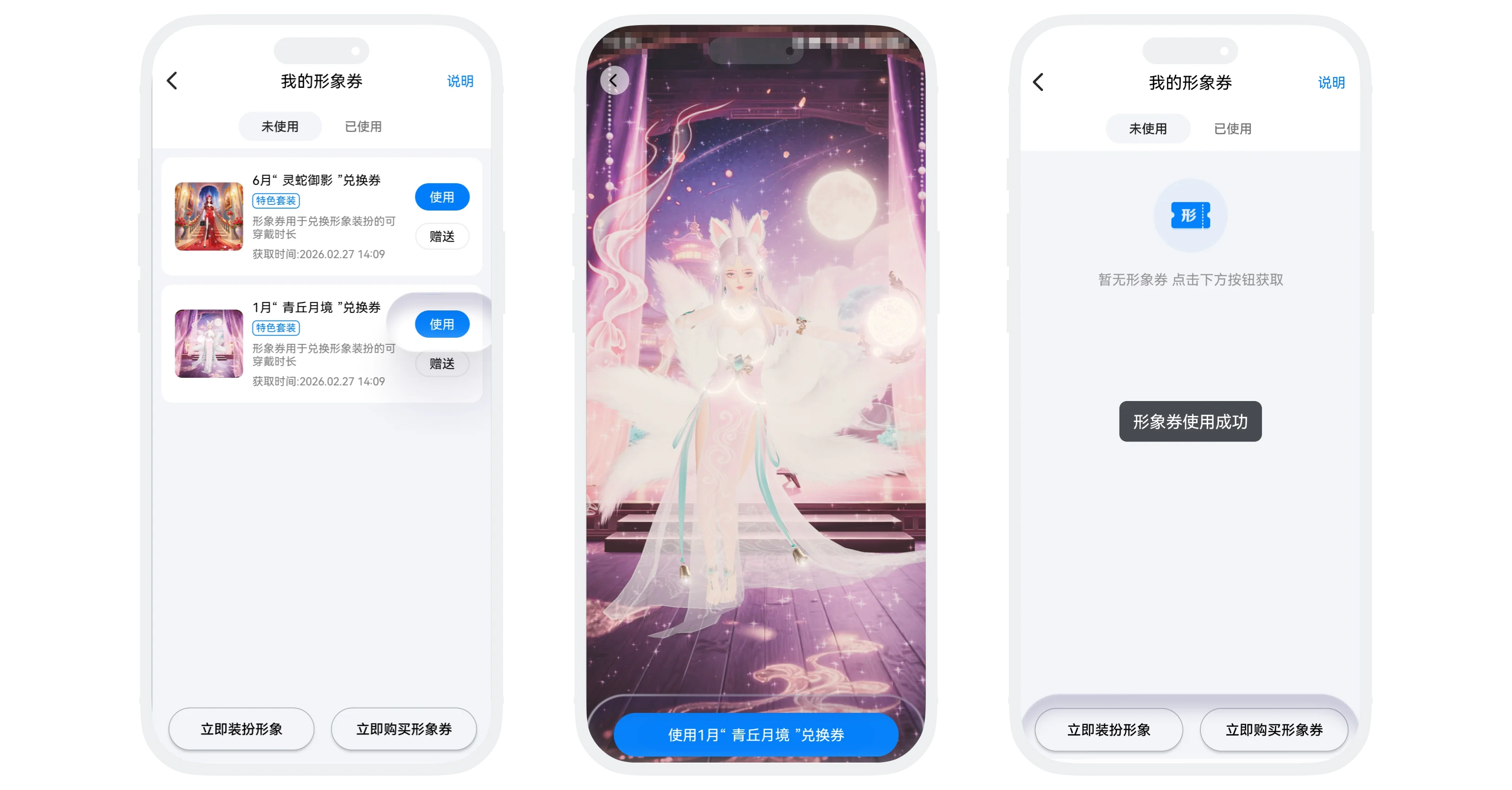
Usage process:
- Enter the "Avatar Outfit Coupon" list, select the coupon you want to use, and tap "Use xxx Exchange Coupon";
- Enter the special outfit preview page and tap "Use" at the bottom. The special outfit will automatically be redeemed for the corresponding valid duration, and your avatar will automatically update to this outfit;
-
Gift, view description, and view used coupons follow the same process as other coupons;
Avatar Monthly Card Usage Instructions
- Purpose: Used to redeem avatar outfit privilege service;
- Privileges:
- Free use of Rare and lower quality outfits;
- Daily 1.6x level acceleration;
- Custom face color;
- Light up the Avatar Monthly Card icon;
- Acquisition method: In "BatChat Mall" - "Avatar Monthly Card", tap "Get Avatar Monthly Card" and complete payment;
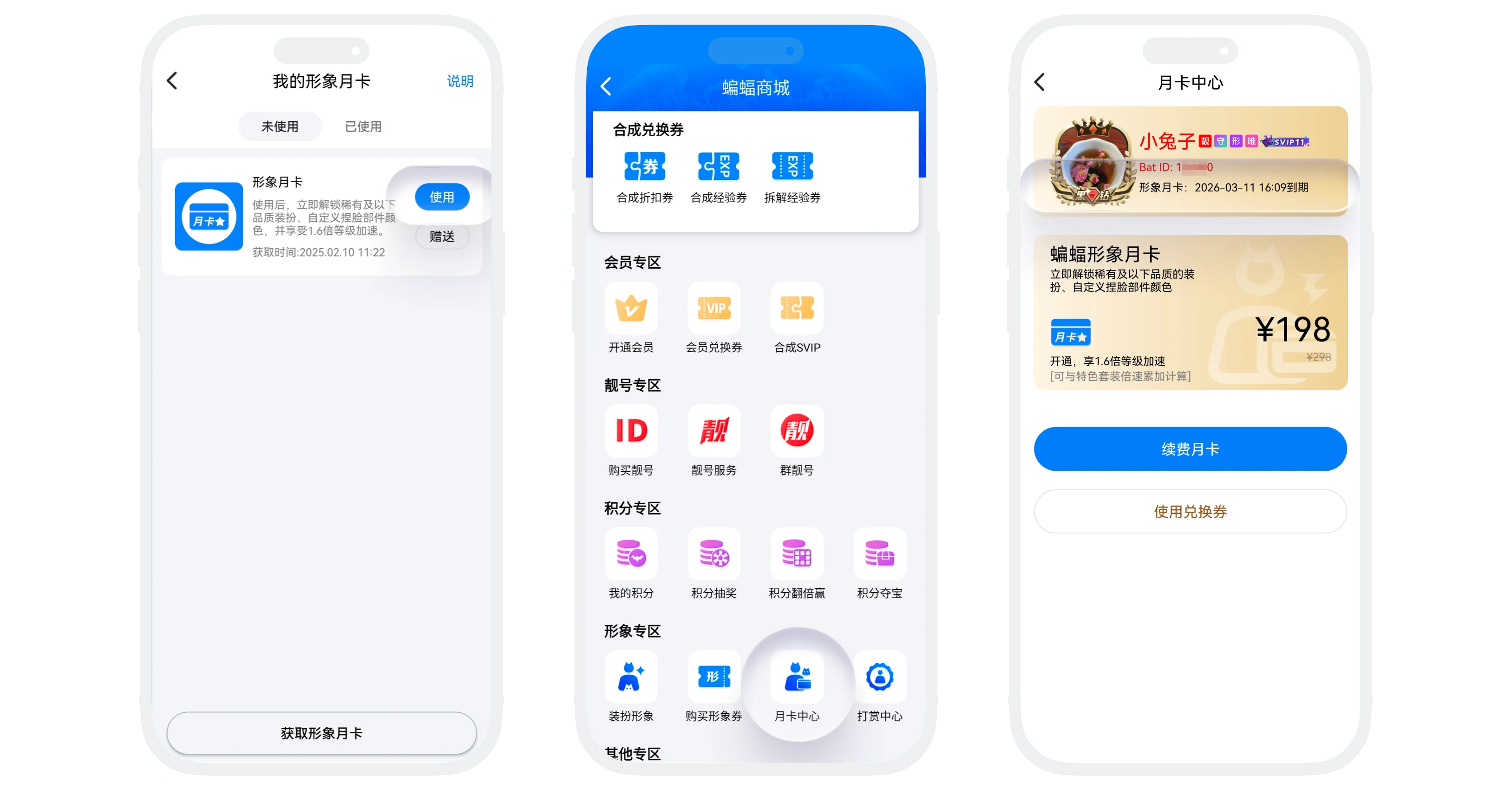
- Usage process:
- In the "Avatar Monthly Card" list, select any unused monthly card, tap "Use", and confirm;
- After successful use, go to "BatChat Mall" - "Avatar Zone" - "Monthly Card Center" to view the monthly card validity period;
- Gift, view description, and view used coupons follow the same process as other coupons;
FAQ
No. Deleting only clears the displayed record. Benefits that have already taken effect are not affected.
You cannot modify it directly. You need to "Cancel Schedule" first, then set a new usage time.
Use that draw coupon again to restore your draw count.
No. Each special ID coupon corresponds to a unique ID that has not been taken.
Yes, but you need to purchase and use a new special ID coupon. Each time you change IDs, the original ID will be recycled.
Yes. Please contact customer service, provide the ID and purchase request, and customer service will evaluate it.
Yes. Level Boost Cards can stack with other bonus effects.
No. It only applies to nickname changes and canceling real-name verification. You can get more avatar change attempts by increasing your membership level.
Yes. A Unique Name Card only supports 3 unique nickname changes. If you change your nickname again after the attempts are used, the unique-name effect is immediately lost.
The platform has the right to process violating nicknames, and you will need to set a new one. The consumed unique-name change attempt will be returned to your account.
Yes. You remain in the regular daily ranking and additionally receive a top exposure position.
No. You can only see the total exposure count and cannot view specific users.
Yes. In "Contacts" - "New Friends", when someone applies to add you as a friend, the source will be displayed. Friends who have already been added can also view the source from the other person's profile page.