个人账户资料设置
个人账户资料设置功能允许您自定义和完善账号的个人信息与展示内容,塑造个性化的社交形象。合理的资料设置不仅能更好地展示自我,也有助于好友识别和联系。
设置流程
打开蝙蝠APP,在「我的」页面点击个人资料区域,进入「资料设置」页面,修改个人信息。
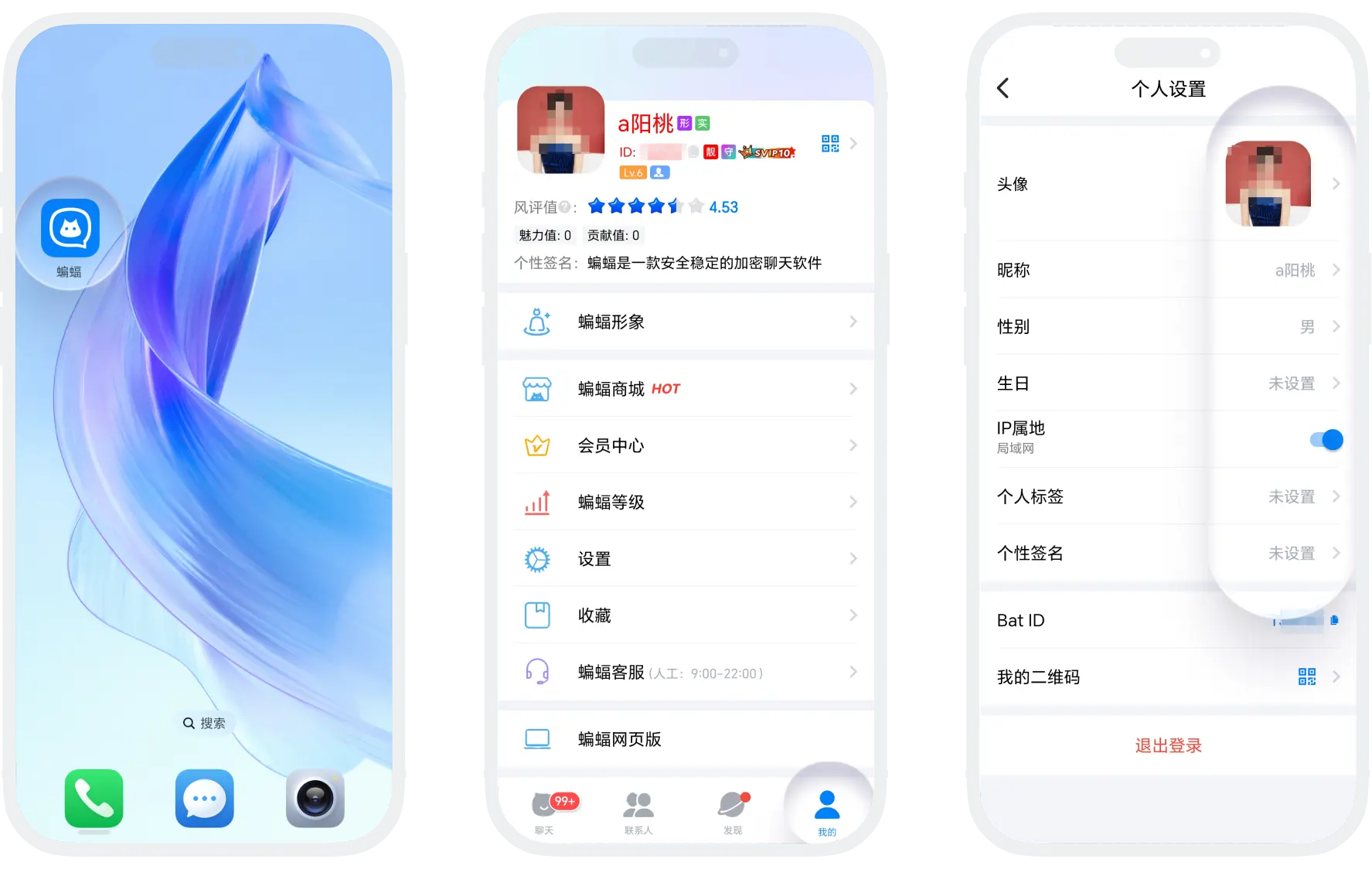
头像设置
- 头像类型:普通用户支持设置静态头像,SVIP10+/黑钻会员支持设置动态头像(GIF格式);此外还可将您的3D蝙蝠形象设为头像,增添趣味性;
- 头像框:开通荣誉会员自动解锁并佩戴头像框,彰显您的尊贵身份;
- 修改规则:
| 用户等级 | 修改规则 |
|---|---|
| 普通用户/VIP | 1次/7日 |
| SVIP1-3 | 2次/7日 |
| SVIP4-5/黄金会员 | 3次/7日 |
| SVIP6-7/铂金会员/钻石会员 | 4次/7日 |
| SVIP8/金钻会员 | 5次/7日 |
| SVIP9-10/黑钻会员 | 6次/7日 |
| SVIP11 | 7次/7日 |
头像设置小贴士:建议使用清晰、高辨识度的图片;动态头像应选择流畅不刺眼的动画
昵称设置
- 修改规则:所有用户7天内仅可修改1次昵称;可通过使用修改卡获取额外修改次数(使用1张修改卡,7天内可额外修改7次昵称);
- 修改卡获取途径:在「蝙蝠商城」-「积分抽奖」,点击右上角「抽奖福利」,消耗一定抽奖次数即可兑换修改卡;
- 使用修改卡:
- 在「蝙蝠商城」找到「修改卡」,点击「使用」;
- 修改昵称上限时,点击「使用修改卡」;
其他资料
- 性别:非必填,性别只可设置1次;
- 生日:非必填,生日信息每7天可修改1次;
- IP属地:自动显示且不可更改(SVIP会员可关闭IP属地显示);
- 个人标签:最多可添加3个兴趣标签,方便好友了解您的爱好;
- 个性签名:可设置一句话简介,展现个人风格或状态;
- Bat ID:您的唯一账号标识;可在「蝙蝠商城」-「靓号广场」购买心仪的靓号,将直接替换您的原ID;
- 我的二维码:生成个人专属二维码,方便好友扫码添加;
- 风评值:风评值是蝙蝠根据用户的设备、网络、等级、经验、举报、违规、会员、靓号、形象、消费及其他因素由系统自动计算生成,满分为6分,分值越高越好,若对方风评值过低,请在与对方聊天时注意风险,谨防诈骗。

- 严禁使用违规、违法、侵权内容的头像、昵称、签名等;
- 不得冒充他人身份或使用官方相关标识;
- 禁止含有色情、暴力、政治敏感等不良信息;
- 遵守公序良俗,维护良好的网络环境。
Was this page helpful?
Profile Settings
The Profile Settings feature allows you to customize and complete your account's personal information and display content, creating a personalized social image. A well-configured profile not only helps you express yourself better but also makes it easier for friends to recognize and contact you.
How to Set Up Your Profile
Open the BatChat app, go to the "Me" page, tap on your profile area to enter the "Profile Settings" page, and edit your personal information.
Avatar Settings
- Avatar Type: Regular users can set static avatars. SVIP10+/Black Diamond members can set animated avatars (in GIF format). You can also use your 3D BatChat avatar for a fun touch.
- Avatar Frame: Activating Honor Membership automatically unlocks and equips an avatar frame to showcase your distinguished status.
- Modification Rules:
| User Level | Modification Rule |
|---|---|
| Regular User/VIP | Once per 7 days |
| SVIP1-3 | Twice per 7 days |
| SVIP4-5/Gold Member | 3 times per 7 days |
| SVIP6-7/Platinum Member/Diamond Member | 4 times per 7 days |
| SVIP8/Gold Diamond Member | 5 times per 7 days |
| SVIP9-10/Black Diamond Member | 6 times per 7 days |
| SVIP11 | 7 times per 7 days |
Avatar Tip: We recommend using a clear, easily recognizable image. For animated avatars, choose a smooth animation that is not jarring to the eyes.
Nickname Settings
- Modification Rules: All users can change their nickname once every 7 days. You can get additional changes by using a Nickname Change Card (one card grants 7 extra changes within a 7-day period).
- How to Get a Nickname Change Card: Go to "BatChat Mall" > "Points Lottery", tap on "Lottery Perks" in the top right corner, and redeem a card by using a certain number of lottery draws.
- How to Use a Nickname Change Card:
- Find the "Nickname Change Card" in the "BatChat Mall" and tap "Use".
- When you reach your nickname change limit, tap "Use Nickname Change Card".
Other Information
- Gender: Optional. Can only be set once.
- Birthday: Optional. Can be changed once every 7 days.
- IP Location: Displayed automatically and cannot be changed (SVIP members can choose to hide their IP location).
- Personal Tags: Add up to 3 interest tags to help friends learn about your hobbies.
- Bio: Set a short bio to show your personality or current status.
- Bat ID: Your unique account identifier. You can purchase a desired premium ID from the "BatChat Mall" > "Premium ID Market", which will directly replace your original ID.
- My QR Code: Generate your personal QR code for friends to scan and add you easily.
- Reputation Score: The Reputation Score is automatically calculated by the BatChat system based on factors such as the user's device, network, level, experience, reports against them, violations, membership status, premium ID, profile style, spending, and more. The maximum score is 6, and a higher score is better. If a user's Reputation Score is too low, please be cautious of risks and potential scams when chatting with them.
- The use of illegal, infringing, or rule-violating content in avatars, nicknames, bios, etc., is strictly prohibited.
- Do not impersonate others or use official-related logos.
- Content that is pornographic, violent, politically sensitive, or otherwise inappropriate is forbidden.
- Please abide by public order and good customs to maintain a positive online environment.
Was this page helpful?