Coupon Acquisition and Usage
The coupon module is a virtual benefits management center provided by BatChat App for users, integrating functions such as coupon acquisition, usage, management, and gifting. Currently, it supports various practical coupons such as membership coupons and discount coupons, helping users obtain value-added products like membership services and special IDs in a more cost-effective way. All coupons are centrally managed with convenient operations and flexible usage.
General Function Description
- Entry path: "My" - "BatChat Mall" - "My Coupons";
- Common operations: Most coupons support operations such as usage, gifting, and viewing instructions;
- Status indicators: Clearly distinguish between unused, used, and being gifted statuses.
Membership Coupon Usage Instructions
- Coupon Basic Information:
- Membership Coupon Types: 1-month VIP coupon, 3-month VIP coupon, 6-month VIP coupon, 1-year SVIP coupon;
- Main Purpose: Redeem corresponding duration of membership services;
- Acquisition Methods:
- "BatChat Mall" - "Purchase Membership Exchange Coupons", select the membership coupon type you want to purchase, and complete the payment;
- "BatChat Mall" - "Points Draw", use account points to draw prizes, with a chance to obtain 1-month VIP coupons;
- Membership Coupon Usage Process:
- Enter the "Membership Coupons" list, select any unused membership coupon, and click "Use";
- After confirming usage, your membership validity period will be automatically extended by the corresponding duration. You can check the membership expiration time in "My" - "Membership Center";
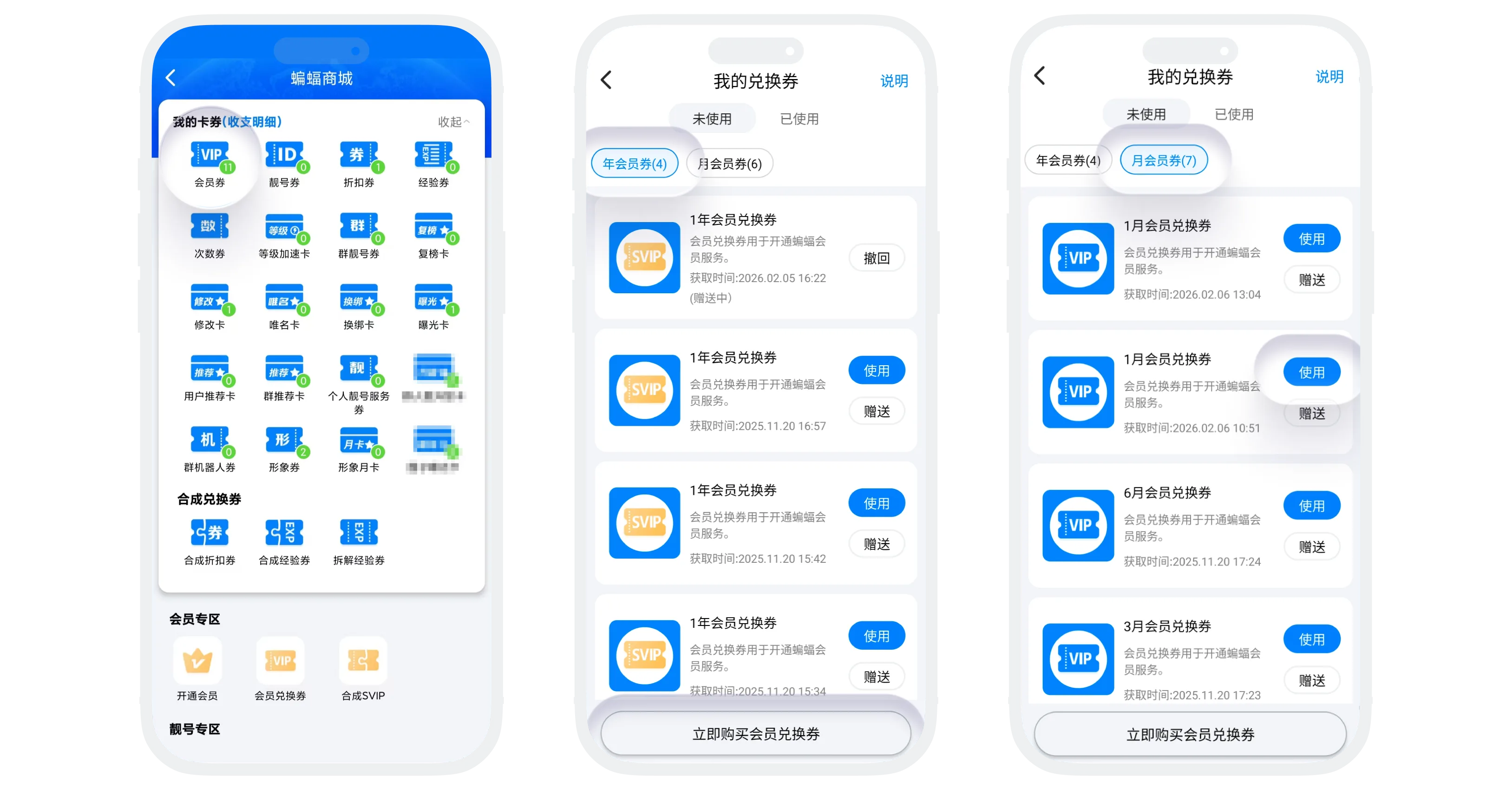

Please note: If you use both VIP and SVIP coupons simultaneously, you will enjoy SVIP services first, and continue to enjoy VIP services after SVIP expires.
- Other Operations:
- Gift to Friends: Click "Gift" to share unused membership coupons with friends or groups, see Gift Coupons;
- View Instructions: Click "Instructions" in the upper right corner to understand detailed usage rules;
- Used List: You can view past redemption records, supporting single item deletion or one-click clearing.
Discount Coupon Usage Instructions
- Coupon Basic Information:
- Discount Coupon Types: 50% off coupon, 40% off coupon, 30% off coupon, 20% off coupon, 10% off coupon;
- Main Purpose: Enjoy discounts when purchasing membership, special IDs, and other services within the BatChat App;
- Acquisition Methods:
- "BatChat Mall" - "Points Draw", participate in draws with a chance to obtain discount coupons;
- "BatChat Mall" - "Points Draw" - "Draw Benefits", exchange already drawn times for discount coupons;
- Discount Coupon Usage Process:
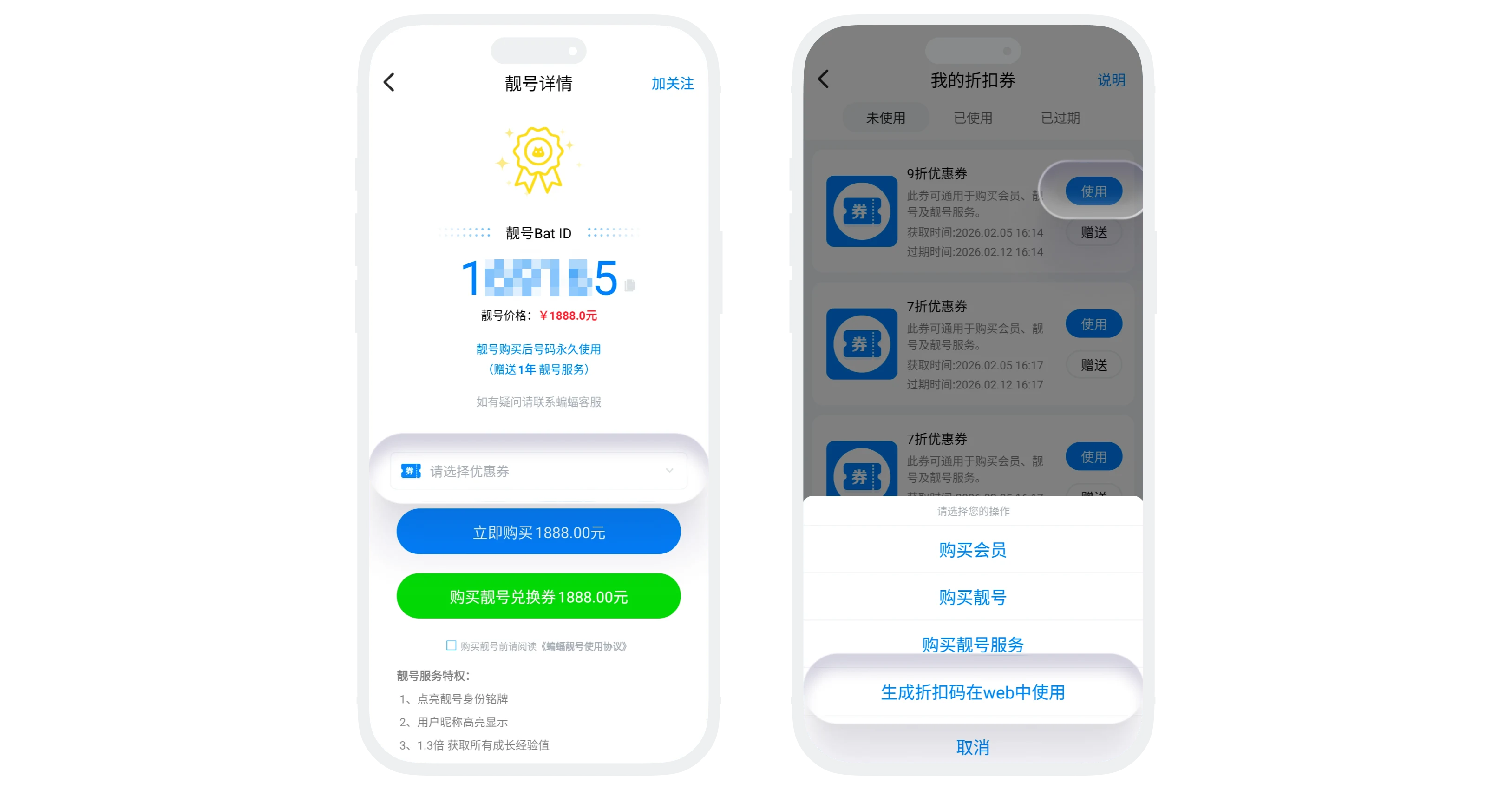
- Method 1: When purchasing membership, special IDs, and other services within the App, select the corresponding discount coupon on the payment page;
- Method 2: In the "My" - "Discount Coupons" list, select any unused discount coupon, click "Use" to generate a discount code, which can be used directly on the BatChat web platform to enjoy discounted prices when purchasing value-added services;
- Discount Coupon Validity Period: Discount coupons are valid for 30 days after acquisition and cannot be used after expiration;
- Other Operations:
- Combine Discount Coupons: Multiple low-discount coupons can be combined into higher-discount coupons, see Combine Coupons;
- Gift discount coupons, view instructions, view used coupons follow the same process as other coupons;
Experience Coupon Usage Instructions
- Coupon Basic Information:
- Experience Coupon Types: 50 experience coupon, 100 experience coupon, 200 experience coupon, 1000 experience coupon;
- Main Purpose: Use experience coupons to obtain experience points to quickly increase account level;
- Acquisition Methods:
- "BatChat Mall" - "Points Draw", participate in draws with a chance to obtain experience coupons;
- "BatChat Mall" - "Points Draw" - "Draw Benefits", exchange already drawn times for experience coupons;
- Experience Coupon Validity Period: Experience coupons are valid for 30 days after acquisition and cannot be used after expiration;
- Experience Coupon Usage Process:
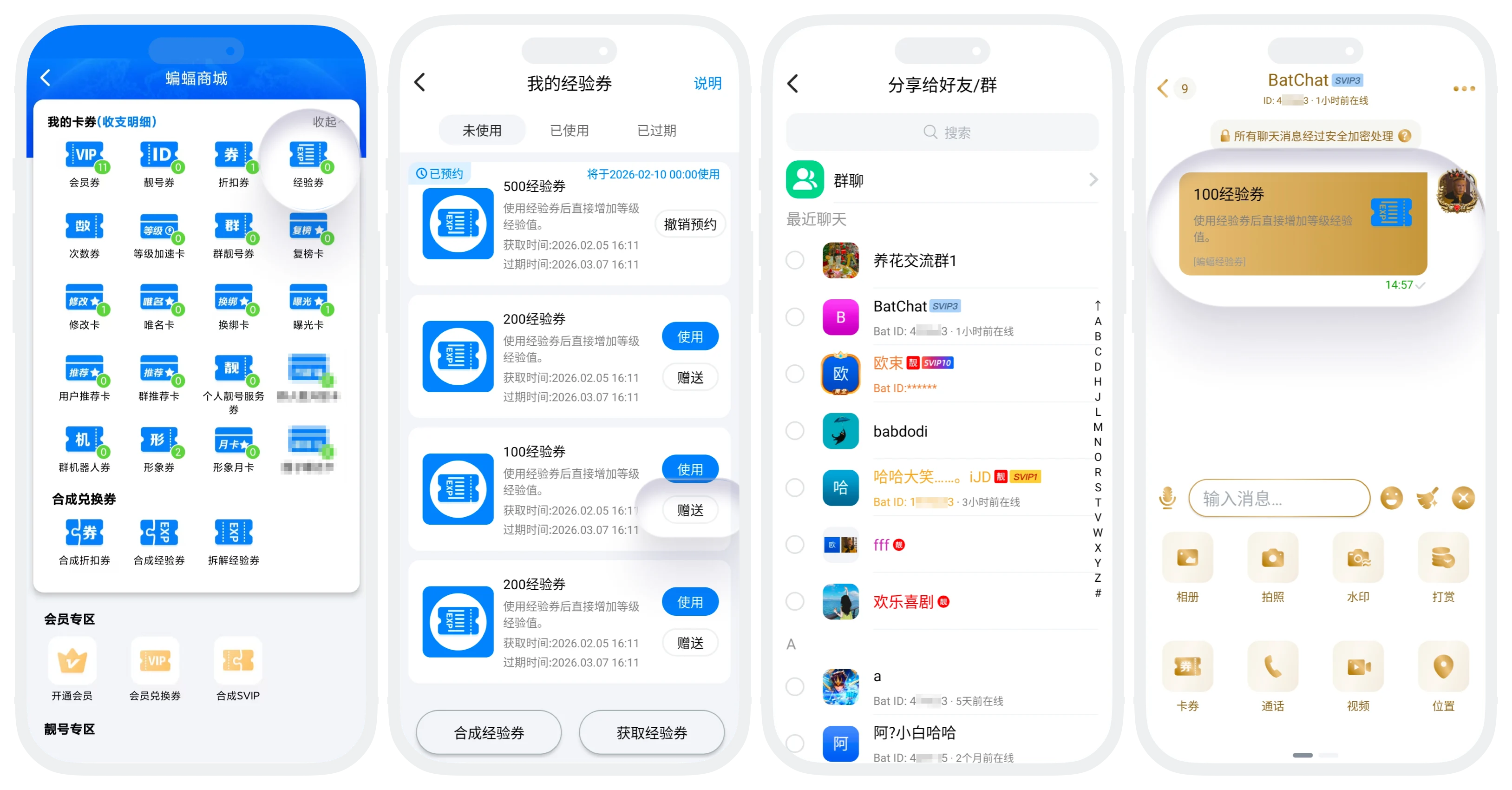
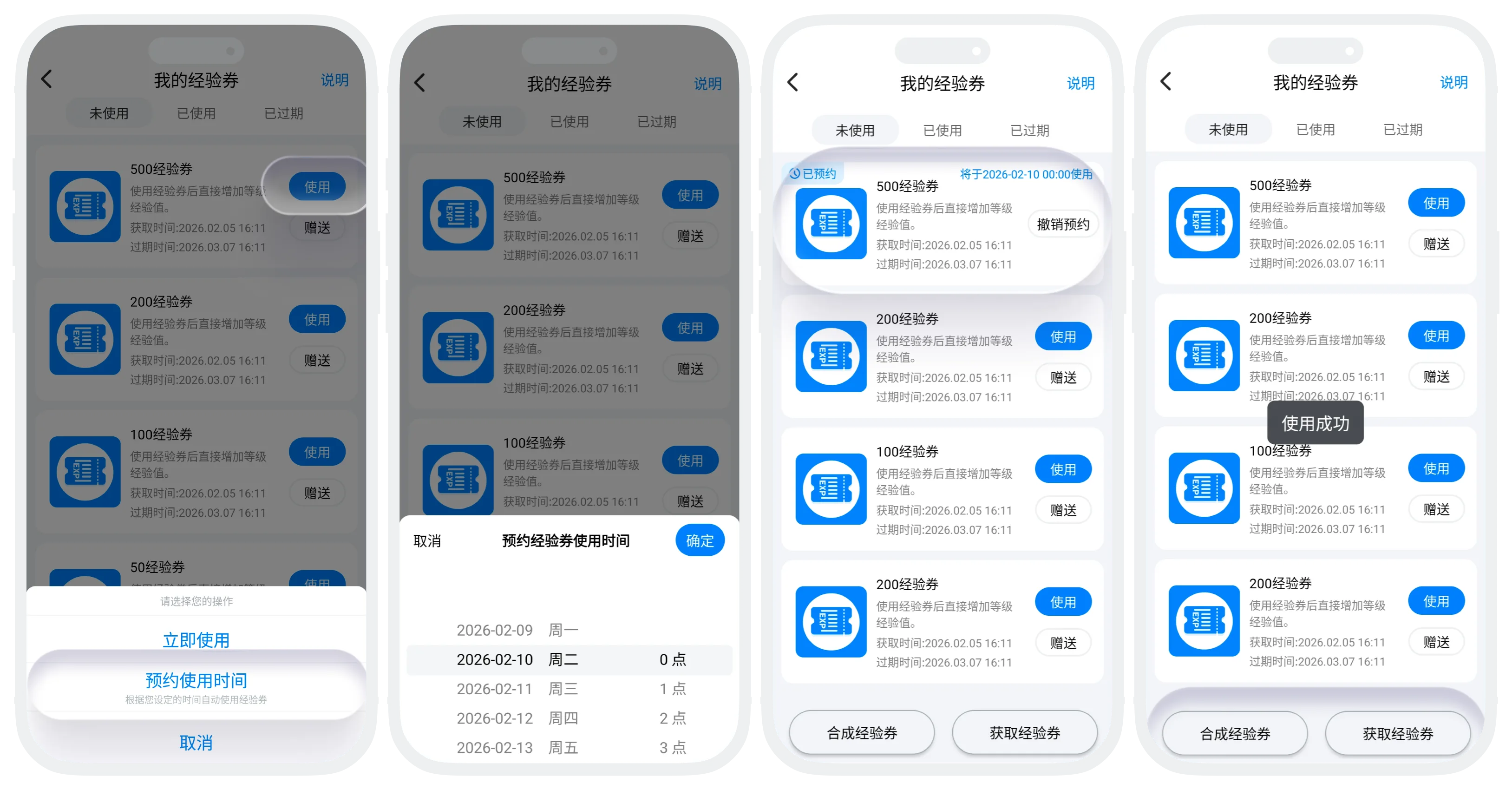
- Enter the "Experience Coupons" list, select any unused experience coupon, and click "Use";
- Click "Use Now" and confirm usage;
- Click "Schedule Usage Time" and set the usage time (can select future time within 7 days, precise to minutes). Scheduled experience coupons will be displayed in the "Unused" list (supports "Cancel Schedule"). The system will automatically use the coupon at the scheduled time;
- After successful usage of the experience coupon, experience points will be credited immediately. You can view detailed information of all experience points obtained today on the "My" - "BatChat Level" page;
- Other Operations:
- Combine Experience Coupons: Multiple low-experience coupons can be combined into higher-experience coupons, see Combine Coupons;
- Split Experience Coupons: One high-experience coupon can be split into multiple low-experience coupons, see Split Coupons;
- Gift, view instructions, view used coupons follow the same process as other coupons;
- Daily Maximum Limit for Using Experience Coupons:
| Membership Level | Experience Coupon Usage Limit |
|---|---|
| Regular User | 2000 |
| VIP | 2000 |
| SVIP1 | 5000 |
| SVIP2 | 5500 |
| SVIP3 | 6000 |
| SVIP4 | 6500 |
| SVIP5 | 7000 |
| SVIP6 | 7500 |
| SVIP7 | 8000 |
| SVIP8 | 8500 |
| SVIP9 | 9000 |
| SVIP10 | 12000 |
| SVIP11 | 13000 |
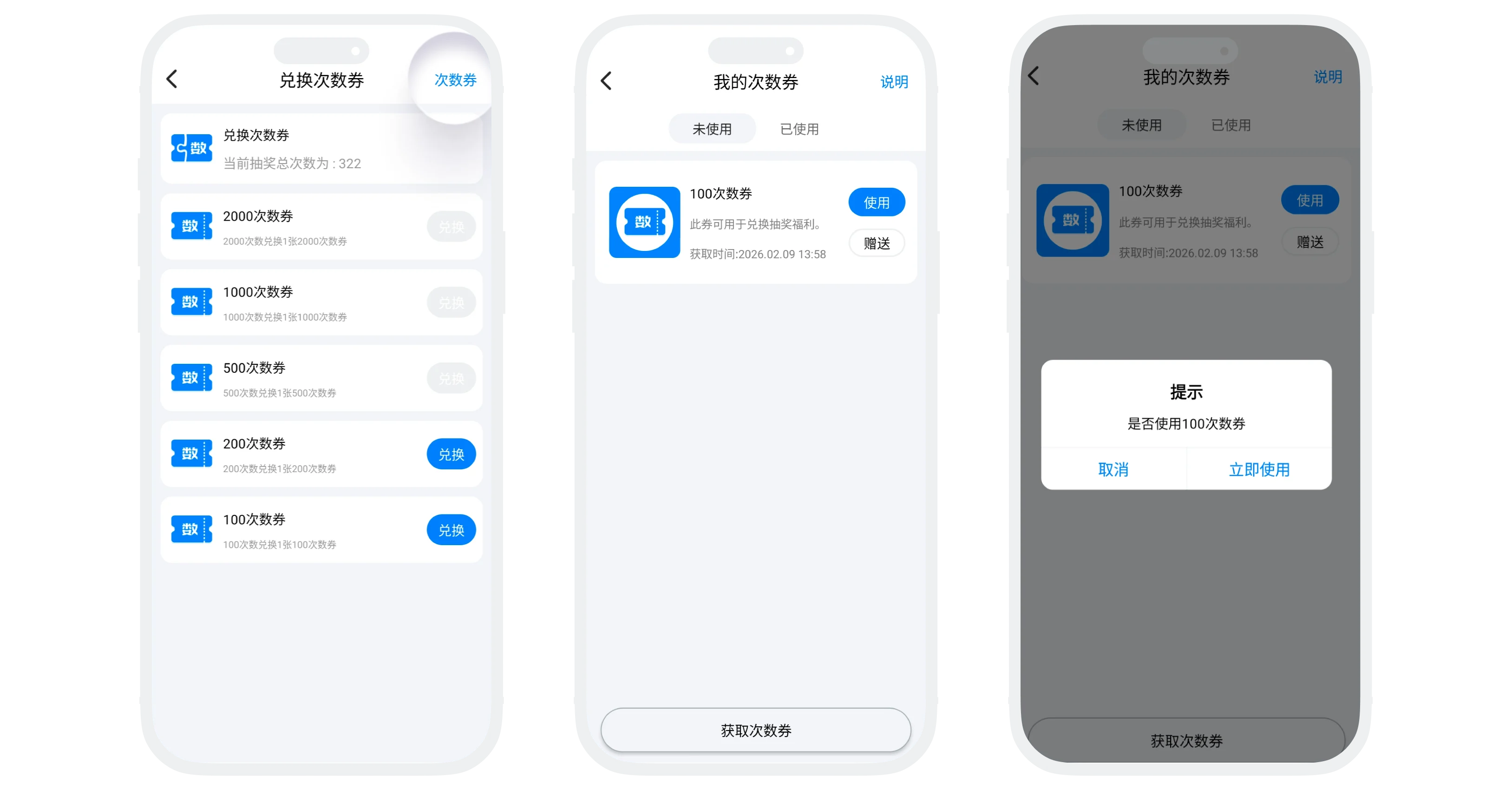
Times Coupon Usage Instructions
- Coupon Basic Information:
- Times Coupon Types: 10 times coupon, 20 times coupon, 30 times coupon, 100 times coupon, 200 times coupon;
- Main Purpose: Special coupons dedicated to exchanging for draw times. After usage, they directly increase your draw times, which can be exchanged for rewards such as honor membership and exposure cards;
- Acquisition Methods:
- In the "Times Coupons" list, use your existing draw times to exchange for corresponding times coupons on an equal basis;
- After successful exchange, total draw times will decrease immediately. Click "Times Coupons" in the upper right corner to view exchanged times coupons;
- Times Coupon Usage Process:
- In the "Times Coupons" list, click "Times Coupons" in the upper right corner to view all owned times coupons;
- Click the "Use" button on any times coupon. After confirming usage, the corresponding number of draw times will be increased immediately;
- Other Operations: Gift, view instructions, view used coupons follow the same process as other coupons;
Special ID Coupon Usage Instructions
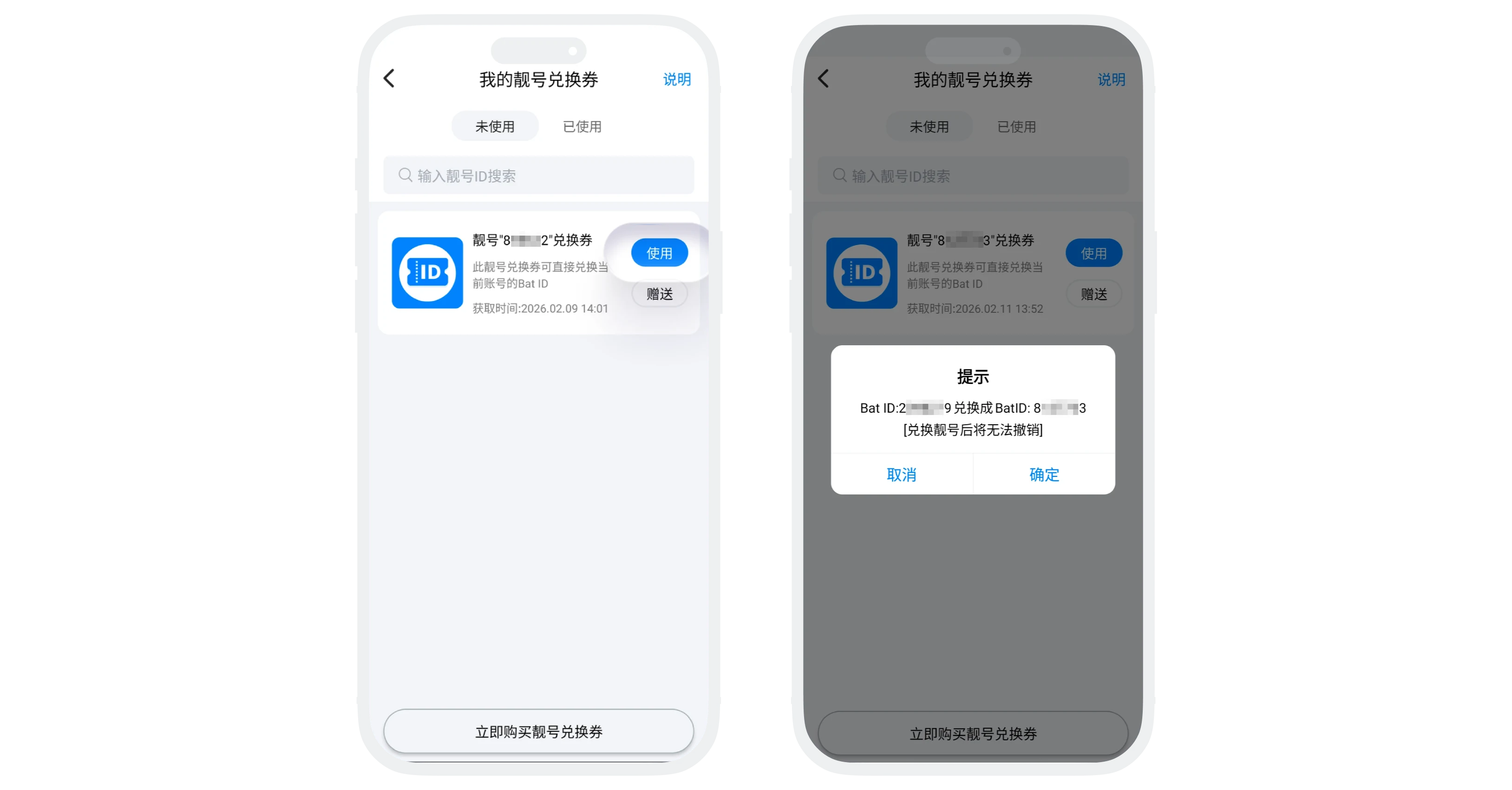
Personal Special ID Coupon
- Coupon Basic Information:
- Main Purpose: Replace your personal BatID with an exclusive special ID (one coupon per ID, each coupon corresponds to a fixed special ID);
- Acquisition Method: In "BatChat Mall" - "Purchase Special ID", click on the special ID you want to purchase and select "Purchase Special ID Coupon";
- Special ID Coupon Usage Process:
- Select the special ID coupon you want to use from the "Special ID Coupons" list and click the "Use" button;
- After confirming everything is correct, click "Confirm", and your personal BatID will be replaced with the ID corresponding to the special ID coupon;
- Other Operations: Gift, view instructions, view used coupons follow the same process as other coupons;
Group Special ID Coupon
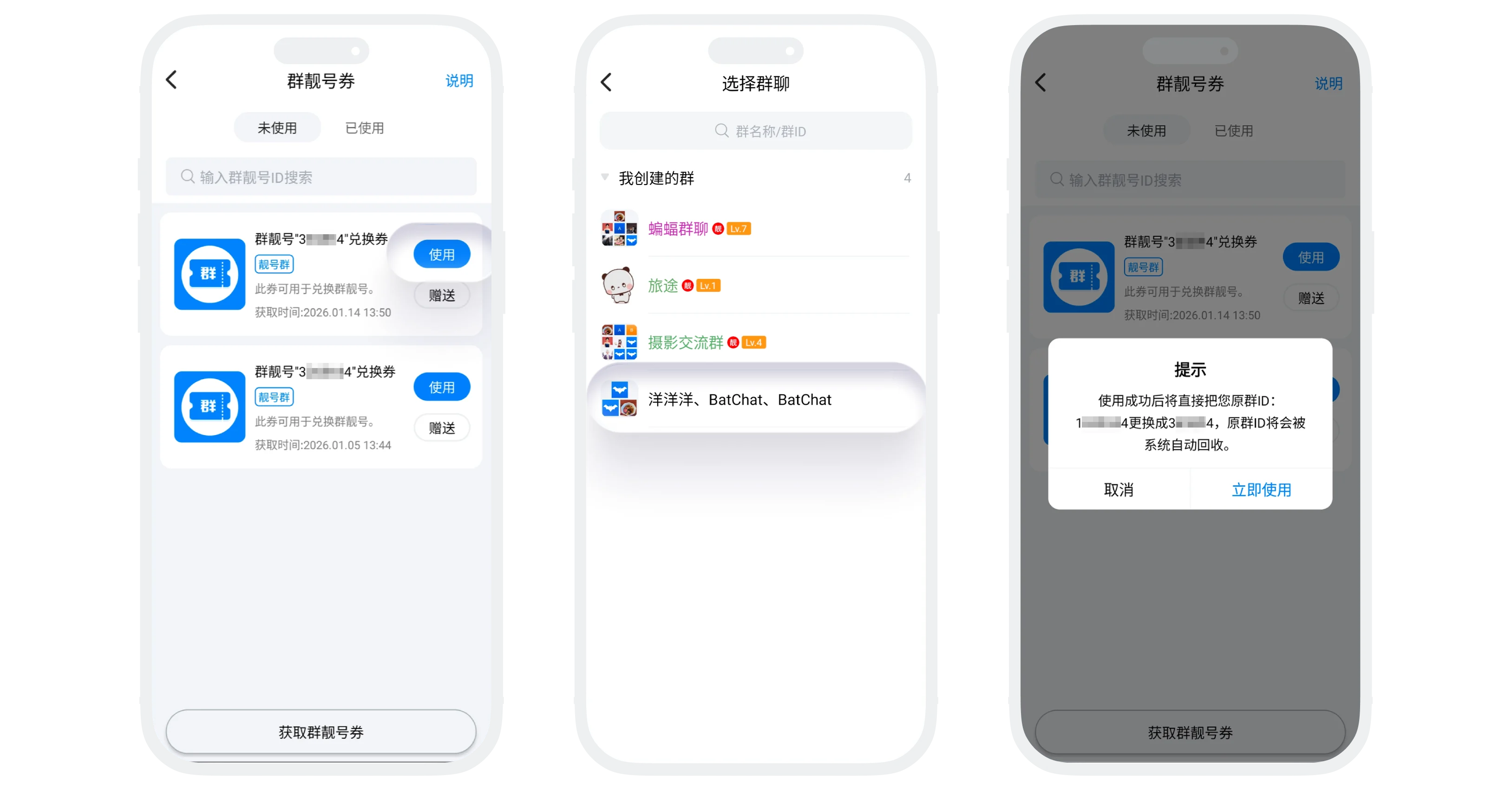
- Coupon Basic Information:
- Main Purpose: Replace the group chat ID you created with an exclusive group special ID (one coupon per ID, each coupon corresponds to a fixed group special ID);
- Acquisition Method: In "BatChat Mall" - "Group Special ID", click on the group special ID you want to purchase and select "Purchase Group Special ID Coupon";
- Group Special ID Coupon Usage Process:
- Select the special ID coupon you want to use from the "Group Special ID Coupons" list and click the "Use" button;
- Select the group chat whose ID you want to change (only allows changing group chats you created);
- After confirming everything is correct, click "Confirm", and the group chat ID will be replaced with the ID corresponding to the special ID coupon;
- Other Operations: Gift, view instructions, view used coupons follow the same process as other coupons;
Please note:
- Whether personal or group special IDs, changes cannot be undone or restored to the original ID. Other users need to use the new ID to find you or the group;
- The original ID will be recycled by the system and may be registered and used by other users;
- Changing the ID does not affect your account data, friend relationships, group chat identity, etc.;
Level Boost Card Usage Instructions
- Coupon Basic Information:
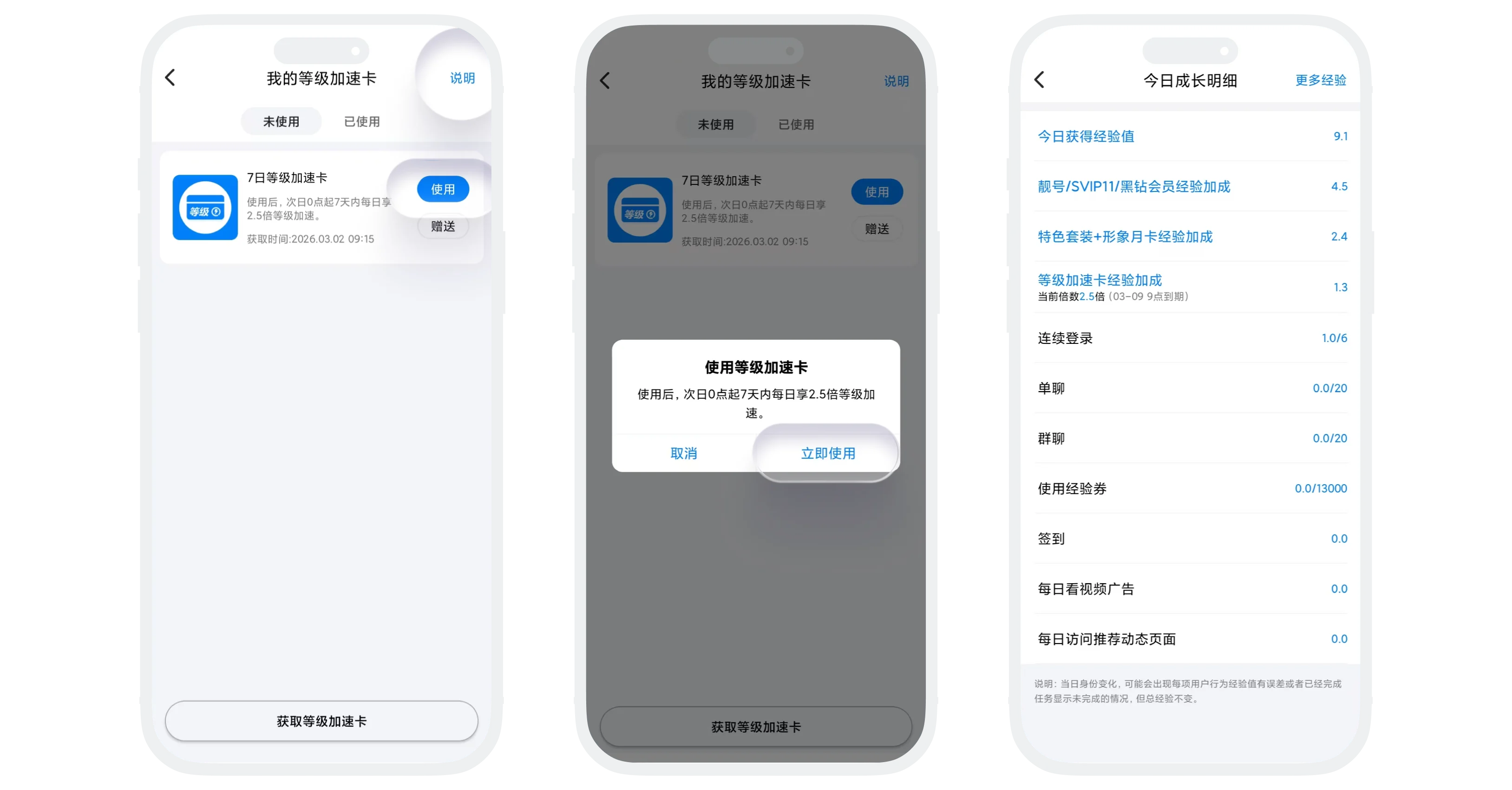
- Boost Card Type: 7-day level boost card (2.5x experience multiplier for daily experience acquisition within 7 days);
- Main Purpose: Advanced道具 for accelerating experience acquisition. After usage, you can enjoy additional experience multiplier speeds within specified days, helping you increase your account level faster;
- Acquisition Method: Purchase from the "Level Boost Cards" list;
- Level Boost Card Usage Process:
- In the "Level Boost Cards" list, select the boost card you want to use;
- Click the "Use" button and confirm usage;
- Level Boost Card Usage Rules:
- After usage, the multiplier starts from 0:00 the next day. For example: If used at 15:00 today, the first day starts counting from 0:00 tomorrow;
- Using multiple boost cards, the effective days will stack and extend, but the multiplier speed remains unchanged;
- Remaining time and multiplier speed of used boost cards can be viewed in "My" - "BatChat Level" - "Boost Details" list;
- Other Operations: Gift, view instructions, view used coupons follow the same process as other coupons;
Ranking Recovery Card Usage Instructions
- Coupon Basic Information:
- Main Purpose: When your account is removed from the level ranking due to violations or other reasons, using a ranking recovery card can immediately restore your ranking status and allow you to participate in ranking competition again;
- Acquisition Method: Exchange using draw times (BatChat Mall - Points Draw - Draw Times Exchange);
- Ranking Recovery Card Usage Process:
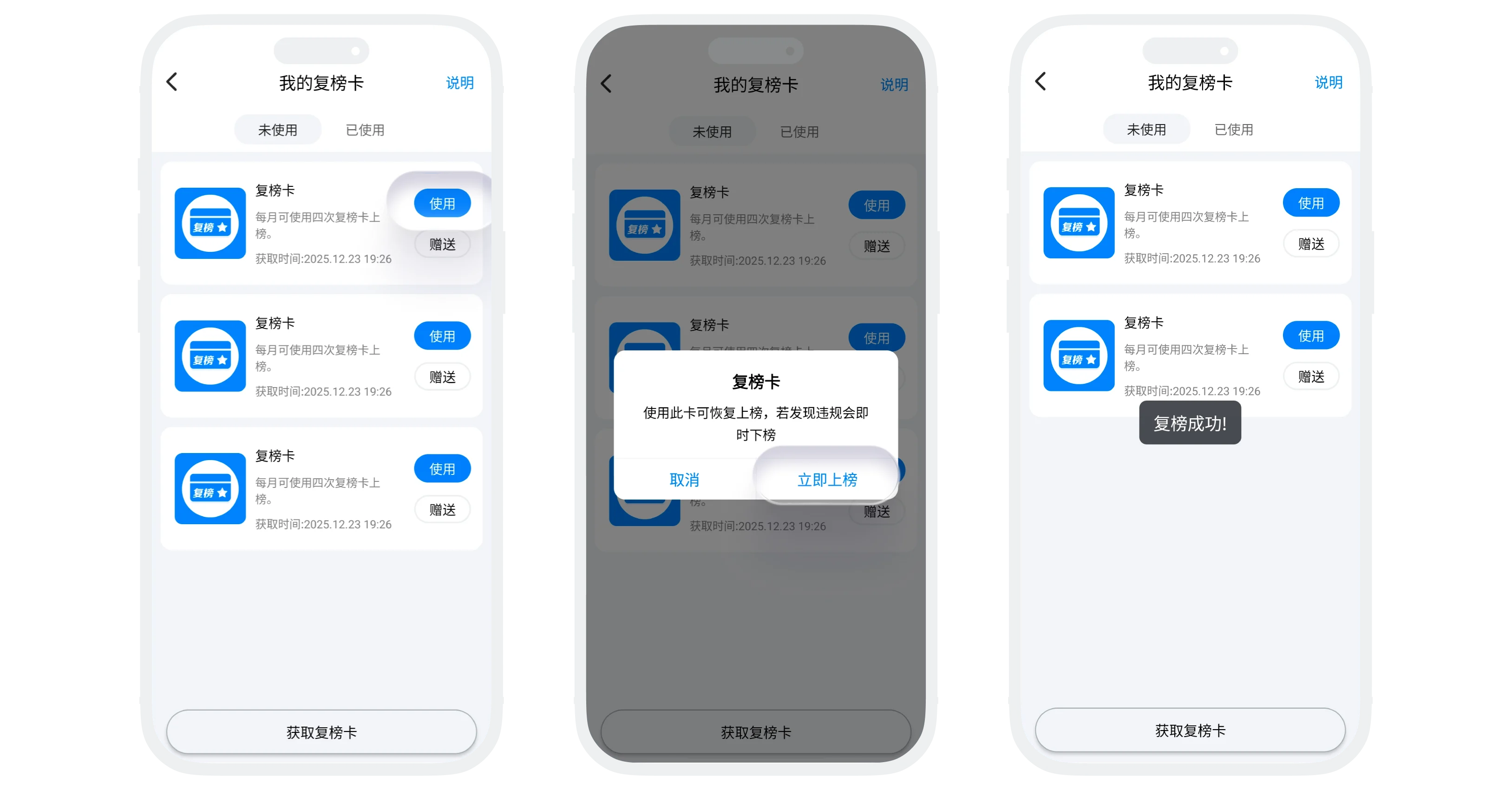
- Prerequisite: Account has been removed from the level ranking due to violations or other reasons;
- Usage Process: In the "Ranking Recovery Cards" list, select a ranking recovery card and click the "Use" button to confirm usage and restore ranking eligibility;
- Usage Limit: Maximum 4 uses per month, cannot be used after exceeding this limit;
- Other Operations: Gift, view instructions, view used coupons follow the same process as other coupons;
Modification Card Usage Instructions
- Coupon Basic Information:
- Main Purpose: Increase nickname modification次数 (after usage, can modify nickname 7 additional times within 7 days),解除已绑定的实名认证信息;
- Acquisition Method: Exchange using draw times (BatChat Mall - Points Draw - Draw Times Exchange);
- Modification Card Usage Process:
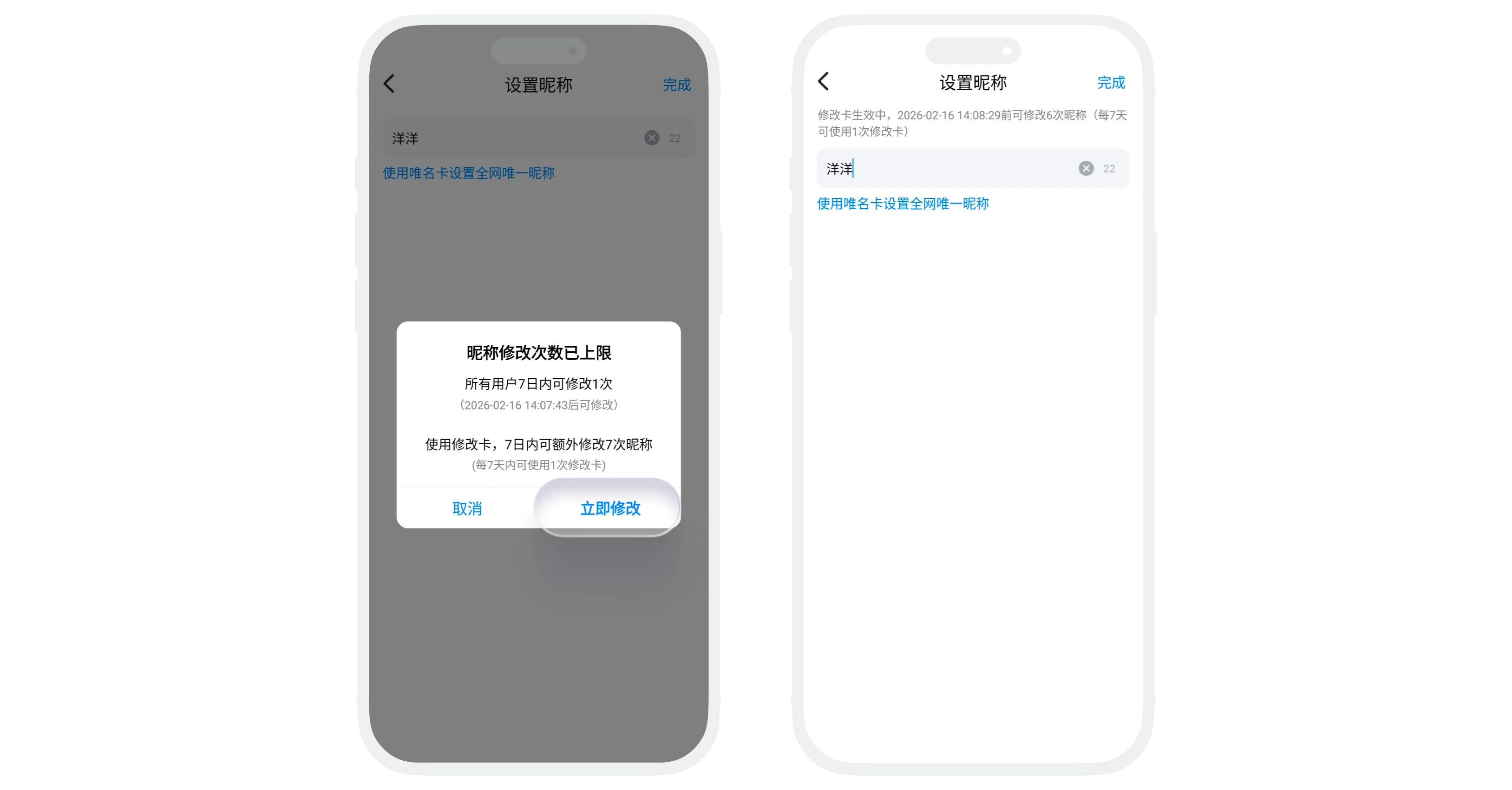
- Increase Nickname Modification Times: When prompted that nickname modification limit has been reached, click "Use Modification Card" to successfully modify, and enjoy remaining 6 nickname modification times within 7 days (remaining modification times can be viewed on the nickname modification page);
- Cancel Real-name Authentication: In "My" - "Settings" - "Account" - "Real-name Authentication", click "Cancel Real-name Authentication" to cancel already authenticated information;
- Modification Card Usage Rules:
- Can be used once every 7 days;
- Valid for 7 days after usage, unused modification times automatically expire after 7 days;
- Other Operations: Gift, view instructions, view used coupons follow the same process as other coupons;
Unique Name Card Usage Instructions
- Coupon Basic Information:
- Main Purpose:
- Can set your nickname as a unique exclusive nickname across the entire platform, prohibiting other users from using the same nickname as yours;
- Your account will be displayed at the top in all friends' contact lists;
- Users who use unique name cards will display special identifiers;
- Acquisition Method: Exchange using draw times (BatChat Mall - Points Draw - Draw Times Exchange);
- Main Purpose:
- Unique Name Card Usage Process:
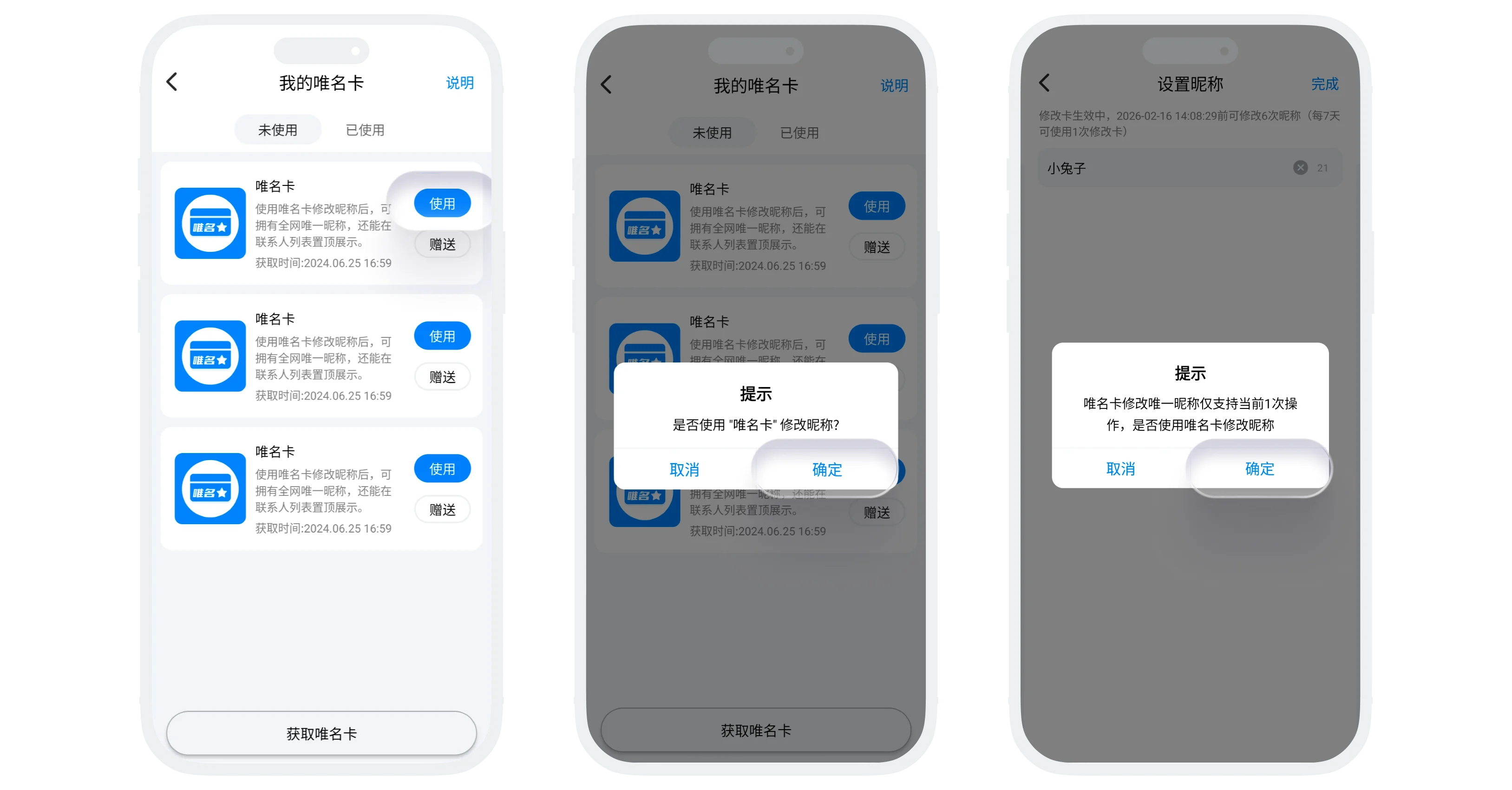
- In the "Unique Name Cards" list, click "Use" to automatically jump to the nickname settings page;
- Enter the unique nickname you want to set (cannot duplicate with other users' nicknames on the platform) and click "Save";
- Unique Name Card Usage Rules:
- Each unique name card can only be used once;
- If you modify your nickname, the unique name privilege will become invalid, and you need to use another unique name card to reset the unique nickname;
- Other Operations: Gift, view instructions, view used coupons follow the same process as other coupons;
Phone Number Change Card Usage Instructions
- Coupon Basic Information:
- Main Purpose: On the account security verification page, if the currently bound phone number cannot be used normally, quickly change the bound phone number using a phone number change card;
- Acquisition Method: Exchange using draw times (BatChat Mall - Points Draw - Draw Times Exchange);
- Usage Process:
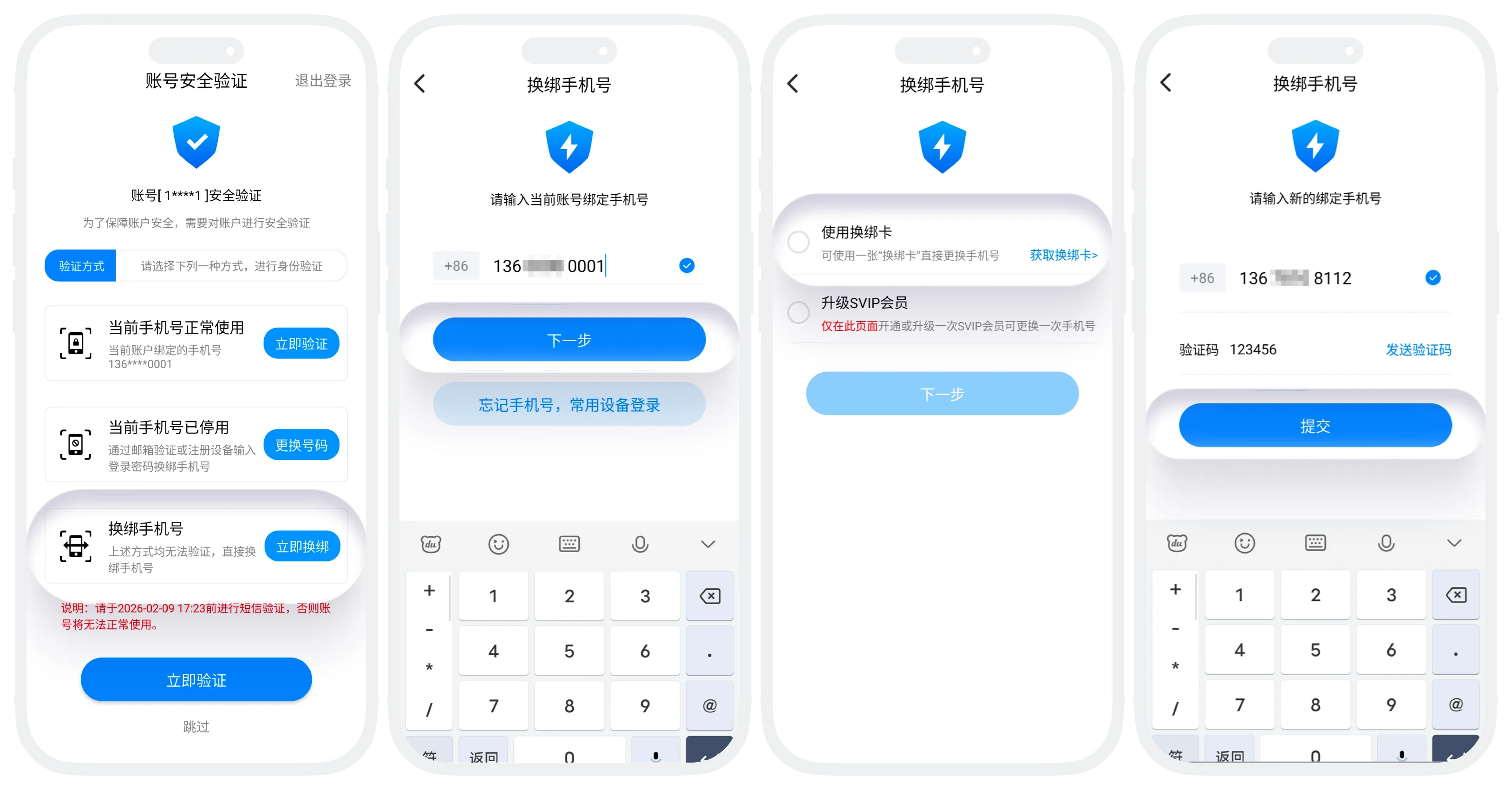
- On the security verification page, click "Change Now" for "Change Phone Number";
- Enter the currently bound phone number for identity verification (if the current device is a frequently used device, verification can be skipped);
- After passing verification, enter the change page, select "Use Phone Number Change Card", and click "Next";
- Enter the new phone number and receive the verification code, input the verification code and complete the phone number change;
- Other Operations: Gift, view instructions, view used coupons follow the same process as other coupons;
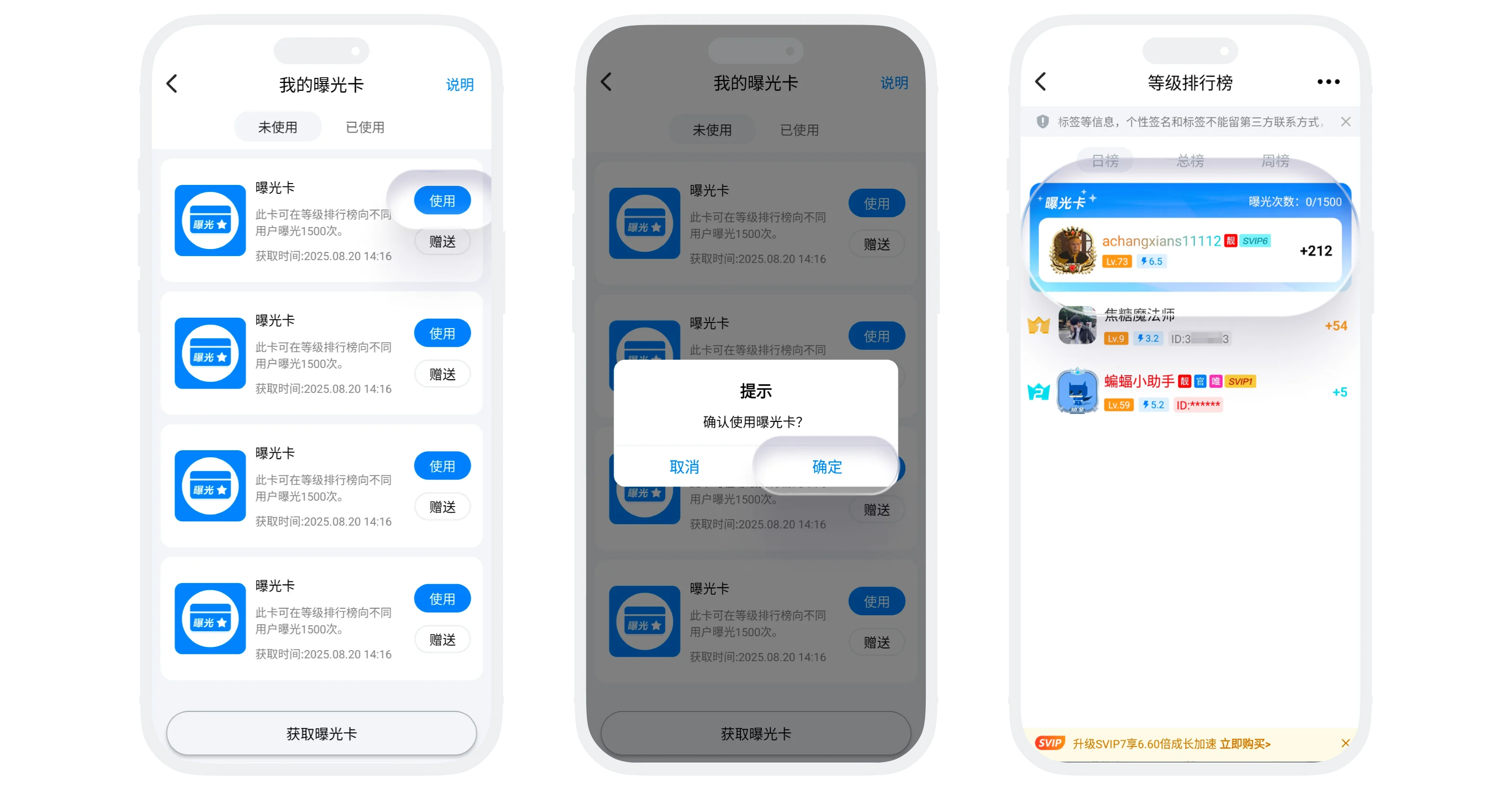
Exposure Card Usage Instructions
- Coupon Basic Information:
- Main Purpose: After using an exposure card, your account will receive 1500 exposure opportunities at the top of the daily level ranking, significantly increasing visibility on the BatChat platform;
- Acquisition Method: Exchange using draw times (BatChat Mall - Points Draw - Draw Times Exchange);
- Exposure Card Usage Process:
- In the "Exposure Cards" list, click "Use" and confirm usage;
- After successful usage, you can enter "Discover" - "Rankings" - "Daily Rankings" to view current exposure count (visible only to yourself);
- Exposure Rules:
- Counting: Each time seen by a different user counts as 1 exposure;
- Usage: Multiple exposure cards can be used consecutively, with exposure counts accumulating. You will also be prioritized for exposure in the daily rankings;
- Removal: When exposure count reaches 1500, immediately disappears from the exposure section;
- Other Operations: Gift, view instructions, view used coupons follow the same process as other coupons;
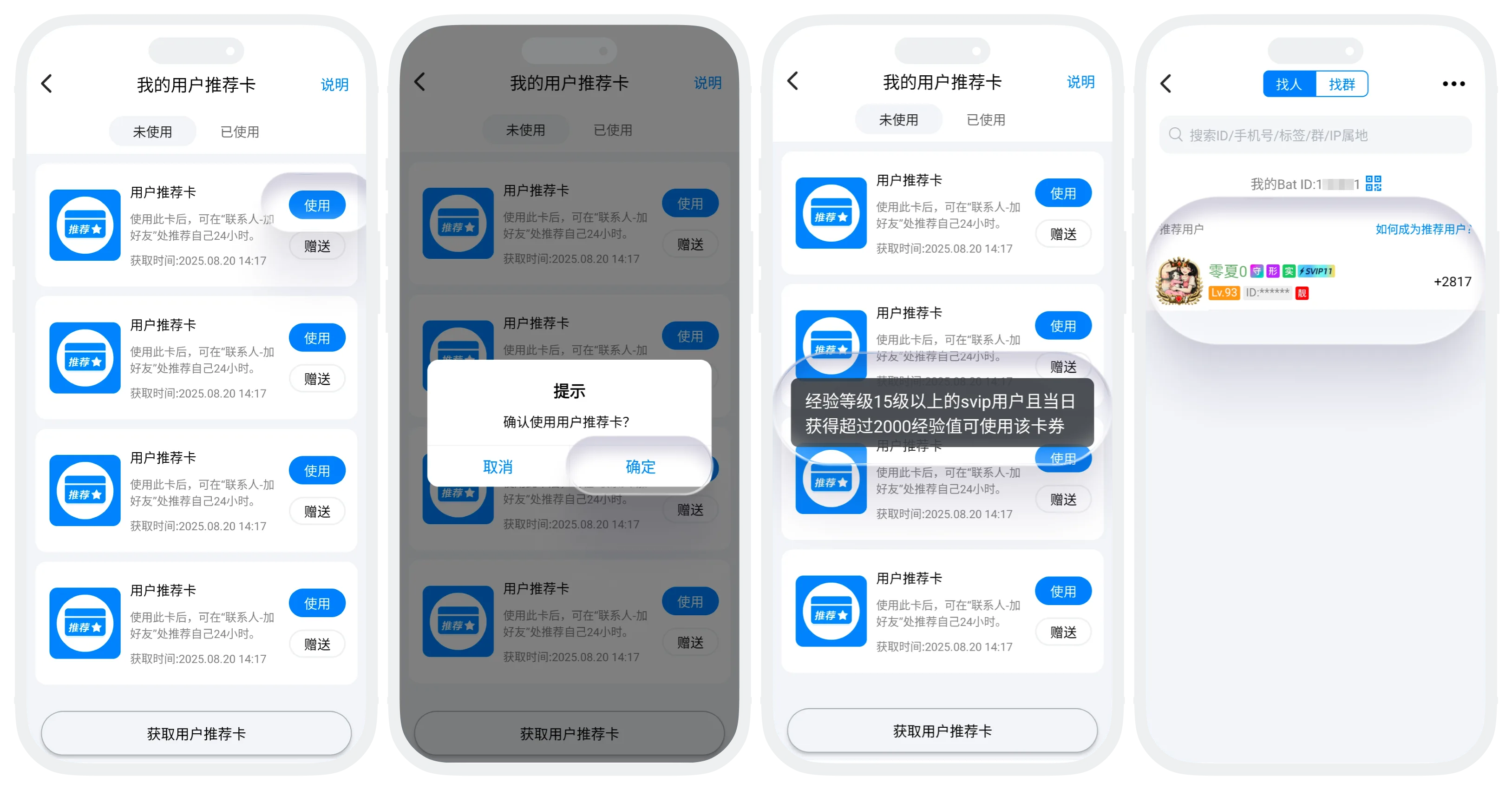
User Recommendation Card Usage Instructions
- Coupon Basic Information:
- Main Purpose: After using a user recommendation card, your account will receive 24 hours of recommended display on the "Add Friends/Groups" - "Find People" page, allowing more potential friends to discover and add you;
- Acquisition Method: Exchange using draw times (BatChat Mall - Points Draw - Draw Times Exchange);
- User Recommendation Card Usage:
- Usage Restrictions: Only available to SVIP users with account level 15 or above who have obtained more than 2000 experience points on that day;
- Usage Process: For users meeting the usage conditions, in the "User Recommendation Cards" list, click "Use" and confirm usage;
- After successful usage, you can enter "Messages" - "+" - "Add Friends/Groups" - "Find People" to view your current recommendation status;
- Recommendation Rules:
- Recommendation Duration: Each user recommendation card provides 24 hours of recommendation time. Using multiple recommendation cards accumulates the duration;
- Recommendation Sorting: If multiple users use user recommendation cards, they will be sorted and displayed based on experience points obtained that day from highest to lowest;
- Removal: After the valid time ends, immediately disappears from the "Recommended Users" position;
- Other Operations: Gift, view instructions, view used coupons follow the same process as other coupons;
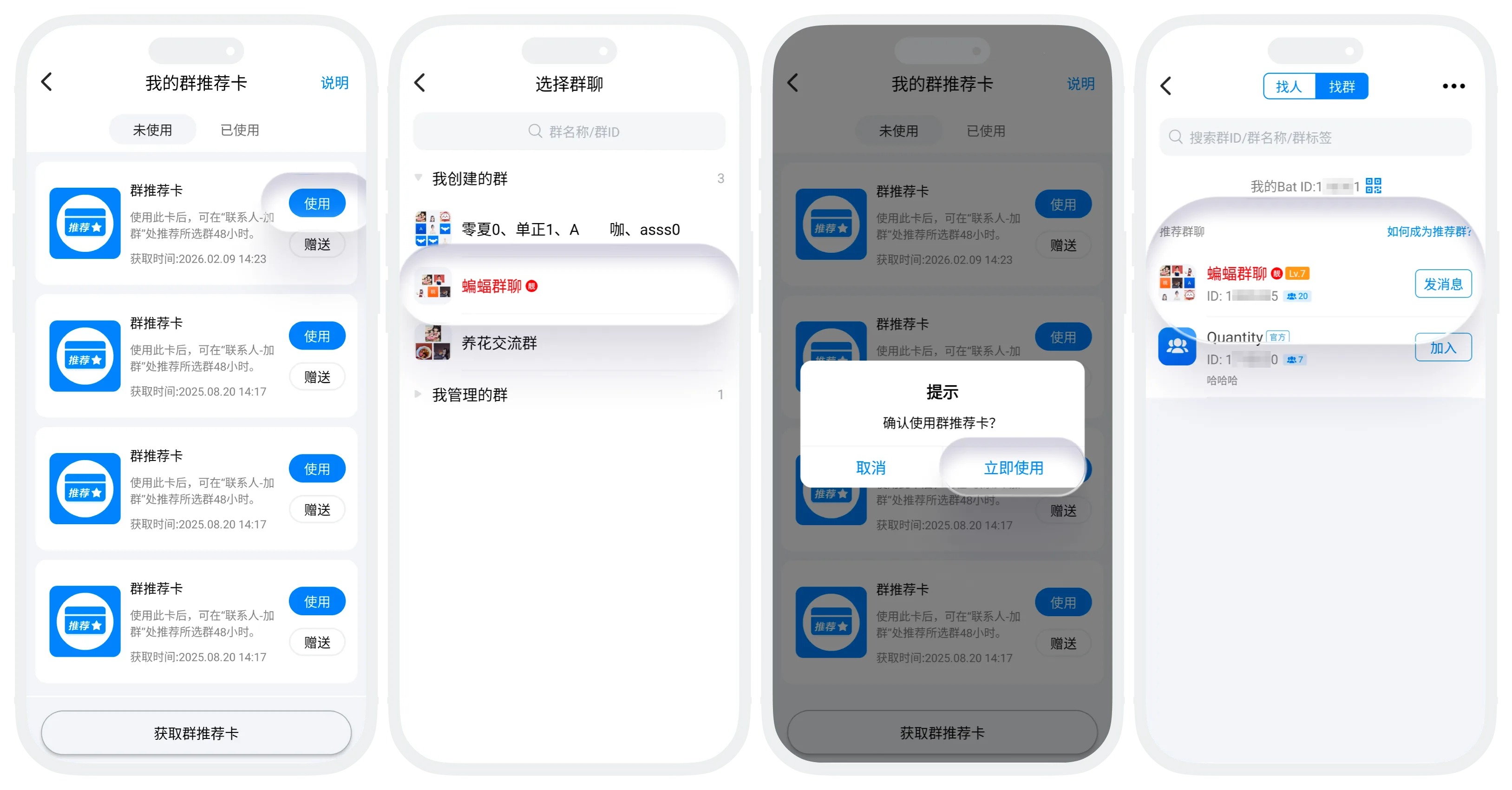
Group Recommendation Card Usage Instructions
- Coupon Basic Information:
- Main Purpose: After using a group recommendation card, your group chat will receive 48 hours of recommended display on the "Add Friends/Groups" - "Find Groups" page, attracting more members to join;
- Acquisition Method: Exchange using draw times (BatChat Mall - Points Draw - Draw Times Exchange);
- Group Recommendation Card Usage:
- Usage Restrictions: Group level must be greater than level 1, and the group chat must not be banned;
- Usage Process:
- For users meeting the usage conditions, in the "Group Recommendation Cards" list, click "Use";
- Click on the group chat you want to recommend and confirm;
- After successful usage, you can enter "Messages" - "+" - "Add Friends/Groups" - "Find Groups" to view recommended group chats;
- Recommendation Rules:
- Recommendation Duration: Each group recommendation card provides 48 hours of recommendation time. Using multiple recommendation cards accumulates the duration;
- Recommendation Sorting: If there are multiple recommended group chats, they will be sorted and displayed based on group level from highest to lowest;
- Removal: After the valid time ends, immediately disappears from the "Recommended Groups" position;
- Other Operations: Gift, view instructions, view used coupons follow the same process as other coupons;
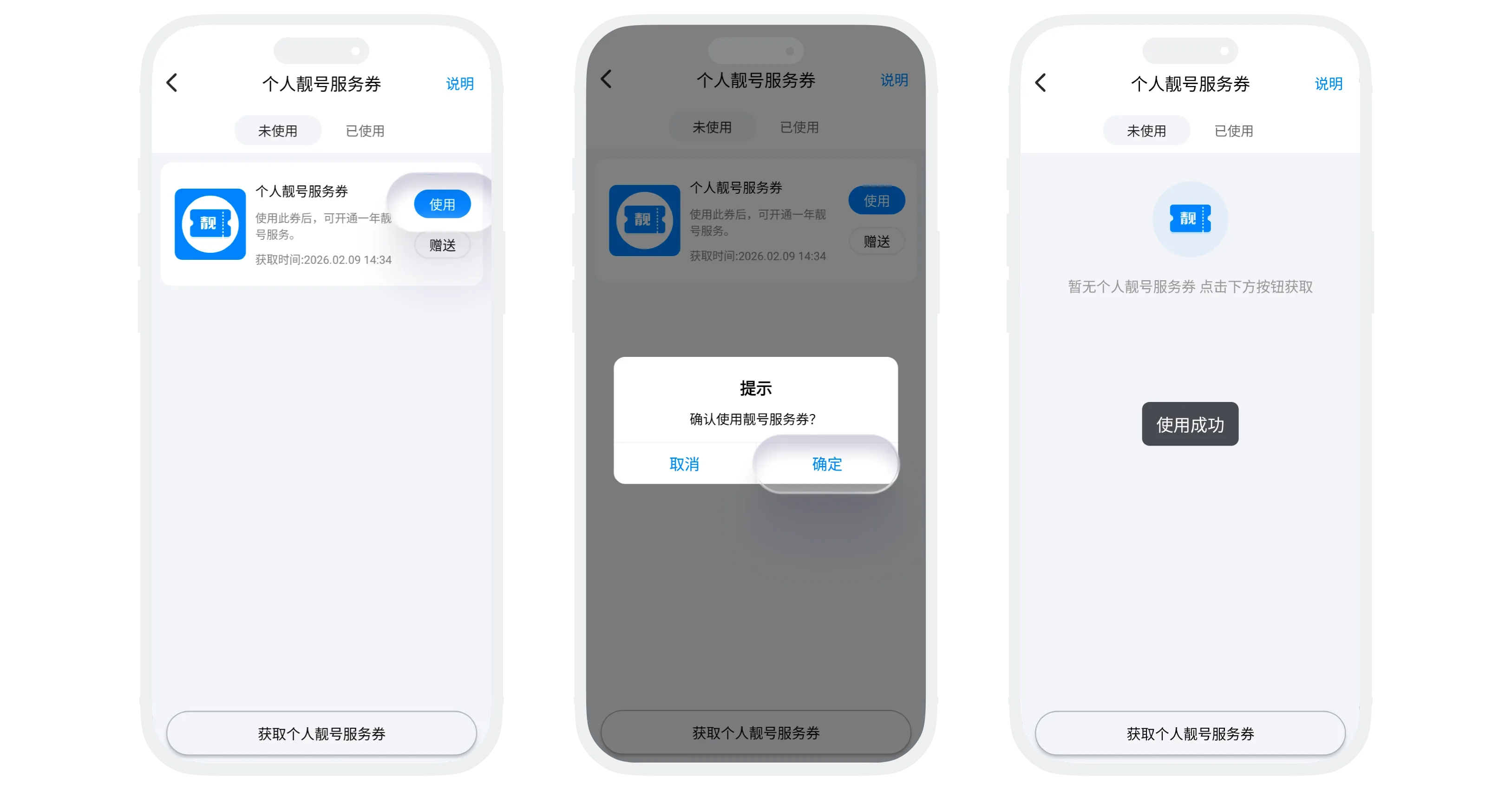
Personal Special ID Service Coupon Usage Instructions
- Coupon Basic Information:
- Main Purpose: After usage, enjoy special ID privilege services for one year;
- Privilege Content: Light up special ID badge, highlight user nickname display, 1.3x level experience acceleration;
- Acquisition Method: "BatChat Mall" - "Special ID Services", click "Purchase Special ID Service Coupon";
- Usage Process:
- In the "Personal Special ID Coupons" list, click "Use" to redeem 1 year of special ID services (using multiple cards will accumulate the valid duration);
- After successful usage, you can view the valid time of special ID services in "BatChat Mall" - "Special ID Services";
- Difference from Special ID Coupons: Only enjoy privilege services, no corresponding exclusive ID;
- Other Operations: Gift, view instructions, view used coupons follow the same process as other coupons;
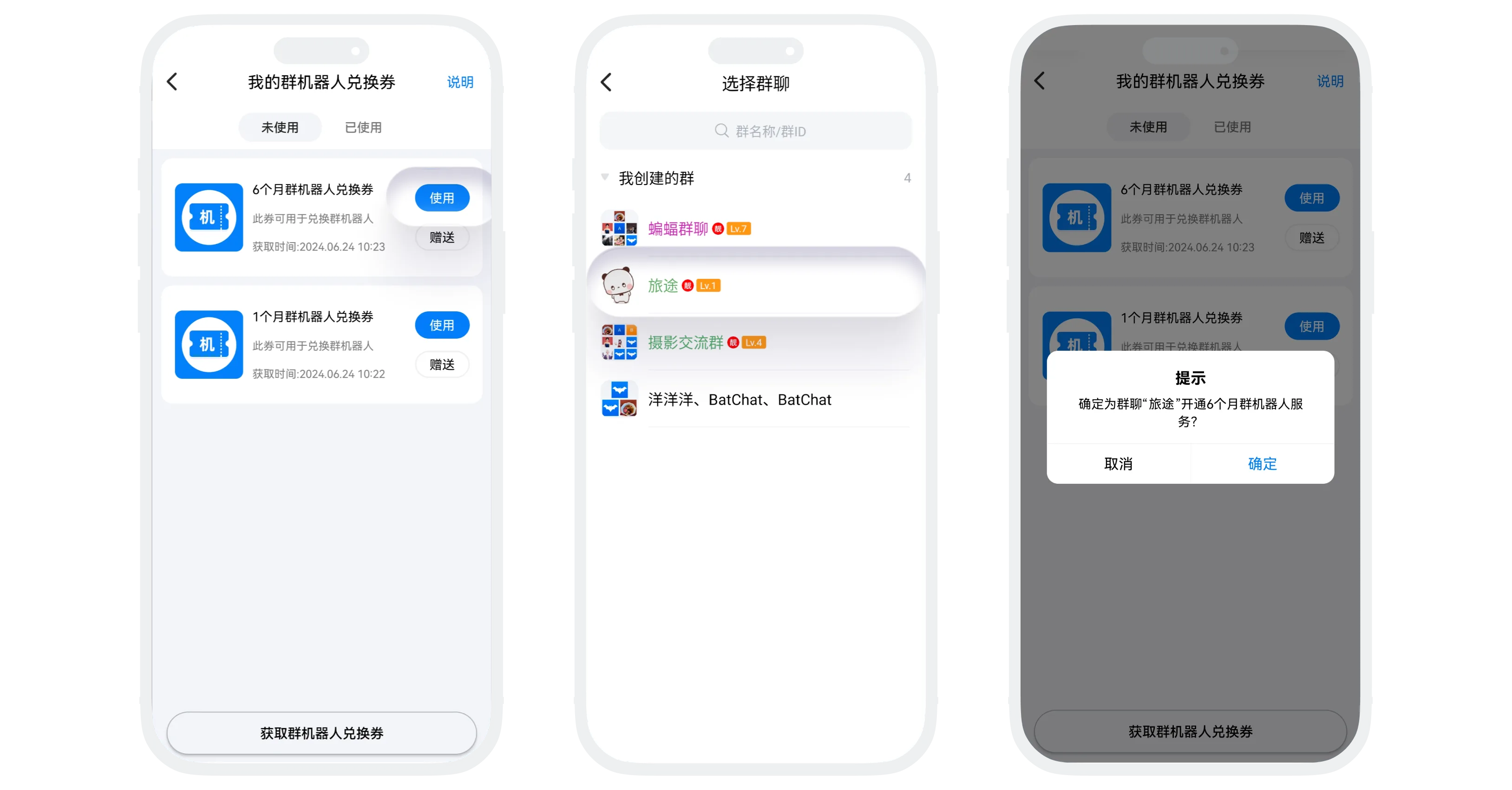
Group Robot Coupon Usage Instructions
- Coupon Basic Information:
- Experience Coupon Types: 1-month group robot coupon, 3-month group robot coupon, 6-month group robot coupon, 1-year group robot coupon;
- Main Purpose: Activate group robot service for group chats or renew group robot service;
- Acquisition Method: In "BatChat Mall" - "Group Robots" list, click "Get Group Robot Coupon", select the exchange coupon of the desired duration you want to purchase, and complete the payment;
- Usage Process:
- Enter the "Group Robot Coupons" list, select any unused group robot coupon, and click "Use";
- Select the group chat to activate (can only activate group robots for group chats where you are the group owner), and confirm usage;
- Usage Rules:
- Independent activation for each group: Each group needs to be activated separately, and the robot's service time will be calculated independently;
- Renewal: For group chats that already have group robots activated, using group robot coupons will extend the robot's service period. Using multiple coupons will correspondingly accumulate and extend the service period;
- Other Operations:
- Group Robot Configuration Management: See Group Robots;
- Gift, view instructions, view used coupons follow the same process as other coupons;
Avatar Coupon Usage Instructions
-
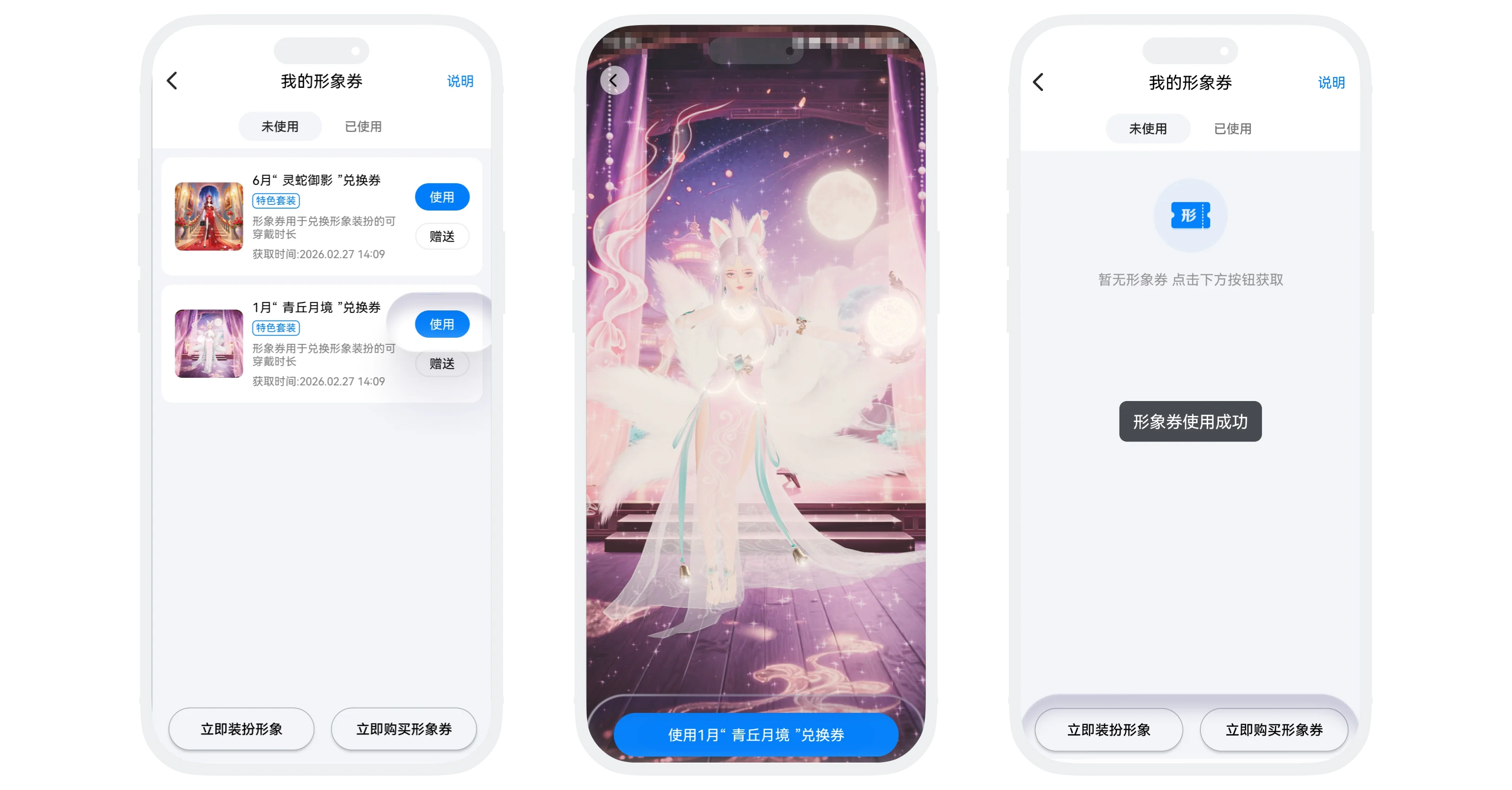
Avatar Coupon Purpose: Dedicated exchange coupons for obtaining or renewing avatar decorations (currently only special outfits support purchasing avatar coupons, other ordinary decorations only support direct purchase);
-
Acquisition Methods:
Method 1:
- In "BatChat Mall" - "Avatar Zone", click "Purchase Avatar Coupon" to enter the purchase interface;
- Click on the decoration you want to purchase for preview;
- Click the shopping cart icon, select the duration to purchase, enter the quantity of coupons to purchase (default 1 coupon, maximum 100 coupons can be purchased at once);
- Click "Purchase Avatar Coupon" and complete the payment;
Method 2:
- In "My" - "BatChat Avatar", click on the decoration you want to purchase for preview;
- Click on unowned special outfits for preview;
- Click the shopping cart icon, select the duration to purchase, choose "Purchase Exchange Coupon" as the purchase method (note: this mode can only purchase 1 coupon at a time);
- Click "Purchase" and complete the payment;
-
Usage Process:
- Enter the "Avatar Coupons" list, select the avatar coupon you want to use, and click "Use xxx Exchange Coupon";
- Enter the preview page of that special outfit, click the "Use" button at the bottom, and the special outfit will be automatically redeemed for the corresponding valid duration. Your avatar will also be automatically updated to this decoration;
-
Gift, view instructions, view used coupons follow the same process as other coupons;
Avatar Monthly Card Usage Instructions
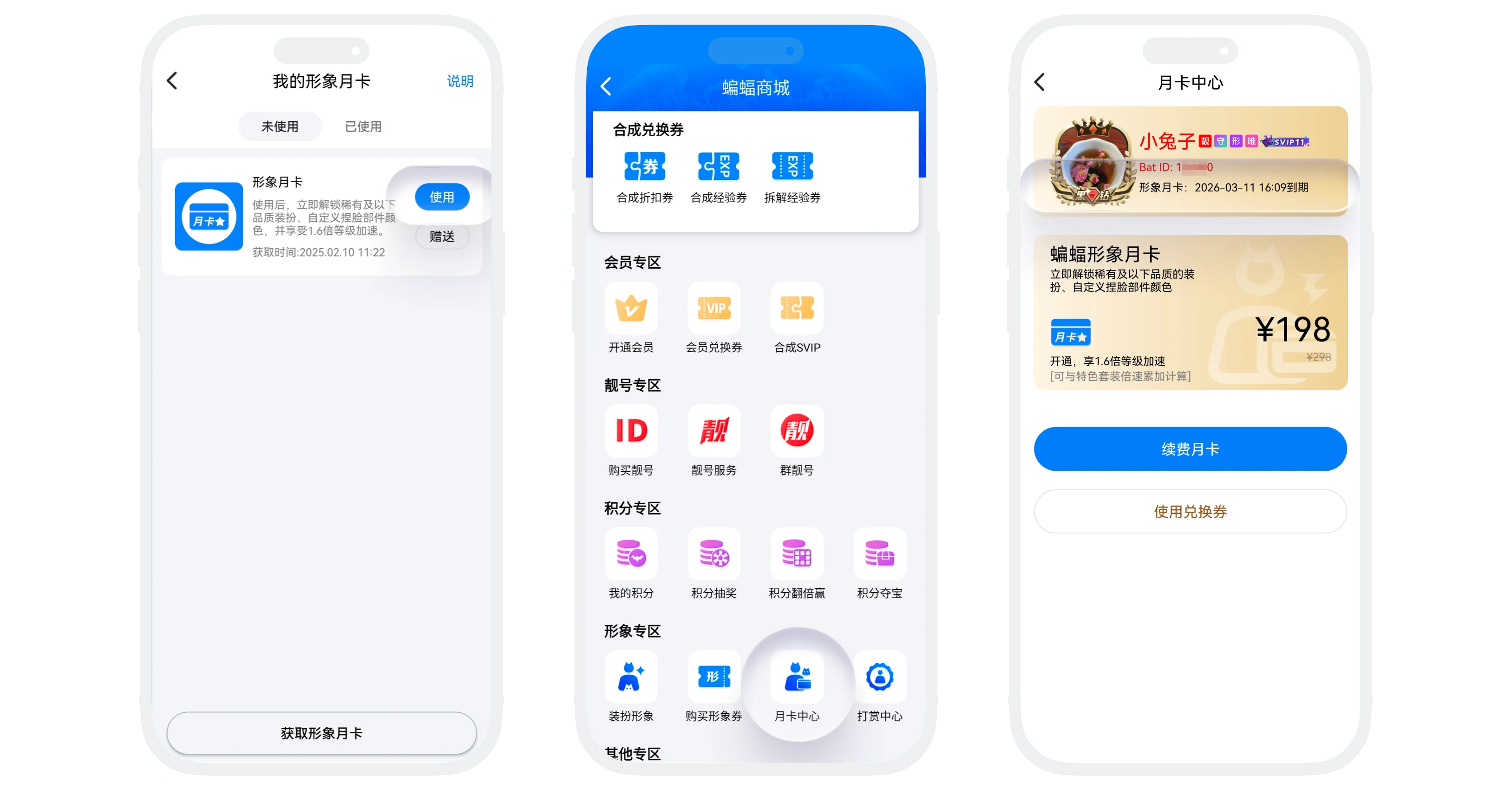
- Avatar Monthly Card Purpose: Used to redeem avatar decoration privilege services;
- Avatar Monthly Card Privileges:
- Free use of rare and below quality decorations;
- Daily 1.6x level acceleration;
- Custom face sculpting colors;
- Light up avatar monthly card icon;
- Acquisition Method: In "BatChat Mall" - "Avatar Monthly Card" list, click "Get Avatar Monthly Card" and complete the payment;
- Usage Process:
- In the "Avatar Monthly Card" list, select any unused avatar monthly card, click "Use" and confirm;
- After successful usage, you can view the monthly card validity period in "BatChat Mall" - "Avatar Zone" - "Monthly Card Center";
- Gift, view instructions, view used coupons follow the same process as other coupons;
Frequently Asked Questions
No, deletion only clears the display records, and already生效 benefits are not affected.
Cannot be modified directly, need to first "Cancel Schedule", then重新设置 the new usage time.
Re-use this times coupon to restore your draw times.
No, the ID corresponding to each special ID coupon is unique and unoccupied.
Yes, but you need to purchase and use new special ID coupons. Each time you change, the original ID will be recycled.
Yes, please contact customer service, provide the ID and purchase requirements, and customer service will evaluate it.
Yes, level boost cards can be叠加 calculated with other bonus effects.
No, they are only for nickname modifications and canceling real-name authentication. You can obtain more avatar modification times by increasing your membership level.
Yes. But the unique name privilege will immediately become invalid.
The platform has the right to handle违规 nicknames, and you need to重新设置 (the unique name card will be returned to your account).
Yes, you are still in the regular daily ranking, just additionally获得 a top exposure position.
No, you can only see the total exposure count, not specific users.
Yes, in the "Contacts" - "New Friends" list, when applying to add you as a friend, the source will be displayed. Added friends can also enter the other party's profile page to view the source.