Sending Message Mode
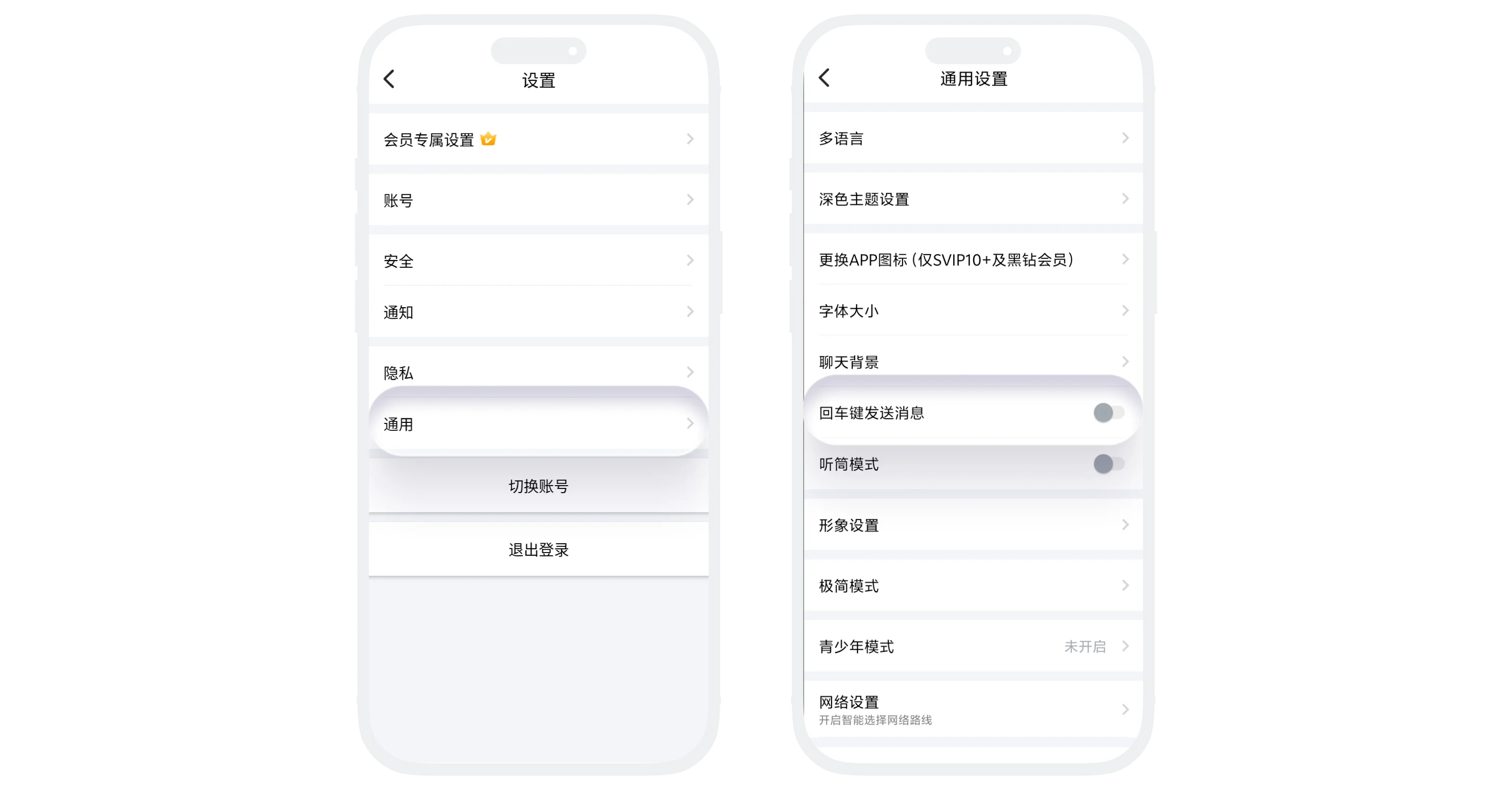
'Enter Key to Send Message' allows you to set the Enter key on Android device keyboards as a shortcut button for sending messages. After enabling, pressing the Enter key in the chat input box will directly send the message without clicking the send button on the screen.
Applicable Scenarios
- You often chat with short messages and want to send quickly after typing;
- You are more used to pressing Enter to send, like in desktop chat tools;
- You need to enter multi-line content, lists, or long text and want Enter to create a new line.
Setting Process
- Enter 'Settings' - 'General', find the 'Enter Key to Send Message' option;
- Click the right switch to set:
- On: Enter key sends message;
- Off: Enter key creates new line.
Mode Description
- Enabled: Pressing Enter in the chat input box sends the message directly;
- Disabled: Pressing Enter creates a new line, and you need to tap the send button to send the message;
- This setting is more suitable for users who often need to reply quickly.
FAQ
This is because "Enter Key to Send Message" is enabled. If you need to enter multi-line content, turn this option off in settings.
Yes. This option is a general chat input setting. After it is enabled or disabled, it applies to chat input boxes on the current device.
Was this page helpful?