My Groups
My Groups
"Group List" centrally displays all groups you participate in. The list is divided into three sections by your relationship to each group, helping you quickly find and manage groups. Some groups must be manually added to Contacts before they appear here.
Group Categories
The list is shown in the following three sections:
| Category | Description |
|---|---|
| Created by Me | Groups where you are the group owner |
| Managed by Me | Groups where you are an administrator, including super administrators |
| Joined by Me | Groups where you are a regular member |
Note: The same group appears in only one category to avoid duplicates.
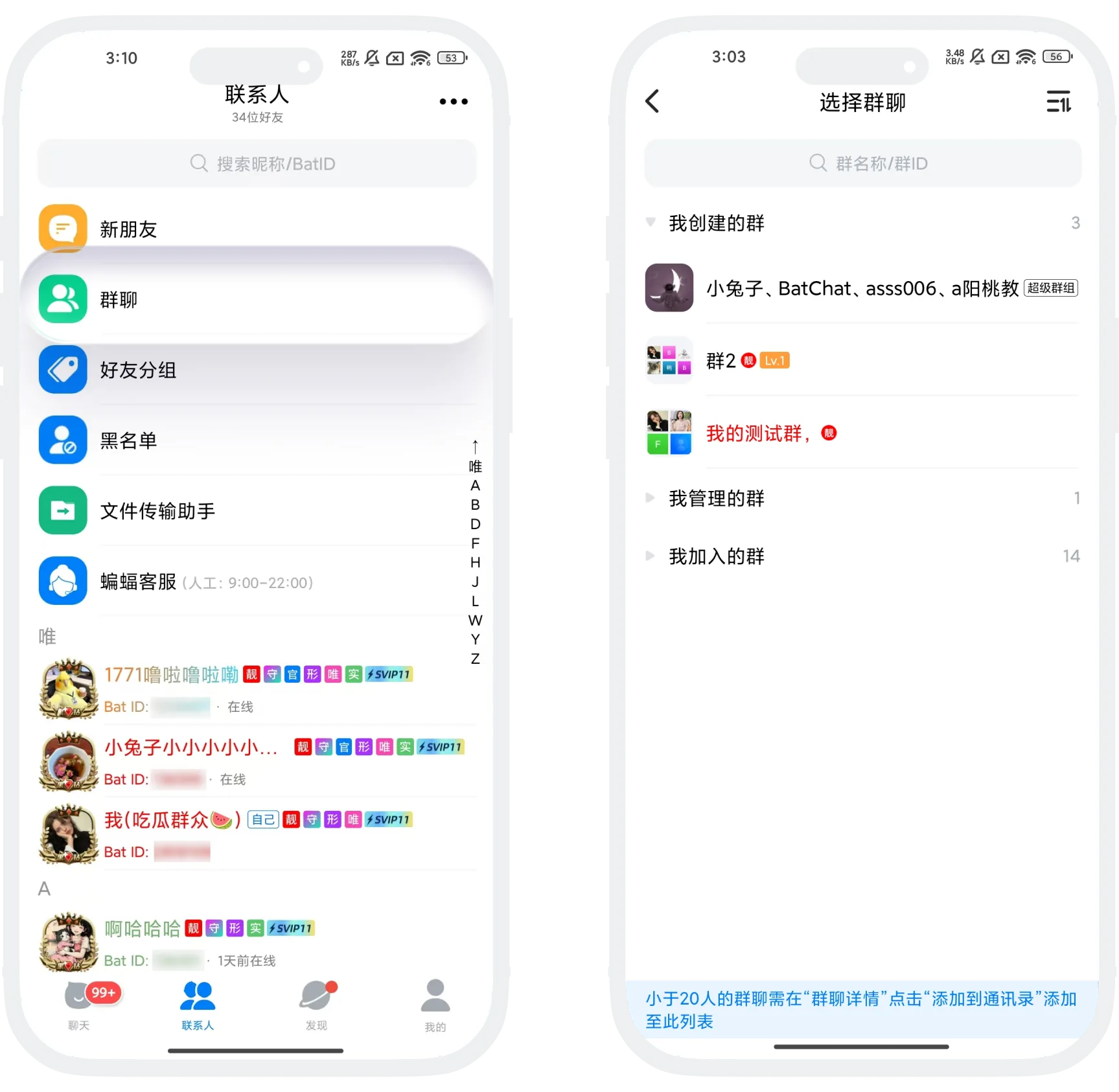
Add a Group to Contacts
- Small groups with fewer than 20 members that you join will not automatically appear in the group list. To quickly find one in the list, open the group details page and tap "Add to Contacts";
- When a group reaches 20 or more members, it will be automatically added to Contacts.

FAQ
The group may have fewer than 20 members. Open the group details page and tap "Add to Contacts" to show it.
Yes. Open the group details page again and turn off "Add to Contacts". If the group has 20 or more members, it is automatically added to Contacts and this switch can no longer be edited.
No. Groups where you are the owner belong to "Created by Me" and will not be repeated in other categories.